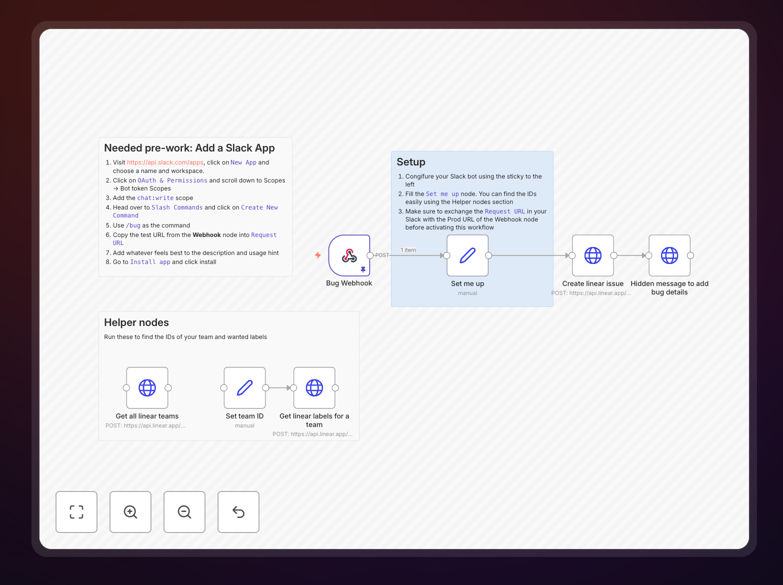
What This Workflow Does
When building products, discovering and eliminating bugs quickly is critical for quality and user satisfaction. Traditional bug reporting involves manual ticket creation, context switching, and often results in incomplete information. This workflow solves that by allowing anyone on your team to report bugs directly from Slack using a simple slash command.
The automation listens for a /bug command in Slack, captures the bug description and details, then automatically creates a properly formatted ticket in Linear with predefined labels, descriptions, and assignments. It then sends a confirmation back to the user in Slack with a link to the newly created ticket, creating a seamless feedback loop.
This eliminates manual data entry, ensures consistent ticket formatting, and keeps your development team focused on fixing bugs rather than administrative tasks. By capturing bugs where they're discovered—in team communication channels—you reduce friction and increase reporting compliance across your organization.
How It Works
1. Slack Command Trigger
A team member uses the /bug command in any Slack channel or direct message. The workflow captures the command text, user information, and channel context through a webhook connection.
2. Data Processing & Validation
The workflow processes the incoming data, extracts key information, and can prompt for additional details through Slack modals if needed. It validates the input and prepares it for Linear ticket creation.
3. Linear Ticket Creation
Using Linear's API, the workflow creates a new issue in your designated project with appropriate labels, priority settings, and a structured description that includes the bug report and context from Slack.
4. Confirmation & Notification
The workflow sends a confirmation message back to the user in Slack with a direct link to the newly created Linear ticket, completing the feedback loop and keeping everyone informed.
Pro tip: Extend this workflow by adding AI classification to automatically route bugs to the right team based on the description, or integrate with GitHub to create linked branches for each bug fix.
Who This Is For
This automation is ideal for product teams, engineering teams, QA teams, and customer support organizations that use Slack for communication and Linear for project management. It's particularly valuable for:
- Product managers who want to streamline bug reporting from multiple sources
- Engineering teams that need structured bug reports without administrative overhead
- QA teams that discover bugs during testing and need to report them quickly
- Customer support teams that receive bug reports from users and need to route them to development
- Startups and scale-ups looking to optimize their product development workflows
What You'll Need
- A Slack workspace with permissions to create apps and slash commands
- A Linear account with API access and a project board for bug tracking
- n8n instance (self-hosted or cloud) to run the workflow
- Basic understanding of Slack app configuration and Linear project setup
- Webhook URL from the workflow to configure in your Slack app
Quick Setup Guide
- Download and import the template JSON file into your n8n instance
- Create a Slack app at api.slack.com with a
/bugslash command pointing to your n8n webhook URL - Configure Linear credentials in n8n with your API key and project IDs
- Customize the ticket template in the Set node to match your bug reporting format
- Test the workflow by using
/bugin Slack and verifying the Linear ticket creation - Activate the workflow and share the Slack command with your team
Pro tip: Before going live, test with a small group and iterate on the bug report format. Consider adding optional fields for severity, reproduction steps, and screenshots through Slack modals.
Key Benefits
Reduce bug reporting time by 80%: What used to take 5-10 minutes of manual ticket creation now happens instantly with a Slack command, freeing your team for more valuable work.
Improve bug report quality: Structured templates ensure every ticket includes necessary information like steps to reproduce, expected vs actual behavior, and environment details.
Eliminate context switching: Team members stay in their workflow—reporting bugs from where they discover them without switching to Linear or other project management tools.
Create audit trails: Every bug report maintains links between Slack conversations and Linear tickets, providing complete context for future reference and analysis.
Scale with your team: As your organization grows, this automated system handles increased bug reporting volume without additional administrative overhead or training.