HubSpot Mailchimp Marketing Automation

HubSpot to Mailchimp Contact Sync

Automatically add new HubSpot contacts to your Mailchimp email lists with field mapping and scheduling

Download Template JSON · n8n compatible · Free
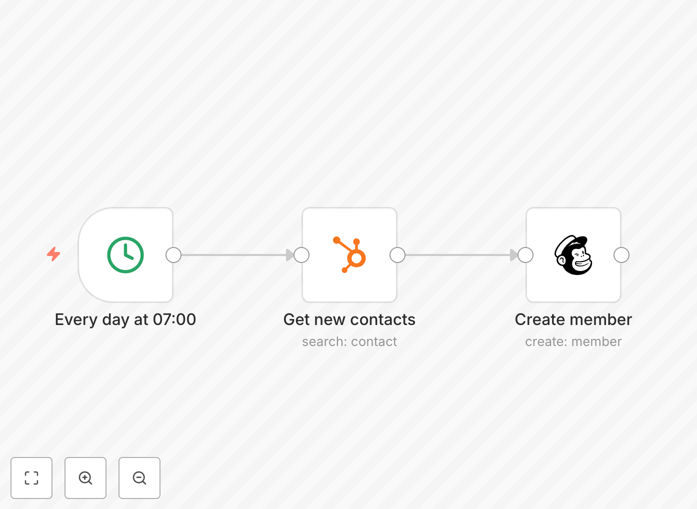
HubSpot to Mailchimp contact sync workflow diagram

What This Workflow Does

This automation solves the common marketing challenge of manually transferring new leads from HubSpot to Mailchimp for email campaigns. The workflow:

  • Checks HubSpot for new contacts at scheduled intervals
  • Maps relevant contact fields between systems
  • Adds subscribers to specified Mailchimp audiences
  • Maintains proper subscription status compliance

By automating this process, marketing teams ensure no leads fall through the cracks while saving 5-10 hours per week on manual data transfers.

How It Works

1. Scheduled Trigger

The workflow runs on a cron schedule (default: daily at 7 AM) to check for new HubSpot contacts added since the last run.

2. HubSpot Contact Retrieval

Queries HubSpot's contacts API to find recently created records, filtering by your specified criteria like contact property values or creation date.

3. Field Mapping & Transformation

Maps HubSpot contact properties to corresponding Mailchimp merge fields, with options to transform data formats if needed.

4. Mailchimp List Addition

Adds properly formatted contact data to your specified Mailchimp audience with "subscribed" status by default (configurable).

Who This Is For

This workflow benefits:

  • Marketing teams managing email campaigns
  • Sales teams wanting new leads added to nurture sequences
  • Operations teams maintaining clean contact data across platforms
  • Agencies managing multiple client HubSpot/Mailchimp accounts

What You'll Need

  1. Active HubSpot account with admin API access
  2. Mailchimp account with API key
  3. n8n instance (cloud or self-hosted)
  4. 10 minutes for initial setup

Quick Setup Guide

  1. Download and import the JSON template into your n8n instance
  2. Configure HubSpot and Mailchimp nodes with your API credentials
  3. Map your HubSpot contact properties to Mailchimp merge fields
  4. Set your preferred schedule in the cron trigger node
  5. Test with a small contact segment before full deployment

Key Benefits

Eliminate manual data entry - The workflow automatically transfers new contacts, reducing human error and saving 5-10 hours per week.

Maintain list hygiene - Automated field mapping ensures consistent data formatting between platforms for better segmentation.

Improve campaign timing - New leads enter nurture sequences immediately rather than waiting for manual uploads.

Flexible scheduling - Run hourly, daily, or weekly based on your campaign needs and contact volume.

Extensible foundation - Easily add conditional logic, tags, or additional field mappings as your needs evolve.

Frequently Asked Questions

Common questions about HubSpot and Mailchimp integration

Automating contact sync eliminates manual data entry errors, ensures timely list updates for campaigns, and saves marketing teams 5-10 hours weekly. The workflow maintains data consistency across platforms.

Manual transfers often lead to missed contacts during busy periods or formatting inconsistencies that affect segmentation and personalization.

You can map contact fields like email, first/last name, company, phone, custom properties, and tags. The workflow supports conditional logic to handle different contact segments.

Common mappings include: HubSpot lifecycle stage → Mailchimp tags, lead score → custom field, and custom properties for segmentation.

Most businesses sync daily or in real-time. This template uses cron scheduling - set intervals from minutes to months based on your campaign needs and contact volume.

High-volume operations may prefer hourly syncs, while niche B2B companies often find daily or weekly sufficient for their nurture sequences.

The workflow can be configured for both. By default it adds new contacts but can be extended to update existing records when source data changes in HubSpot.

For update functionality, you'd add a step to first check if the contact exists in Mailchimp before deciding whether to add or update.

Best practice is to sync unsubscribe status back to HubSpot. This template can be extended with a reverse sync to maintain compliance across both platforms.

Without this, you risk emailing unsubscribed contacts if they're still marked as marketing-contacts in HubSpot.

This offers more field mapping options, conditional logic, and scheduling flexibility than the native integration. It also avoids Mailchimp's contact duplication issues.

The native integration often requires workarounds for proper field mapping and can create duplicate contacts in Mailchimp when dealing with multiple HubSpot forms.

Yes! Our team builds tailored HubSpot-Mailchimp integrations with custom field mapping, segmentation rules, and bi-directional sync capabilities for your specific needs.

We can add features like: lead scoring sync, custom audience segmentation, unsubscribe management, and integration with your other martech stack components.

  • Bi-directional contact sync
  • Custom field transformations
  • Advanced segmentation logic

Need a Custom HubSpot-Mailchimp Automation?

This free template is a starting point. Our team builds fully tailored automation systems for your specific business needs.