What This Workflow Does
In the fast-paced world of crypto and stock trading, information is power. Missing a single breaking news item can mean the difference between a profitable trade and a significant loss. This n8n automation template solves that problem by continuously monitoring multiple trusted news sources, filtering out noise, and delivering only the most relevant market-moving headlines directly to you.
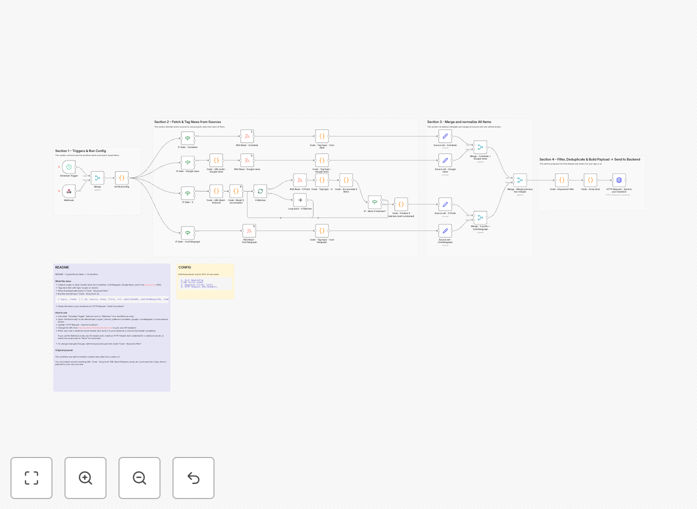
The workflow aggregates real-time news from CoinDesk, CoinTelegraph, Google News, and X (formerly Twitter) via RSS proxies. It normalizes all incoming data into a consistent format, applies your custom keyword filters to focus on specific assets or topics, removes spam and irrelevant content like giveaway announcements, and deduplicates items across runs. The final output is a clean, structured JSON payload ready to be sent to your backend, dashboard, or notification system.
Instead of spending hours manually scanning news sites and social media, you get an automated intelligence feed that helps you spot trends, react to market shifts faster, and make data-driven trading decisions with confidence.
How It Works
The automation follows a logical pipeline to transform raw news feeds into actionable intelligence.
Step 1: Multi-Source Collection
The workflow begins by fetching RSS feeds and API data from your configured sources simultaneously. Each source is handled in its own branch, allowing for parallel processing and fault tolerance—if one source is temporarily unavailable, the others continue to deliver data.
Step 2: Data Normalization & Enrichment
Raw items from different sources arrive in varying formats. A dedicated function node standardizes each item with consistent fields: source, kind (article/tweet), title, URL, publication date, matched keywords, media links, and topic (crypto/stocks). This creates a uniform data structure for reliable filtering.
Step 3: Intelligent Filtering
Your custom keyword lists (configurable in the Init node) are applied to keep only relevant items. A separate spam blacklist removes common noise like "airdrop," "giveaway," and "free NFT" announcements. This dual-layer filtering ensures high signal-to-noise ratio.
Step 4: Deduplication & Output
The system tracks previously seen URLs to avoid sending duplicate alerts. Finally, all filtered items are bundled into a clean JSON payload and sent via HTTP request to your chosen endpoint—ready for integration with your trading tools, dashboards, or alert systems.
Who This Is For
This template is designed for traders, investors, and financial analysts who need to stay ahead of market movements without constant manual monitoring.
Active Crypto Traders: Track Bitcoin, Ethereum, and altcoin news across multiple platforms in real-time. Set alerts for regulatory announcements, exchange listings, or security incidents that could impact prices.
Stock Market Investors: Monitor earnings reports, Fed announcements, sector news, and company-specific developments. Filter by ticker symbols and industry keywords to focus on your portfolio.
Financial Research Teams: Use the aggregated, deduplicated output as a clean data source for sentiment analysis models, market reports, or internal dashboards.
Fintech Startups: Integrate this workflow into your product to offer clients curated market intelligence feeds, enhancing your platform's value proposition.
What You'll Need
- An n8n instance (cloud or self-hosted) with internet access to fetch external feeds.
- Basic familiarity with n8n's interface to import the JSON and configure nodes.
- A destination endpoint (optional but recommended) such as a webhook URL, database, or notification service (Slack, Telegram, etc.) to receive the processed news.
- Your custom keyword lists for assets and topics you want to track (e.g., BTC, ETH, TSLA, "interest rates").
Pro tip: Start with broad keywords and refine based on output. You can easily adjust filters in the workflow without touching any code.
Quick Setup Guide
Get your automated news feed running in under 20 minutes.
- Import the template: In your n8n workspace, click "Import from File" and upload the downloaded JSON.
- Configure the Init node: Open the "Init RunConfig" node. Set your default topic (crypto/stocks), select which platforms to enable, and edit the keyword arrays to match your interests.
- Set up the HTTP Request node: Locate the final "Send to your backend" node. Replace the placeholder URL with your actual endpoint. Remove or update the
x-webhook-secretheader based on your authentication needs. - Choose your trigger: Enable either the Schedule Trigger for periodic runs (e.g., every 30 minutes) or the Webhook trigger to run on-demand via API call.
- Test and deploy: Click "Execute Workflow" to run a test. Check the output in the HTTP Request node to confirm data is flowing correctly. Then activate the workflow.
Key Benefits
Save 5–10 hours per week previously spent manually scanning news sites and social media. The automation works 24/7, never missing a beat.
Reduce reaction time from hours to minutes. Get alerted to breaking news as it happens, giving you a critical edge in fast-moving markets.
Eliminate information overload with smart filtering. Focus only on news relevant to your specific trading strategy and asset portfolio.
Create a structured, searchable history of market events by sending the JSON output to a database. Analyze trends and correlations over time.
Build on a flexible foundation. This template is a starting point. Easily add more sources, integrate AI sentiment analysis, or connect to trading APIs for automated execution based on news triggers.