What This Workflow Does
Compliance officers and regulatory teams spend hours daily manually checking SEC, FINRA, ESMA, and other regulatory websites for updates. Missing a critical announcement can lead to compliance violations, fines, or operational disruptions. This automation eliminates that manual burden.
The workflow automatically monitors regulatory news daily, uses AI-powered scraping to extract updates from multiple agencies, filters for announcements from the last 24 hours, sends instant Slack alerts to compliance teams, and logs all updates to Google Sheets for historical tracking. It transforms a time-consuming, error-prone manual process into a reliable, automated compliance system.
Financial services firms, investment advisors, risk management professionals, and corporate legal departments can maintain regulatory awareness without constant manual checking, ensuring timely responses to regulatory changes while creating audit-ready compliance records.
How It Works
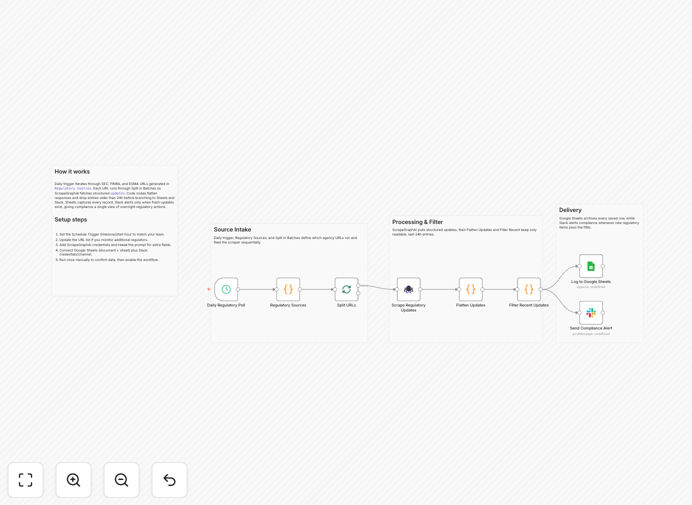
1. Daily Schedule Trigger
The workflow automatically runs every 24 hours to check for regulatory updates. No manual initiation required—it becomes part of your daily compliance routine.
2. Regulatory Sources Configuration
A predefined list of regulatory agencies and their URLs (SEC, FINRA, ESMA) is processed. You can easily add additional sources like FCA, BaFin, or state regulatory bodies.
3. Batch Processing
The system iterates through regulatory sources one at a time for reliable processing, handling errors gracefully if one website is temporarily unavailable.
4. AI-Powered Scraping
ScrapeGraphAI intelligently extracts regulatory updates including title, summary, date, agency, and source URL. The AI understands webpage structure even when sites change layout.
5. Data Flattening & Time Filtering
Scraped data is transformed into individual update records and filtered to keep only those from the last 24 hours. Updates with unreadable or invalid dates are discarded.
6. Historical Tracking & Alerts
Filtered updates are logged to Google Sheets with timestamps for compliance records. Simultaneously, Slack notifications are sent to your designated compliance alerts channel.
Pro tip: Start with one regulatory source (like SEC) to test the workflow before adding multiple agencies. This ensures your scraping configuration works correctly before scaling.
Who This Is For
Compliance officers and regulatory teams in financial services firms who need to monitor multiple regulatory bodies daily.
Investment advisors and wealth managers tracking regulatory changes that affect client portfolios and investment strategies.
Risk management professionals needing timely awareness of regulatory developments that impact business operations.
Corporate legal departments in regulated industries (finance, healthcare, energy) requiring up-to-date regulatory intelligence.
Stock traders and analysts monitoring regulatory news that could affect market movements or specific securities.
Any business in a regulated industry where missing regulatory updates carries significant compliance or operational risk.
What You'll Need
- An n8n instance (cloud or self-hosted) with community nodes enabled
- ScrapeGraphAI API account and credentials for AI-powered web scraping
- Google Sheets API access (OAuth2) and a spreadsheet for regulatory update tracking
- Slack workspace with API access and a channel (like #compliance-alerts) for notifications
- Basic understanding of regulatory websites you want to monitor
Quick Setup Guide
- Install community nodes: Add the ScrapeGraphAI node to your n8n instance via npm or the community nodes manager.
- Configure credentials: Set up ScrapeGraphAI API credentials, Google Sheets OAuth2, and Slack API credentials in n8n.
- Customize regulatory sources: Update the "Regulatory Sources" code node with additional agency URLs if needed.
- Prepare Google Sheets: Create a spreadsheet with columns: Title, Summary, Date, Agency, Source URL, Scraped At.
- Set up Slack channel: Ensure your #compliance-alerts channel exists and the bot has permission to post messages.
- Adjust schedule: Modify the schedule trigger if you need monitoring more than once daily or at specific times.
- Test manually: Run the workflow once to verify all connections work and data appears correctly in Sheets and Slack.
Pro tip: Respect website terms of service and rate limits when scraping regulatory sites. Consider implementing polite delays between requests to avoid overwhelming servers.
Key Benefits
Saves 2-3 hours daily per compliance team member by eliminating manual website checking across multiple regulatory agencies. That time can be redirected to actual compliance implementation rather than monitoring.
Reduces risk of missed regulatory updates that could lead to violations, fines, or operational disruptions. Automated systems don't forget to check websites during busy periods.
Creates audit-ready compliance records in Google Sheets with timestamps, sources, and summaries. This documented history supports compliance processes during audits or reviews.
Provides instant team awareness via Slack alerts when new updates are detected. Everyone stays informed simultaneously without waiting for someone to manually share information.
Adapts to website changes through AI scraping that understands webpage structure. Unlike fixed RSS feeds, AI scraping can adjust when regulatory sites update their layout.