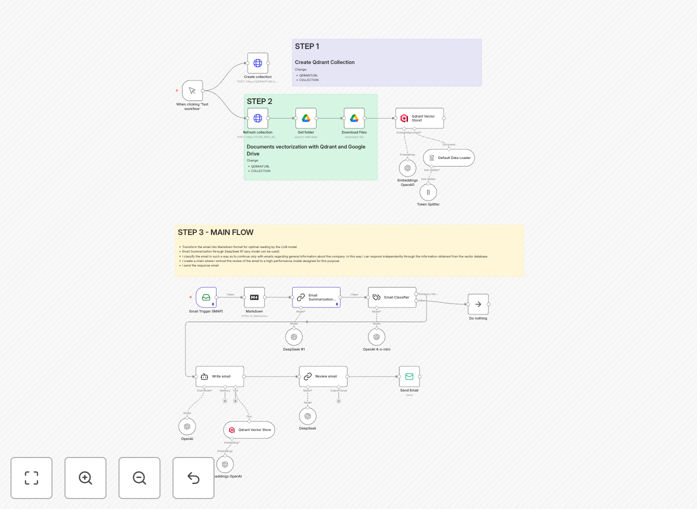
What This Workflow Does
Manual email response is a major time sink for businesses. This AI-powered automation solves that by intelligently handling incoming emails—especially inquiries about company information—using Retrieval-Augmented Generation (RAG). The workflow monitors your inbox, reads new messages, classifies their intent, searches your knowledge base for accurate information, and drafts professional responses.
It's designed for businesses receiving repetitive information requests, customer support inquiries, or FAQ-style emails. Instead of staff copying and pasting from documents or spending time crafting individual replies, this system provides instant, accurate responses 24/7 while maintaining your brand voice and ensuring information consistency.
The automation reduces response time from hours to seconds, ensures customers get correct information every time, and frees your team to focus on complex issues that truly require human judgment. It's particularly valuable for support teams, sales departments, and any business that receives standardized information requests.
How It Works
The workflow follows a sophisticated pipeline that transforms raw emails into intelligent responses.
1. Email Trigger & Preprocessing
The IMAP Email Trigger node monitors your specified inbox for new messages. When an email arrives, it captures the full content including sender, subject, and body. The Markdown node then converts HTML email content into clean plain text, removing formatting noise and preparing it for AI analysis.
2. AI Analysis & Classification
The system uses multiple AI models in sequence. First, a summarization chain (using DeepSeek R1) creates a concise 100-word summary of the email content. Then, a classifier (OpenAI 4-o-mini) categorizes the email into predefined types like "Company Info Request," "Support Question," or "Other." This classification determines how the system will respond.
3. Knowledge Retrieval (RAG)
For emails needing factual responses, the workflow queries your vector database (Qdrant) where your company documents are stored. The Embeddings OpenAI node converts the email query into searchable vectors, then finds the most relevant information from your knowledge base—whether it's pricing sheets, policy documents, or product specifications.
4. Response Generation & Review
Using the retrieved information and email context, the OpenAI model drafts a professional response limited to 100 words. A second AI model (DeepSeek) then reviews this draft, ensuring proper formatting with HTML tags for readability and maintaining a professional tone that matches your brand voice.
5. Automated Sending
The final reviewed response is sent back to the original sender through your configured email service. The entire process—from receiving the email to sending the response—happens automatically, with optional human review gates for complex or low-confidence classifications.
Who This Is For
This automation is ideal for customer support teams drowning in repetitive inquiries, small businesses without dedicated support staff, educational institutions handling information requests, SaaS companies with technical documentation, and any organization that maintains a knowledge base but struggles with consistent information dissemination.
Marketing agencies managing multiple client inquiries, consulting firms responding to proposal requests, and e-commerce businesses handling pre-sale questions will find particular value. The system scales effortlessly—whether you receive 10 or 1,000 similar inquiries daily, each gets the same accurate, instant response.
Pro tip: Start by automating responses to your 5 most common email types. This gives immediate time savings while you refine the system before expanding to more complex scenarios.
What You'll Need
- n8n instance (cloud or self-hosted)
- Email account credentials (IMAP access for receiving, SMTP for sending)
- OpenAI API key or compatible LLM provider
- DeepSeek API access for the summarization and review models
- Qdrant vector database instance (cloud or self-hosted)
- Google Drive or other document storage containing your knowledge base
- Company documents (FAQs, policies, product info) in accessible format
Quick Setup Guide
Follow these steps to implement this automation in your business:
- Import the template into your n8n instance using the downloaded JSON file.
- Configure email connections by adding your IMAP and SMTP credentials to the Email Trigger and Send Email nodes.
- Set up AI services by adding your OpenAI and DeepSeek API keys to their respective nodes.
- Connect your knowledge base by linking Google Drive and configuring the Qdrant vector store with your collection.
- Customize classification categories in the Email Classifier node to match your business needs.
- Test with sample emails using the manual trigger, then activate the workflow for automatic operation.
- Monitor and refine by reviewing sent responses weekly and updating your knowledge base as needed.
Implementation note: Run the document processing branch first to populate your vector database before activating the main email response flow. This ensures the AI has information to retrieve when emails arrive.
Key Benefits
Reduce response time from hours to seconds. Customers get immediate answers instead of waiting for business hours, dramatically improving satisfaction and reducing support ticket volume.
Ensure 100% information accuracy. By pulling responses directly from your approved documents, you eliminate human error and inconsistency that creeps into manual responses over time.
Free up 10-15 hours per week per team member previously spent on repetitive email responses. That's 500+ hours annually that can be redirected to strategic work.
Scale support without hiring. The system handles unlimited volume at zero marginal cost—perfect for growing businesses experiencing increasing customer inquiries.
Maintain brand voice consistency. The AI can be trained on your previous email responses to match your company's communication style across all automated replies.