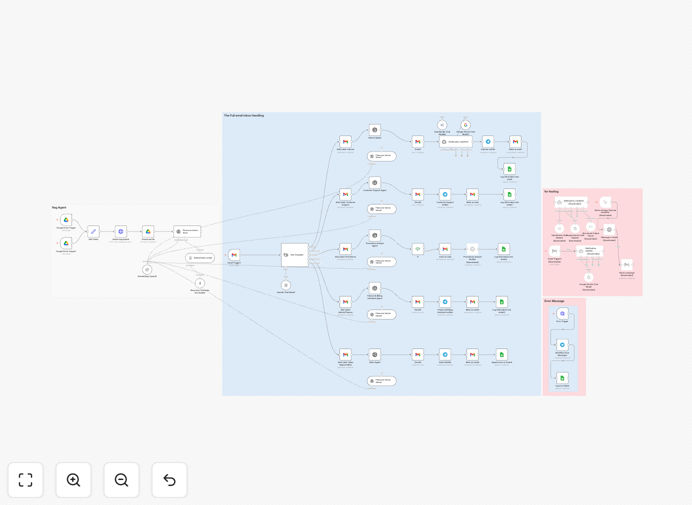
What This Workflow Does
This automation solves the problem of email overload by intelligently classifying incoming messages and routing them to specialized AI agents. Instead of manually sorting through your inbox, the system automatically processes emails based on their content and intent.
The workflow handles the complete email lifecycle - from initial receipt through classification, processing, and response. It's particularly valuable for businesses receiving high volumes of customer inquiries, support tickets, and sales leads through email.
How It Works
1. Email Trigger
The workflow activates whenever a new email arrives in your Gmail inbox. It captures the full message content including subject, body, and attachments.
2. AI Classification
An OpenAI-powered classifier analyzes the email content to determine its category: Support, Sales, Internal, Finance, or Promotions. This uses natural language understanding rather than simple keyword matching.
3. Specialized Processing
Each category routes to a dedicated AI agent with custom instructions. Support emails get drafted responses, sales leads are summarized for follow-up, and promotions are logged for analysis.
4. Automated Actions
Based on the classification, the system either sends an immediate reply (for support), creates a draft response (for sales), or logs the message (for promotions). All actions are tracked in a central dashboard.
Who This Is For
This template is ideal for:
- Customer support teams handling 50+ daily inquiries
- Sales teams managing inbound lead flow
- Marketing teams tracking campaign responses
- Small businesses needing to automate email processing
- Operations teams managing internal communications
What You'll Need
- A Gmail account (or Google Workspace)
- OpenAI API access (or alternative LLM provider)
- Basic understanding of n8n workflows
- Optional: Telegram/Slack for notifications
Pro tip: Before deploying, review the AI agent prompts in each classification branch to match your brand voice and response style.
Quick Setup Guide
- Import the JSON template into your n8n instance
- Connect your Gmail account credentials
- Add your OpenAI API key
- Configure notification channels (optional)
- Test with sample emails to verify classification
- Activate the workflow for production use
Key Benefits
80% faster response times: AI-generated replies go out immediately for common support inquiries, while sales leads get prioritized for follow-up.
24/7 email processing: The system works around the clock to classify and triage messages, even when your team isn't available.
Consistent quality: Every email receives standardized processing according to your business rules, eliminating human variability.
Actionable insights: Built-in tracking provides data on email volumes, response times, and common inquiry types for continuous improvement.
Scalable solution: Easily handles email volume spikes without additional staffing requirements.