What This Workflow Does
Meetings are essential for collaboration but create massive administrative overhead. Teams waste hours manually transcribing discussions, extracting action items, and chasing follow-ups. This creates inconsistent documentation, missed commitments, and delayed projects.
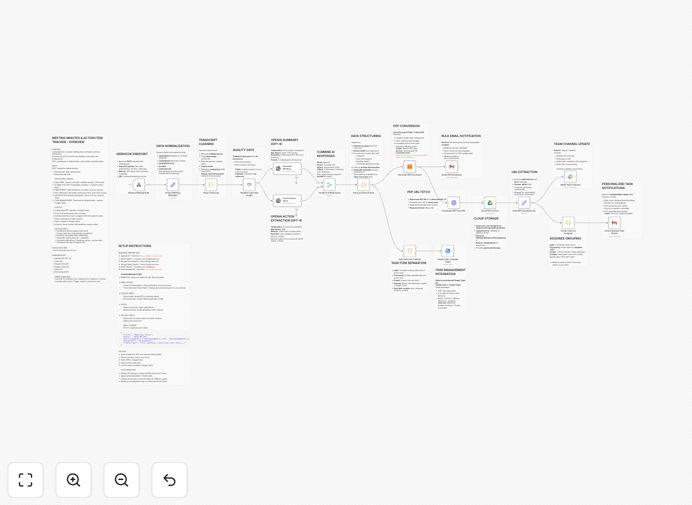
This automation solves that by creating a complete meeting documentation system. It takes raw meeting transcripts (from Zoom, Teams, or manual input), uses AI to generate professional summaries, extracts specific action items with assignees and deadlines, creates tasks in Google Tasks, generates branded PDFs, and distributes everything via email and Slack notifications.
The result: every meeting instantly produces searchable documentation, clear accountability, and automated follow-ups—saving 2-3 hours per meeting while improving execution.
How It Works
1. Transcript Input & Validation
The workflow starts with a webhook that accepts meeting data including title, date, participants, and transcript text. It validates the input to ensure the transcript contains sufficient content for meaningful processing.
2. AI-Powered Analysis & Summarization
GPT-4 processes the transcript to create a concise executive summary, identify key decisions, and extract action items. The AI assigns each action to specific participants mentioned in the conversation and suggests appropriate deadlines based on context.
3. Data Enrichment & Task Creation
Extracted action items are structured with owner email addresses, priority levels, and formatted deadlines. Tasks are automatically created in Google Tasks with these details, ensuring they appear in participants' task management systems.
4. Professional PDF Generation
A professionally styled PDF document is generated containing the meeting title, date, summary, and all action items in a clean, branded format. This PDF is automatically saved to a designated Google Drive folder for archival and easy sharing.
5. Multi-Channel Distribution
Three distribution channels activate simultaneously: a summary email to all participants with the PDF attached, individual task emails to each assignee with their specific responsibilities, and a Slack notification to a designated channel with the meeting highlights and document link.
Who This Is For
This automation is ideal for project managers, team leads, operations managers, and anyone who runs recurring meetings. It's particularly valuable for remote teams, consulting firms, agencies, and product teams who need consistent documentation and accountability.
Companies with compliance requirements benefit from the audit trail. Sales teams can use it for client meeting follow-ups. Engineering teams can document technical discussions and action items. Executive assistants can automate board meeting minutes distribution.
Pro tip: Start with your weekly team standups or project review meetings first. These recurring meetings have predictable structures that make the automation immediately valuable and easy to validate.
What You'll Need
- OpenAI API key for GPT-4 access (from platform.openai.com)
- Google Workspace account with access to Gmail, Google Drive, and Google Tasks
- Slack workspace with permission to create app integrations
- htmlcsstopdf API key or alternative PDF generation service
- n8n instance (cloud or self-hosted) to run the workflow
- Meeting transcripts from your preferred platform (Zoom, Teams, Otter.ai, etc.)
Quick Setup Guide
- Download and import the template JSON file into your n8n instance.
- Configure credentials for OpenAI, Google OAuth2 (Gmail, Drive, Tasks), Slack, and your PDF service.
- Customize email templates in the Gmail nodes to match your company branding and tone.
- Set your Google Drive folder where meeting PDFs should be stored (create a "Meeting Minutes" folder).
- Select your Slack channel for team notifications (suggest #meeting-notes).
- Test with a sample meeting transcript using the webhook URL or manual trigger.
- Connect to your meeting sources by modifying the webhook to accept data from your recording tools.
Key Benefits
Save 2-3 hours per week per team member on meeting documentation and follow-up tasks. What used to be manual administrative work now happens automatically in seconds.
Improve accountability and task completion by 40% through immediate, personalized task assignments. When people receive their specific action items right after the meeting, they're more likely to complete them.
Create searchable meeting archives with professional PDFs automatically organized in Google Drive. Never lose track of decisions or action items again.
Ensure consistency across all meetings with standardized formats and processes. Every meeting produces the same high-quality output regardless of who's running it.
Scale meeting effectiveness as your team grows without adding administrative overhead. The system handles 10 meetings or 100 meetings with the same efficiency.