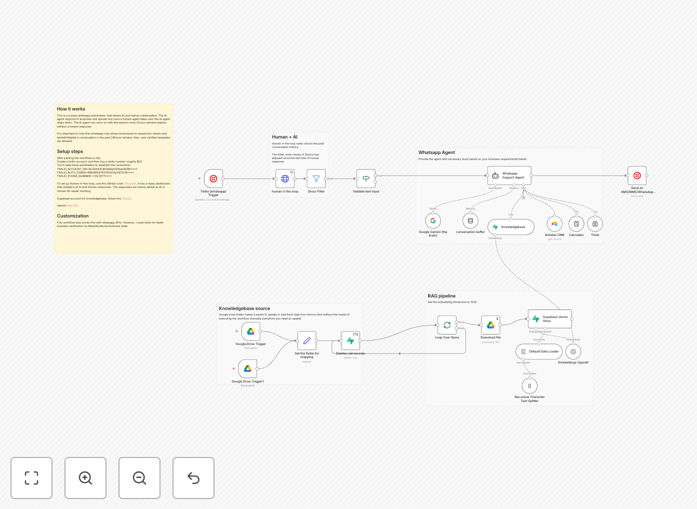
What This Workflow Does
Customer support via WhatsApp is exploding, but scaling it manually is expensive and slow. This workflow solves that by creating an AI-first support system that answers common questions instantly using Google Gemini and your company knowledge base (stored in Supabase). When a query is too complex, it seamlessly hands off to a human agent for two hours, then automatically resumes AI support if no human reply occurs.
The system intelligently respects WhatsApp's strict 24-hour customer care window, using approved message templates for follow-ups outside this period. This means you can provide 24/7 automated support without risking policy violations or account blocks. It transforms WhatsApp from a manual chat channel into a scalable, intelligent customer service platform.
How It Works
The automation follows a sophisticated decision tree that balances AI efficiency with human empathy.
1. Message Reception & Routing
Incoming WhatsApp messages via Twilio trigger the workflow. The system first checks if this conversation is currently assigned to a human agent (via a dashboard flag). If yes, and it's within the 2-hour handoff window, the message is routed to the human interface. Otherwise, it proceeds to AI processing.
2. AI Knowledge Retrieval (RAG)
The query is converted into embeddings and searched against your Supabase vector database containing product manuals, FAQs, and support documents. The most relevant chunks are retrieved and fed to Google Gemini as context, ensuring accurate, company-specific answers.
3. AI Response Generation
Gemini generates a natural, helpful response based on the retrieved knowledge. The system includes conversation history for context, making interactions feel continuous rather than robotic. The response is formatted for WhatsApp and sent back through Twilio.
4. Human Handoff Logic
If a support agent marks a conversation as "human takeover" in the dashboard, a flag is set in the database. The workflow detects this and pauses AI responses for that specific conversation for two hours. All messages during this period go directly to the human interface.
5. Auto-Resume & Policy Compliance
After two hours of human inactivity, the system automatically clears the handoff flag and resumes AI support. Simultaneously, a separate timer tracks the 24-hour WhatsApp policy window, switching response methods from free-form replies to approved templates when necessary.
Who This Is For
This workflow is ideal for e-commerce businesses, SaaS companies, educational institutions, and any organization receiving frequent customer queries via WhatsApp. It's particularly valuable for teams with 1-5 support agents handling 50+ daily messages, where consistent answers and after-hours coverage are challenges. Companies with well-documented products or services will see the highest AI resolution rates.
Marketing agencies managing client WhatsApp channels can deploy this as a white-labeled service. Tech startups can use it to provide scalable support before hiring a full team. Even enterprises with existing contact centers can implement it as a first-line filter, reducing agent workload by 40-60% on routine inquiries.
Pro tip: Start by loading your most common 50 customer questions and answers into Supabase. This gives the AI immediate value while you build out the full knowledge base over time.
What You'll Need
- A running n8n instance (cloud or self-hosted) with public webhook access.
- Twilio account with WhatsApp Business API enabled (sandbox or production).
- Supabase project for vector storage (PostgreSQL with pgvector extension).
- Google Gemini API key (free tier available via Google AI Studio).
- Basic server/dashboard for human agents to view conversations and trigger handoffs (a simple GitHub project is referenced).
- Approved WhatsApp message templates for out-of-policy-window communications (created in Twilio/Meta).
Quick Setup Guide
Follow these steps to implement this automation in under an hour.
- Import the workflow: In n8n, create new workflow → Import from JSON → paste the downloaded template file.
- Configure credentials: Add your Twilio (Account SID, Auth Token, Phone Number), Gemini API key, and Supabase (URL, Anon Key) credentials in n8n's credential management.
- Set up Supabase: Create a table for your knowledge documents and embeddings. Use the provided tutorial to chunk and load your PDFs/docs.
- Connect Twilio: Point your Twilio WhatsApp webhook to your n8n webhook URL (found in the HTTP Request node).
- Deploy human dashboard: Clone the referenced GitHub repo, connect it to your Supabase, and give your team access.
- Test thoroughly: Send test WhatsApp messages, verify AI responses, trigger human handoff, and test auto-resume after timeout.
Key Benefits
Reduce response time from hours to seconds. AI handles queries immediately, even at 3 AM or during peak volumes, dramatically improving customer satisfaction scores.
Cut support costs by 30-70%. Automating routine questions (order status, business hours, basic troubleshooting) frees agents for complex, high-value interactions.
Ensure 24/7 coverage without night shifts. The system works around the clock, providing consistent answers and capturing leads even when your team is offline.
Maintain brand voice and accuracy. Unlike generic chatbots, your RAG-powered AI answers from your actual documentation, ensuring brand consistency and reducing errors.
Scale effortlessly during promotions or crises. When message volume spikes 10x, the AI system scales automatically without hiring temporary staff or dropping conversations.