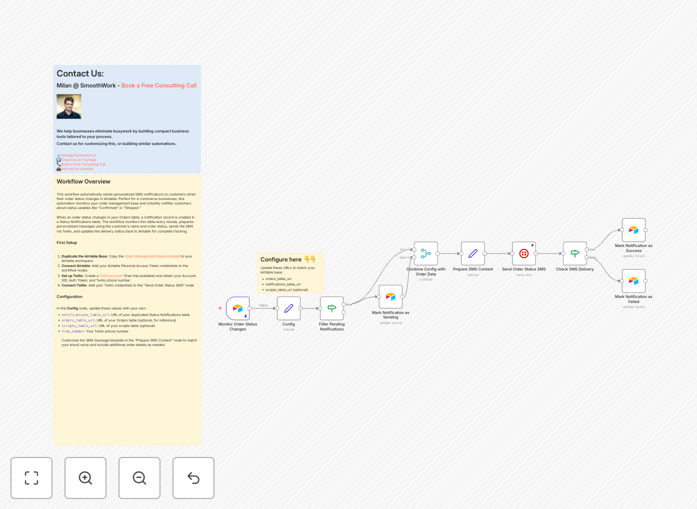
What This Workflow Does
This automation solves the tedious problem of manually texting customers every time their order status updates. Businesses using Airtable for order management often waste hours copying phone numbers, crafting messages, and sending individual SMS notifications—leading to delays, errors, and frustrated customers.
The workflow automatically monitors your Airtable Orders table for status changes. When a record updates (e.g., from "Pending" to "Shipped"), it creates a notification entry, prepares a personalized message with the customer's name and details, sends the SMS via Twilio, and logs the delivery status back into Airtable. This creates a complete, trackable communication loop without any human intervention.
Beyond e-commerce, this template works for any scenario where you need to send timely notifications based on data changes—appointment reminders, event updates, membership alerts, or internal team communications.
How It Works
Step 1: Monitor Airtable for Changes
The workflow starts by checking your Status Notifications table in Airtable every minute. It looks for new records created by your Airtable automation (which triggers when order status changes). These records contain the customer's phone number, name, order details, and the new status.
Step 2: Prepare Personalized SMS Content
For each notification, the automation fetches additional order details from the Orders table, then constructs a friendly, personalized message. It inserts the customer's name, order reference, status, and any other relevant information you configure.
Step 3: Send SMS via Twilio
The prepared message is sent through Twilio's SMS API. The workflow validates phone numbers, handles formatting, and uses your Twilio account credentials. It supports both free trial and paid Twilio accounts.
Step 4: Update Delivery Status
After sending, the workflow captures Twilio's response—success or error—and updates the original notification record in Airtable. This creates a complete audit trail showing which messages were delivered, failed, or encountered issues.
Who This Is For
This template is ideal for e-commerce businesses, retailers, service providers, event organizers, and any organization using Airtable as a central database. Specifically:
- Online stores needing automatic order confirmation and shipping notifications.
- Service businesses (salons, clinics, consultants) sending appointment reminders.
- Event managers updating attendees about schedule changes or important information.
- Membership organizations communicating with members about renewals or events.
- Internal teams wanting automated alerts when project statuses change in Airtable.
What You'll Need
- An Airtable account with a base containing Orders and Status Notifications tables.
- Airtable Personal Access Token for API authentication.
- A Twilio account (free trial available) with an active phone number.
- Twilio Account SID, Auth Token, and phone number credentials.
- n8n instance (cloud or self-hosted) to run the workflow.
- Basic understanding of how to import and activate n8n workflows.
Quick Setup Guide
1. Duplicate the Airtable Base: Copy the provided Order Management Base template to your workspace. You need your own copy for write permissions.
2. Connect Accounts: Add your Airtable Personal Access Token to the workflow nodes. Create a Twilio account and add your Account SID, Auth Token, and phone number to the "Send Order Status SMS" node.
3. Configure URLs: In the Config node, update the notifications_table_url and orders_table_url with your duplicated Airtable base URLs. Also set your Twilio phone number as from_number.
4. Customize Messages: Modify the "Prepare SMS Content" node to match your brand voice. Add or remove details like order numbers, shipping dates, or special instructions.
5. Activate: Toggle the workflow to 'Active' in n8n. It will now monitor your Airtable base every minute and send notifications automatically.
Pro tip: Test with a single record first. Create a test order in Airtable, change its status, and verify the SMS arrives correctly before scaling to all customers.
Key Benefits
Eliminates manual texting completely. Save 2–5 hours per week previously spent copying numbers and sending individual messages. Staff can focus on higher-value tasks while customers receive instant updates.
Reduces communication errors by 90%. Automated messages pull data directly from Airtable, eliminating typos, wrong numbers, and missed notifications. Every customer gets the correct information at the right time.
Improves customer satisfaction through proactive updates. Customers appreciate timely notifications about their orders. This builds trust, reduces inquiry calls, and creates a positive brand experience that encourages repeat business.
Creates a complete audit trail in Airtable. Every SMS delivery status is logged back into your base. You can see which messages succeeded, failed, or had issues—valuable for compliance, reporting, and troubleshooting.
Scalable without additional cost. The same automation handles 10 notifications or 10,000. As your business grows, your communication system scales automatically without hiring extra staff.