What This Workflow Does
Gathering and understanding attendee feedback during and after events is a massive, time-consuming task. Traditionally, organizers are buried in spreadsheets and survey results for days, struggling to separate useful insights from noise. This delays critical decisions about session content, speaker effectiveness, and future event planning.
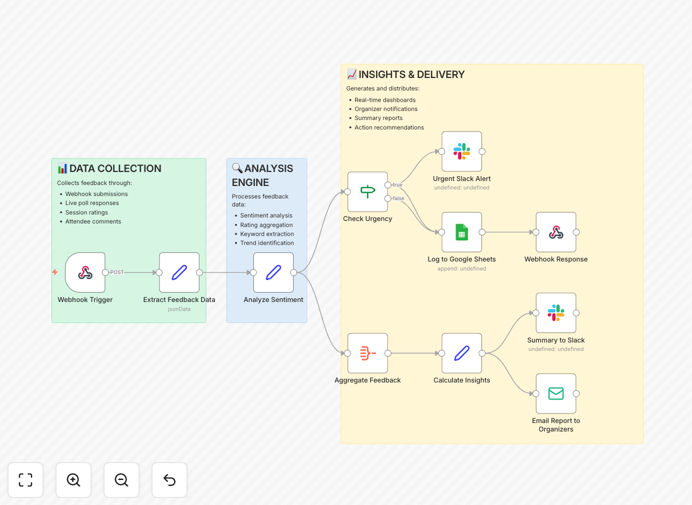
This n8n workflow automates the entire feedback lifecycle. It captures real-time responses from live polls, session surveys, or chat tools, uses AI to perform sentiment analysis, categorizes feedback, and then distributes summarized reports and urgent alerts directly to your team via Google Sheets, Slack, and Email. You move from data collection to actionable intelligence in minutes, not days.
The automation ensures no feedback is lost in the shuffle. It provides a clear, quantifiable pulse on your event's success, highlighting what resonated with attendees and what needs immediate attention, allowing you to improve experiences on the fly and demonstrate ROI to stakeholders.
How It Works
The workflow is a structured pipeline that transforms raw attendee comments into organized, prioritized insights.
Step 1: Feedback Capture & Trigger
The process begins when attendee feedback is submitted through your event platform (like Slido, Mentimeter, or a custom form). A webhook trigger instantly captures this data, initiating the workflow. This ensures real-time processing the moment feedback is received.
Step 2: Data Preparation & Sentiment Analysis
The raw text feedback is cleaned and structured. It then passes through an AI service (like OpenAI or a similar LLM) which performs sentiment analysis, scoring each response as positive, negative, or neutral, and extracting key themes or topics mentioned.
Step 3: Insight Aggregation & Prioritization
Individual analyzed responses are aggregated to show overall sentiment trends for a session or the entire event. A logic node checks for urgency—like a cluster of negative feedback on a technical issue—flagging items that require immediate organizer attention.
Step 4: Multi-Channel Reporting & Logging
The processed insights are then dispatched simultaneously: a detailed log is appended to a Google Sheet for permanent records, a concise summary is posted to a designated Slack channel for team visibility, and a formatted report is emailed to key stakeholders. The webhook also sends an acknowledgment back to the source system.
Who This Is For
This template is ideal for event managers, conference organizers, community managers, and marketing teams who run webinars, workshops, or large-scale conferences. It's perfect for businesses that value attendee experience and need to prove the impact of their events through data. Teams overwhelmed by post-event survey analysis or those wanting to make real-time adjustments during live sessions will find immediate value.
What You'll Need
- An n8n instance (Cloud or self-hosted).
- Access to an AI/LLM service (like OpenAI, Google AI, or Anthropic) for sentiment analysis.
- A Google Sheets spreadsheet prepared to receive logged feedback data.
- A Slack workspace and a channel to receive notifications.
- Email service credentials (like Gmail/ SMTP) for sending reports.
- An event platform or form tool capable of sending data via webhook or API.
Quick Setup Guide
Get this automation running in your environment in under 30 minutes.
- Import the Template: Download the JSON file above and import it into your n8n workspace.
- Configure the Trigger: Set up the Webhook node with a unique URL. Connect this URL to your event platform's webhook settings.
- Set Up AI Analysis: In the AI node, add your API credentials (e.g., OpenAI) and adjust the prompt to fit your feedback style.
- Connect Your Apps: Authenticate the Google Sheets, Slack, and Email nodes with your respective accounts. Specify the Sheet ID, Slack channel, and recipient email addresses.
- Test the Flow: Send a sample feedback message to the webhook URL. Verify that data flows to your Sheet, Slack, and Email correctly.
- Activate & Monitor: Turn the workflow on. Monitor the initial runs during your next event to ensure smooth operation.
Pro tip: Before a major event, run a dry test with a small group. This helps you calibrate the sentiment analysis and ensure alert thresholds are set correctly to avoid notification fatigue for your team.
Key Benefits
Turn qualitative feedback into quantitative data instantly. Move from reading hundreds of comments to reviewing clear sentiment scores and trend reports, saving dozens of manual analysis hours per event.
Enable real-time event adjustments. Get alerted to negative sentiment spikes as they happen, allowing you to address technical issues or confusing content during the session itself, improving the live attendee experience.
Centralize insights across tools your team already uses. By feeding data into Google Sheets, Slack, and Email, you eliminate data silos. Everyone from organizers to executives gets the information in the format they prefer, fostering faster, aligned decision-making.
Build a searchable feedback archive. All analyzed feedback is logged in Google Sheets, creating a permanent, queryable database. Track speaker performance over time or identify recurring themes across multiple events to guide future planning.
Demonstrate clear event ROI and value. Automated reports provide stakeholders with immediate, data-backed evidence of attendee engagement and satisfaction, strengthening the case for future event investments.