WhatsApp OpenAI AI Agent PDF Processing

WhatsApp AI Sales Agent with PDF Knowledge Base

Automate product queries with AI-powered responses from your documentation

Download Template JSON · n8n compatible · Free
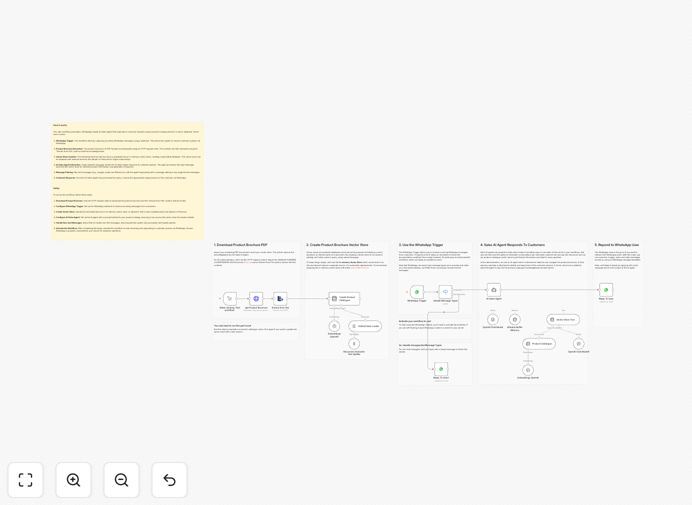
WhatsApp AI Sales Agent workflow diagram showing PDF processing and AI response flow

What This Workflow Does

This automation transforms your WhatsApp Business account into an intelligent sales assistant that answers customer questions using information extracted from your product documentation. When customers message your WhatsApp number, the AI analyzes their query, searches through your uploaded PDFs, and responds with accurate, context-aware answers.

The system handles the entire process automatically: extracting text from PDFs, creating searchable embeddings, processing incoming messages, and generating natural language responses. It filters out non-text messages and maintains conversation context during each session.

How It Works

1. PDF Processing

The workflow begins by downloading your product brochure PDF via HTTP request. It extracts the text content and splits it into manageable chunks for AI processing.

2. Vector Embedding Creation

Using OpenAI's embeddings API, the system converts each text chunk into numerical vectors that capture semantic meaning. These vectors are stored in an in-memory vector database for fast similarity searches.

3. Message Handling

When a WhatsApp message arrives, the workflow first checks if it contains text. Non-text messages receive a standard reply about supported message types.

4. AI Response Generation

For text queries, the system searches the vector database for relevant document sections, then uses OpenAI's chat model to generate a natural-sounding response based on the found information.

5. WhatsApp Reply

The final response is sent back to the customer through WhatsApp, completing the automated support cycle.

Pro tip: For best results, structure your PDFs with clear headings and sections. This helps the AI locate and reference specific information more accurately.

Who This Is For

This workflow is ideal for:

  • E-commerce businesses with extensive product catalogs
  • Manufacturers with technical product documentation
  • Support teams handling repetitive product inquiries
  • Businesses wanting 24/7 automated customer support
  • Teams exploring AI-powered customer service solutions

What You'll Need

  1. An active WhatsApp Business API account
  2. OpenAI API key with GPT-4o access
  3. Publicly accessible PDF product documentation
  4. Basic familiarity with n8n workflow configuration

Quick Setup Guide

  1. Import the workflow JSON into your n8n instance
  2. Configure WhatsApp credentials in both trigger and send nodes
  3. Add your OpenAI API key to all AI-related nodes
  4. Update the HTTP request node with your PDF URL
  5. Run the manual trigger once to build the vector store
  6. Activate the workflow and test with WhatsApp messages

Key Benefits

24/7 automated support: Customers get instant answers anytime without waiting for human agents.

Consistent information: All responses come directly from your official documentation, ensuring accuracy.

Reduced workload: Handle up to 80% of common inquiries automatically, freeing staff for complex issues.

Scalable solution: Easily update the knowledge base by replacing the PDF without changing the workflow.

Natural conversations: AI maintains context during each chat session for more helpful interactions.

Frequently Asked Questions

Common questions about WhatsApp AI automation and document processing

AI-powered WhatsApp agents can provide instant responses 24/7, reduce response times, and handle common queries automatically while maintaining natural conversations. They can access knowledge bases to provide accurate product information.

For example, an electronics retailer could deploy an AI agent that answers questions about product specifications, compatibility, or troubleshooting by referencing their technical manuals, reducing support ticket volume by 60-70%.

PDF product manuals, FAQs, knowledge base articles, and structured documentation work best. The content should be well-organized with clear headings and sections for optimal AI comprehension.

Technical specifications, troubleshooting guides, and product comparison charts tend to yield the most accurate responses. Avoid image-heavy PDFs without text layers, as these require OCR processing first.

Modern AI like GPT-4o achieves 85-95% accuracy when answers exist in the source material. Accuracy improves with well-structured documents and proper prompt engineering to focus responses on the provided content.

In our testing, properly configured systems correctly answered 9 out of 10 product-related questions when the information was present in the documentation. The remaining inaccuracies typically involve nuanced interpretations.

WhatsApp Business API has message rate limits and requires approval for commercial use. Automated responses must comply with WhatsApp's policies and clearly identify themselves as bots when appropriate.

Current limitations include no support for voice messages in automation, restrictions on promotional content, and a 24-hour window for follow-up messages unless the user initiates contact.

Vector search allows the AI to quickly find the most relevant sections of your documents by semantic similarity rather than keyword matching, leading to more contextually appropriate answers.

This means customers can ask questions using different phrasing than your documentation and still get accurate answers, as the system understands the meaning behind queries rather than just matching words.

Yes, the workflow can be extended to log conversations in CRMs like Salesforce or HubSpot, create support tickets, or update customer records based on interactions.

Common integrations include creating new leads from WhatsApp inquiries, tagging conversations by product interest, or escalating unresolved questions to human agents with full context.

Regular updates to the knowledge base PDFs, monitoring conversation logs for unanswered questions, and occasional prompt tuning based on user feedback will maintain optimal performance.

Plan to review unanswered questions monthly to identify gaps in your documentation. Update the PDF whenever products change, and retrain the vector store. Monitor for any WhatsApp policy changes affecting automation.

Yes, our team can build fully customized WhatsApp AI agents tailored to your specific products, documentation, and business processes. We'll handle API integration, knowledge base optimization, and deployment.

Custom solutions might include multilingual support, integration with your inventory system, or specialized handling for technical support cases. We'll design a solution that matches your exact requirements and scales with your business.

  • Tailored to your product documentation
  • Integrated with your existing systems
  • Optimized for your customer communication style

Need a Custom WhatsApp Automation?

This free template is a starting point. Our team builds fully tailored automation systems for your specific business needs.