What This Workflow Does
Staying on top of cutting-edge academic research is a massive time sink. Manually checking Arxiv, reading dozens of abstracts, and synthesizing findings into a digestible format can consume 10–15 hours per week for researchers, content creators, and tech leaders.
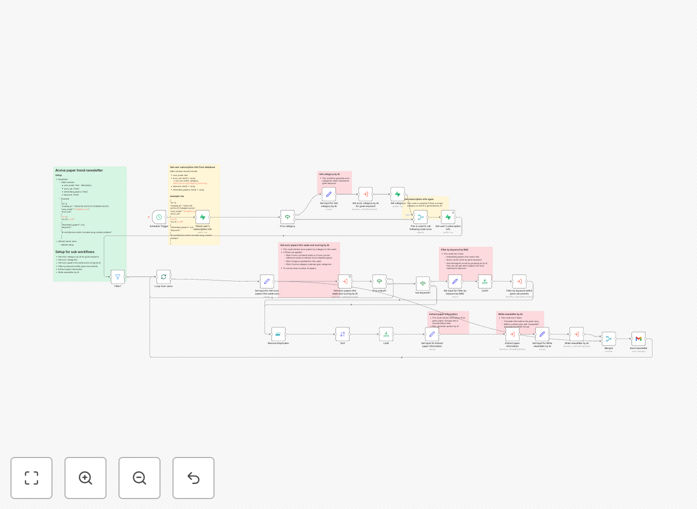
This intelligent automation solves that problem. It acts as your personal research assistant, automatically scanning the Arxiv preprint server for new papers in your specified categories (like cs.AI, cs.LG). It then uses AI to analyze, score, and summarize the most relevant publications based on your keywords. Finally, it compiles these insights into a polished newsletter and delivers it directly to your subscriber list via Gmail—all without any manual intervention.
The result? You and your audience receive a curated, insightful digest of the latest research trends every week, saving you countless hours and ensuring you never miss a pivotal paper.
How It Works
The workflow connects several powerful tools to create a seamless pipeline from raw research to delivered insight.
1. Trigger & Data Collection
A scheduled trigger (like Cron or Schedule Trigger node) runs the workflow weekly. It queries the Arxiv API using your configured search parameters—categories, publication date range, and keywords.
2. AI-Powered Analysis & Filtering
Each fetched paper is sent to an AI model (like OpenAI or Anthropic). The AI evaluates the paper's relevance based on your criteria, extracts the core thesis, and generates a concise, readable summary suitable for a non-expert audience.
3. Personalization & Database Lookup
The workflow connects to a Supabase database containing your subscriber list. For each subscriber, it retrieves their preferred categories and keywords, ensuring the final newsletter contains only papers that match their individual interests.
4. Newsletter Composition & Delivery
Using the filtered and summarized papers, the workflow constructs a well-formatted HTML email newsletter. It then uses the Gmail node (or your preferred email service) to send the personalized digest to each subscriber, complete with links to the full papers.
Pro tip: Use the "Split in Batches" node to process large numbers of papers efficiently without hitting API rate limits. Add a "Filter" node after the AI step to only include papers with a relevance score above a threshold you set.
Who This Is For
This automation is a game-changer for:
- Academic Researchers & Labs: Keep your team updated on the latest publications in your niche without manual literature reviews.
- Tech Content Creators & Educators: Build a loyal audience by providing a valuable, automated service that curates the latest AI or CS research.
- Startups & R&D Teams: Monitor competitive and adjacent research fields to inform product development and strategy.
- Investors & Analysts: Track emerging trends and innovations in specific technological domains to identify potential opportunities early.
- Community Managers: Foster engagement in Discord, Slack, or forum communities by sharing regular, high-quality research digests.
What You'll Need
- An n8n instance (cloud or self-hosted).
- Access to an AI/LLM API (OpenAI, Anthropic, Groq, etc.) with credits.
- A Supabase account (free tier works) or another database to store subscriber preferences.
- A Gmail account (or SendGrid/Mailgun API keys) for sending emails.
- (Optional) A Qdrant or similar vector database for advanced semantic search and deduplication of papers.
Quick Setup Guide
Get this automation running in your n8n instance in under 30 minutes.
- Download & Import: Click the "Download Template" button above and import the JSON file into your n8n canvas.
- Configure Credentials: Set up the credentials for your AI service (OpenAI), your database (Supabase), and your email sender (Gmail) in n8n.
- Set Your Search Parameters: In the "Arxiv" node, define the categories (e.g., cs.AI, stat.ML) and the query (e.g., "large language models"). Adjust the schedule trigger to your preferred frequency.
- Populate Your Subscriber Database: Add test subscribers to your Supabase table with their email and preferred categories/keywords.
- Test & Activate: Run the workflow once in manual mode to see the full flow from search to email. Check the results, then activate the schedule trigger.
Pro tip: Start with a small, trusted test group for your newsletter. Use the AI's summary output to fine-tune your prompts for clarity and tone before sending to your full list.
Key Benefits
Save 10+ Hours Weekly: Eliminate the manual process of searching, reading, and summarizing papers. This workflow does the heavy lifting automatically.
Never Miss a Key Paper: Automated, scheduled scans ensure you're always up-to-date with the latest publications in your field, even during busy periods.
Scale Personalized Communication: Move from a generic newsletter to a personalized digest for each subscriber based on their unique interests, increasing engagement and value.
Establish Thought Leadership: Consistently delivering high-quality, curated research positions you or your brand as a trusted source of insight in your industry.
Foundation for Advanced AI Agents: This workflow is a perfect building block for more complex AI research agents that can answer questions, generate reports, or trigger alerts based on specific findings.