Telegram AI Transcription Groq n8n Automation

Automated Telegram Voice Message Transcription with Groq AI

Convert voice messages to text instantly. Free n8n workflow template for meetings, support, and documentation.

Download Template JSON · n8n compatible · Free
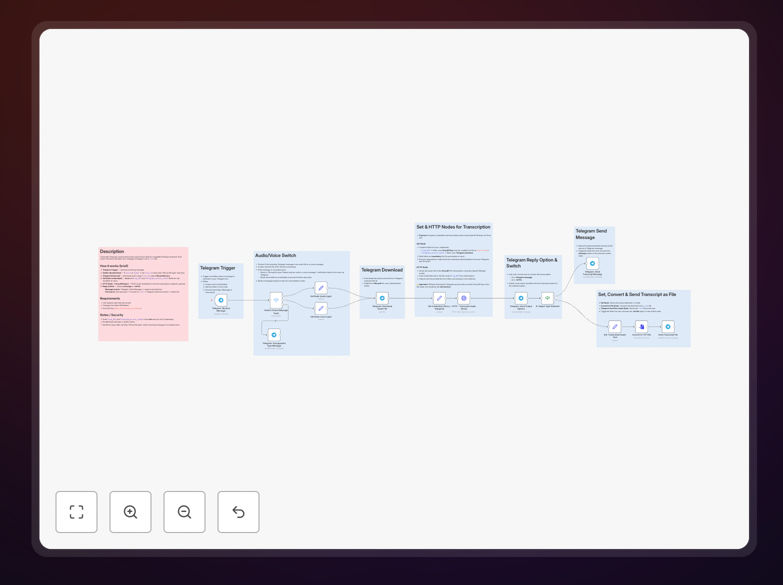
Visual diagram showing Telegram voice message being transcribed to text via Groq AI automation workflow

What This Workflow Does

This automation solves the time-consuming problem of manual audio transcription. When team members, customers, or partners send voice messages through Telegram, this workflow automatically converts them into accurate, searchable text. The transcription happens in seconds using Groq's high-performance Whisper AI, eliminating hours of manual typing and ensuring important verbal information isn't lost or forgotten.

The system intelligently handles both voice messages and audio files, validates file types, and delivers transcripts either as immediate Telegram replies or downloadable text files. This creates a seamless bridge between casual voice communication and formal documentation, making verbal information as actionable and organized as written content.

How It Works

1. Telegram Message Detection

The workflow triggers instantly when any new message arrives in your connected Telegram bot or group. It checks whether the message contains a voice note or audio file, filtering out text messages, images, or other content types.

2. Audio File Processing

When a valid audio message is detected, the system downloads the file directly from Telegram's servers using the unique file identifier. This happens securely without storing the audio on intermediate servers, maintaining privacy while preparing the content for transcription.

3. AI-Powered Transcription

The downloaded audio is sent to Groq's Whisper endpoint, which uses advanced speech recognition to convert spoken words into text. Groq's infrastructure provides fast, accurate transcription with support for multiple languages and accents, returning clean text with proper punctuation.

4. Intelligent Response Delivery

Based on your configuration, the transcribed text is either sent back as a Telegram message for immediate viewing or converted into a downloadable .txt file. The system includes error handling for failed transcriptions and provides clear feedback if unsupported file types are received.

Who This Is For

This automation is ideal for businesses and teams that rely on voice communication but need written records. Remote teams using Telegram for daily standups can automatically document meetings. Customer support teams can transcribe voice complaints into ticketing systems. Content creators can convert interviews and brainstorming sessions into editable text. Educators can transform lecture recordings into study materials. Any organization that values both the convenience of voice messaging and the utility of searchable text will benefit from this workflow.

What You'll Need

  1. A Telegram bot token (created free via BotFather)
  2. Groq API key (free tier available from console.groq.com)
  3. n8n instance (cloud or self-hosted version)
  4. Basic understanding of webhook configuration
  5. Telegram group or channel where the bot has access

Quick Setup Guide

1. Download the template using the button above and import it into your n8n instance.

2. Create credentials for Telegram and Groq in n8n's credential management system.

3. Configure the Telegram trigger node with your bot token and set up the webhook.

4. Update the Set node with your preferred output format (message or file).

5. Test the workflow by sending a voice message to your Telegram bot.

6. Monitor the first few transcriptions for accuracy and adjust language settings if needed.

Pro tip: For team environments, configure the workflow to save transcripts to a shared Google Doc or Notion page automatically. This creates a searchable knowledge base of all voice communications without manual copying and pasting.

Key Benefits

Save 15+ hours monthly per team member on manual transcription work. What used to require listening and typing now happens automatically while team members focus on higher-value tasks.

Improve information accessibility by converting voice-only content into searchable, shareable text. Team members can quickly find specific discussions without listening to entire recordings.

Reduce transcription costs by 90%+ compared to human transcription services. AI transcription costs pennies per minute versus dollars, with comparable accuracy for most business content.

Create audit trails and compliance records automatically. Important verbal agreements, feedback, or instructions become documented evidence without additional administrative work.

Enable downstream automation by transforming voice data into structured text that can trigger other workflows, update CRMs, or populate databases.

Frequently Asked Questions

Common questions about audio transcription automation and integration

Audio transcription automation converts spoken words from voice messages, meetings, or recordings into searchable, editable text automatically. This saves hours of manual typing, improves accessibility, creates written records for compliance, and enables data analysis from conversations that would otherwise be lost.

For businesses, this means customer support voice messages become trackable tickets, team meetings generate automatic minutes, and verbal feedback transforms into actionable data. The automation bridges the gap between convenient voice communication and organized written documentation.

AI transcription is significantly faster (seconds vs hours), more cost-effective (pennies per minute vs dollars), available 24/7, and integrates directly into your workflows. While human transcribers may handle complex accents slightly better, modern AI like Groq's Whisper achieves 95%+ accuracy for most business use cases at a fraction of the cost and time.

The key advantage is integration capability. AI transcription can automatically feed into your CRM, project management tools, or knowledge bases, creating seamless data flows that manual services can't match without additional manual steps.

Common business applications include: transcribing customer support voice messages for ticket creation, converting team meeting notes from Telegram groups into searchable documents, creating written records of verbal feedback or interviews, generating subtitles for training content, and archiving important voice communications for compliance purposes.

Remote teams particularly benefit from automatically documented daily standups and brainstorming sessions. Sales teams can transcribe customer discovery calls directly from Telegram recordings, while product teams can convert user feedback sessions into organized feature requests.

Security depends on your implementation. Using reputable AI providers like Groq with proper API key management, keeping transcripts within your controlled systems, and avoiding sending highly sensitive data through third-party services are best practices. For confidential information, consider on-premise transcription solutions or additional encryption layers.

This template uses direct API calls without intermediate storage, and transcripts can be configured to stay within your Telegram ecosystem or be saved to your private cloud storage. For regulated industries, additional compliance measures should be implemented based on specific requirements.

Yes, that's the primary advantage of automation. Transcribed text can be automatically sent to CRM systems, added to customer records, saved to Google Docs or Notion, analyzed for sentiment, used to trigger follow-up actions, or indexed in search databases.

This creates seamless workflows where voice input becomes actionable data across your tech stack. For example, a customer complaint via voice message could automatically create a support ticket with the transcribed text, trigger a satisfaction survey follow-up, and update the customer's profile—all without manual intervention.

Building custom transcription from scratch requires developer time (weeks), API integration work, error handling, and ongoing maintenance. This free template provides production-ready logic in minutes. The main costs are minimal API usage fees (typically $0.006 per minute), compared to thousands in development or monthly subscription fees for enterprise transcription services.

For most businesses, using this template represents a 95%+ cost saving versus custom development and a 90%+ saving versus manual transcription services, while providing greater flexibility and integration capabilities than either alternative.

Yes, GrowwStacks specializes in building custom automation solutions tailored to specific business needs. We can create transcription workflows integrated with your existing CRM, helpdesk, or document management systems, add custom processing logic, implement security protocols, and scale the solution across your organization with proper monitoring and maintenance.

Our team works with you to understand your unique requirements, compliance considerations, and integration points, delivering a solution that fits seamlessly into your operations rather than forcing you to adapt to generic tools.

  • Integration with your existing software stack
  • Custom security and compliance configurations
  • Scalable architecture for organizational-wide deployment
  • Ongoing support and optimization

Need a Custom Audio Transcription Automation?

This free template is a starting point. Our team builds fully tailored automation systems for your specific business needs.