Typeform Vapi AI Voice Assistant Lead Follow-up Automation

Auto-call New Typeform Submissions with Vapi Voice Assistant

Instantly call new form respondents with a personalized AI voice message. Connect Typeform and Vapi AI to engage leads within minutes of submission.

Download Template JSON · n8n compatible · Free
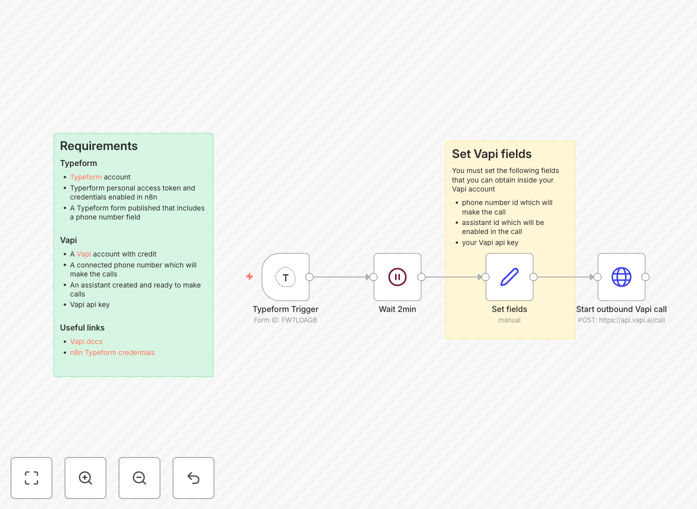
Automation workflow connecting Typeform submissions to Vapi AI voice calls

What This Workflow Does

This automation solves the critical problem of delayed lead follow-up. When someone submits a Typeform expressing interest in your service, product, or consultation, they're at peak engagement. Waiting hours or days for manual contact drastically reduces conversion chances.

The workflow automatically triggers a personalized AI voice call via Vapi within minutes of form submission. Using data collected in the Typeform—like name, interest area, or location—the voice assistant delivers a tailored message that feels human and responsive. This immediate engagement captures momentum, qualifies leads conversationally, and sets the stage for successful sales or onboarding.

How It Works

Step 1: Typeform Submission Trigger

The workflow monitors your Typeform for new responses. When a submission arrives—especially one containing a phone number field—it captures all form data including custom fields you've set up for personalization.

Step 2: Short Processing Delay

A brief wait ensures data is fully processed and allows time for any parallel automations (like sending confirmation emails) to complete before the call initiates.

Step 3: Data Mapping & Personalization

The workflow extracts specific fields from the Typeform response and maps them into variables for the voice assistant. This could include first name, product interest, appointment preference, or geographic location.

Step 4: Vapi AI Call Initiation

Using the Vapi API, the workflow initiates an outbound call to the respondent's phone number. It passes the personalized variables to the AI assistant, which uses them in its conversational script to create a context-aware interaction.

Pro tip: Add conditional logic to only call respondents who opt-in via a checkbox field in your Typeform. This ensures compliance and respects user preferences.

Who This Is For

This automation is ideal for businesses where immediate personal contact drives conversions. Consultants, coaches, SaaS companies, healthcare providers, real estate agents, education programs, and high-ticket service providers benefit enormously. If your leads come through forms and require timely, personalized follow-up, this workflow transforms your response capability.

Marketing teams running lead generation campaigns, sales teams needing instant qualification, and appointment-based businesses wanting to confirm bookings quickly will see dramatic efficiency gains. The system works for both B2B and B2C scenarios where phone conversation adds value beyond email or chat.

What You'll Need

  1. A Typeform account with a published form containing a phone number field.
  2. Typeform personal access token and credentials configured in your automation platform.
  3. A Vapi AI account with credits, a connected phone number for outbound calls, and an assistant configured.
  4. Your Vapi API key for authentication.
  5. Basic understanding of how to import and activate automation workflows.

Quick Setup Guide

  1. Download the template file and import it into your automation platform.
  2. Connect your Typeform credentials and select the specific form to monitor.
  3. Configure your Vapi API key, assistant ID, and phone number ID in the workflow settings.
  4. Map Typeform fields to Vapi variables for personalization (e.g., first_name → assistant script variable).
  5. Test with a dummy submission to verify call initiation and personalization.
  6. Activate the workflow and monitor initial calls for quality assurance.

Key Benefits

3–5x higher conversion rates: Immediate follow-up within minutes captures leads at peak intent, dramatically increasing likelihood of conversion compared to delayed manual contact.

80% reduction in manual follow-up time: Eliminates the need for sales or support teams to manually call each new lead, freeing hours per week for higher-value activities.

Personalized at scale: Uses actual form data to tailor each call, making thousands of interactions feel individually crafted without human effort.

24/7 lead engagement: Works automatically regardless of time zone or business hours, ensuring no lead waits overnight for initial contact.

Conversational qualification: The AI assistant can ask qualifying questions during the call, gathering insights before human sales reps engage, improving pipeline efficiency.

Frequently Asked Questions

Common questions about Typeform and AI voice assistant automation

AI voice assistants can dramatically improve lead response times by automatically calling new form respondents within minutes of submission. This eliminates manual follow-up delays, ensures immediate engagement, and increases conversion rates by reaching leads when their interest is highest.

For example, a consulting firm using this automation can call potential clients within 2 minutes of their inquiry form submission, capturing their attention while they're still researching options. This speed creates a competitive advantage and builds trust through responsiveness.

Integrating Typeform with voice AI systems allows you to personalize outreach using form data like name, interest, or location. This creates a tailored experience that feels human, builds rapport faster, and can qualify leads through conversational interaction before manual sales follow-up.

The integration transforms static form data into dynamic conversations. A real estate agency can call potential buyers immediately after they submit a property interest form, referencing the specific neighborhood they selected and asking about timing preferences naturally.

Immediate follow-up after form submission significantly boosts conversion rates because prospects are most engaged right after expressing interest. Studies show response within 5 minutes increases conversion likelihood by 3-5x compared to waiting hours or days, as momentum and intent are preserved.

In practice, a SaaS company implementing this saw their demo request conversion jump from 15% to 45% simply by calling within minutes instead of emailing later that day. The quick personal contact signaled priority and commitment.

Businesses with high-value leads, appointment-based services, or complex sales processes benefit most. Examples include consulting firms, SaaS companies, healthcare providers, real estate agencies, and education programs where personalized immediate contact dramatically improves qualification and closing rates.

These businesses often have longer sales cycles where early rapport matters. A healthcare clinic using automated voice follow-up for consultation requests can schedule appointments faster, reduce no-shows through verbal confirmation, and improve patient satisfaction with prompt attention.

You can personalize AI calls by mapping Typeform fields like first_name, product_interest, or location into the voice assistant script. The AI can reference these values naturally, e.g., "Hi John, I see you're interested in our Premium plan..." This creates a contextual conversation that feels individually crafted.

Advanced personalization can include conditional branching based on answers. If a respondent selects "urgent" in a timing field, the assistant can prioritize scheduling; if they select "researching," it can offer informational resources first.

  • Map at least 2-3 key fields for meaningful personalization
  • Use natural language variables in your assistant script
  • Test personalization with diverse form submissions

Common mistakes include not validating phone number formats, forgetting consent checkboxes, using generic scripts without personalization, calling at inappropriate times, and lacking fallback logic for failed calls. Proper setup requires testing, data cleaning, and conditional routing based on respondent answers.

A frequent oversight is calling international numbers without format conversion, leading to failed calls. Another is not segmenting calls by time zone—calling a US lead at 3 AM because the form was submitted during your business day in another region.

  • Always include a consent checkbox in your Typeform
  • Validate and format phone numbers automatically
  • Set time zone logic or reasonable calling hours

Yes, GrowwStacks specializes in building custom automation systems connecting Typeform with Vapi AI and other voice platforms. We tailor workflows to your specific lead data, call scripts, timing rules, and integration needs, ensuring maximum conversion impact and operational efficiency.

Our team designs systems that match your brand voice, integrate with your CRM, include advanced logic for lead scoring, and provide analytics on call performance. We handle everything from initial consultation to ongoing optimization.

  • Complete workflow design and implementation
  • Integration with your existing CRM and tools
  • Performance monitoring and optimization support

Need a Custom Typeform & Vapi AI Automation?

This free template is a starting point. Our team builds fully tailored automation systems for your specific business needs.