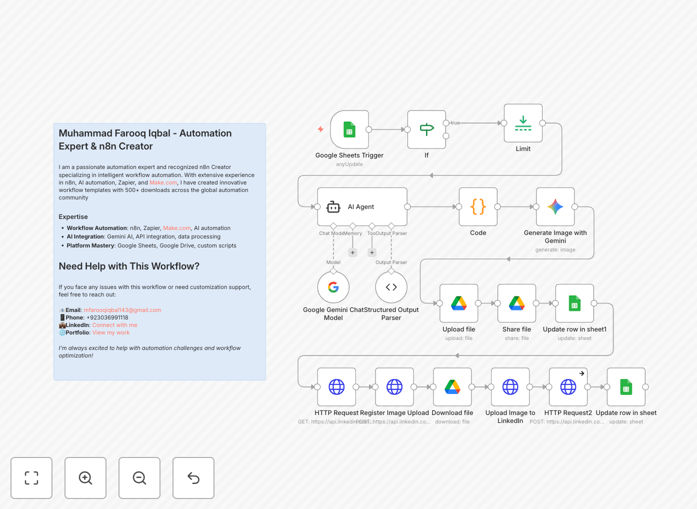
What This Workflow Does
This n8n automation solves the biggest challenge for businesses on LinkedIn: consistent, high-quality content creation. Instead of spending hours brainstorming, writing, designing, and scheduling posts, this workflow handles everything automatically.
The system monitors a Google Sheet for new post ideas, uses Google Gemini AI to generate engaging LinkedIn content with proper formatting and hashtags, creates custom AI-generated images, and publishes everything directly to your LinkedIn profile. It transforms simple post titles into complete, professional LinkedIn updates with visuals.
Perfect for startups, marketing teams, HR departments, agencies, and solo entrepreneurs who need to maintain an active LinkedIn presence without the time commitment. The automation runs continuously, ensuring your LinkedIn feed stays fresh and engaging 24/7.
How It Works
1. Content Trigger & Management
A Google Sheets trigger monitors your content calendar spreadsheet for new post titles marked as "pending." The workflow processes one post at a time to maintain control and prevent overwhelming your LinkedIn audience.
2. AI Content Generation
Google Gemini AI analyzes each post title and generates complete LinkedIn posts including compelling opening hooks, 3-4 informative paragraphs, engagement questions, relevant hashtags (4-6), and appropriate emojis. The output is professionally formatted for maximum engagement.
3. AI Image Creation
Using the generated post content as context, Gemini creates custom visuals featuring modern workspace elements, professional aesthetics, and 16:9 aspect ratio suitable for LinkedIn. Images contain no text overlays, keeping them clean and platform-appropriate.
4. Image Processing & Storage
Generated images are automatically uploaded to Google Drive with public access permissions. The image URLs are stored back in your spreadsheet for tracking and future reference, creating a complete content archive.
5. LinkedIn Publishing
The LinkedIn API integration handles the complete publishing process: registering image uploads, uploading to LinkedIn's servers, creating posts with text and image, and publishing to your profile. Status updates to "posted" upon successful completion.
Pro tip: Start with 1-2 posts daily and monitor engagement for 2 weeks before increasing frequency. This helps LinkedIn's algorithm recognize your consistent quality without flagging as spam.
Who This Is For
This automation is ideal for marketing teams overwhelmed with content creation, startups building their brand presence, HR departments establishing employer branding, agencies managing multiple client accounts, and solo entrepreneurs who need professional social media presence without hiring staff.
Businesses that post regularly on LinkedIn (3+ times weekly) will see the most immediate ROI. The system scales effortlessly whether you're managing one profile or multiple company pages.
What You'll Need
- Google Gemini API access for content and image generation
- LinkedIn API credentials with posting permissions
- Google Sheets for content management (free tier works)
- Google Drive for image storage and sharing
- n8n instance (cloud or self-hosted) to run the workflow
- Basic spreadsheet with columns for titles, status, and image URLs
Quick Setup Guide
1. Download the template and import into your n8n instance. 2. Connect your Google Sheets, Google Drive, and LinkedIn accounts in n8n credentials. 3. Set up your Google Gemini API key in the AI nodes. 4. Create a simple Google Sheet with columns: Title, Status, Image URL. 5. Add 5-10 post ideas and mark them as "pending." 6. Activate the workflow and test with one post. 7. Review the published content and adjust AI prompts if needed. 8. Scale up by adding more content ideas to your sheet.
Important: Always review the first 3-5 AI-generated posts before full automation. This ensures the tone and quality match your brand voice before scaling.
Key Benefits
⏰ Save 20+ hours weekly – Eliminate manual content creation, design, and scheduling. What used to take a full day now happens automatically while you focus on strategy.
📈 Consistent professional presence – Never miss a posting day. Maintain regular engagement with your audience even during busy periods or vacations.
🎨 Brand-appropriate quality – AI-generated content matches professional standards with proper formatting, relevant hashtags, and custom visuals that align with LinkedIn's best practices.
📊 Complete performance tracking – All content is logged in your spreadsheet with status updates and image URLs, making it easy to analyze what works and optimize your strategy.
💰 Cost-effective scaling – Handle unlimited content volume without additional staff. Perfect for growing businesses that need to increase output without increasing overhead.