What This Workflow Does
For developers, creators, and tech professionals, maintaining an active LinkedIn presence is crucial for career growth and networking, but manually sharing content is time-consuming. This automation solves that by creating a hands-off content distribution system.
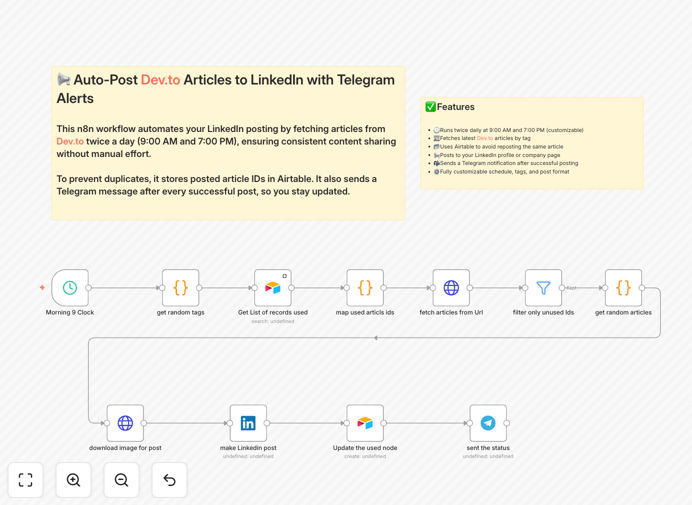
The workflow automatically fetches your latest Dev.to articles based on your chosen tags, checks if they've already been posted using Airtable as a tracking database, publishes them to your LinkedIn profile or company page, and sends you a confirmation message on Telegram. It runs on a schedule you control (default is twice daily), ensuring your LinkedIn feed stays fresh with your technical content without any daily effort.
Beyond simple posting, this system prevents duplicate content, maintains a searchable history of what's been shared, and gives you real-time notifications—transforming your Dev.to writing into consistent LinkedIn engagement that builds your professional brand.
How It Works
The automation follows a logical sequence that mimics what you'd do manually, but completely automated.
1. Scheduled Trigger
A schedule trigger initiates the workflow at your specified times (default: 9 AM and 7 PM daily). This ensures regular, consistent posting without you having to remember.
2. Fetch Dev.to Articles
The workflow calls the Dev.to API to retrieve your latest articles filtered by specific tags. You can customize which tags to monitor, how many articles to fetch, and set quality thresholds.
3. Check Airtable for Duplicates
Each article's unique ID is checked against your Airtable "PostedArticles" base. If the article already exists, it's skipped. If it's new, it proceeds to the next step.
4. Format & Post to LinkedIn
The article title, description, and URL are formatted into an engaging LinkedIn post. You can customize the message, add relevant hashtags, and choose whether to post to your personal profile or company page.
5. Record in Airtable
Once successfully posted, the article ID, title, and posting timestamp are saved to Airtable. This creates a permanent record and prevents future reposts.
6. Send Telegram Notification
A success message is sent to your Telegram channel or direct messages, confirming the post went live with a link to view it. If any step fails, you'll receive an error alert.
Pro tip: Add a "Content Quality Filter" node between steps 2 and 3 to only share articles with minimum engagement (likes, comments) or word count, ensuring only your best content gets promoted.
Who This Is For
This automation is ideal for developers, technical writers, and content creators who want to maximize their professional visibility without adding hours to their weekly routine.
Developers building their personal brand: Showcase your technical expertise automatically by sharing your Dev.to tutorials and articles with your LinkedIn network.
Solo founders and indie hackers: Maintain consistent content sharing to attract users, investors, and partners while focusing on product development.
Community and page managers: Keep company or community LinkedIn pages active with curated technical content from your team's Dev.to publications.
Busy professionals: Anyone who writes technical content but struggles with the repetitive task of cross-posting to social platforms.
What You'll Need
- An n8n instance (cloud or self-hosted) with workflow execution capabilities.
- A Dev.to account with published articles you want to share.
- A LinkedIn Developer App with appropriate permissions to post content.
- An Airtable base with a simple table to track posted articles.
- A Telegram bot token and chat ID for receiving notifications.
- Basic API understanding for configuring the connections (step-by-step guide included).
Quick Setup Guide
Follow these steps to get your automation running in under 30 minutes:
- Import the template: Download the JSON file above and import it into your n8n instance.
- Configure Airtable: Create a new base with a "PostedArticles" table containing an "ArticleID" field (single line text).
- Set up Dev.to connection: Update the HTTP Request node with your preferred Dev.to tag (like #javascript, #webdev, or #ai).
- Connect LinkedIn: Create a LinkedIn Developer App, get your OAuth2 credentials, and authenticate the LinkedIn node in n8n.
- Configure Telegram: Create a bot via @BotFather, get your token and chat ID, and add them to the Telegram node.
- Adjust the schedule: Modify the Cron node to run at times that match your audience's peak engagement.
- Test and activate: Run the workflow once manually to verify all connections work, then activate it.
Pro tip: Start with a test LinkedIn page or set the schedule to run less frequently initially. Once you confirm posts look right and Airtable tracking works, switch to your main profile and increase frequency.
Key Benefits
Save 2-3 hours weekly that you'd spend manually copying, formatting, and posting content across platforms. That's 100+ hours annually regained for actual content creation or development work.
Consistent professional presence on LinkedIn without the mental load of remembering to post. The automation ensures your network sees your expertise regularly, building credibility over time.
Never duplicate content thanks to Airtable tracking. The system remembers every article posted, preventing embarrassing repeats and maintaining content variety.
Real-time monitoring via Telegram notifications. You'll know immediately when content goes live or if there are issues, without constantly checking platforms.
Fully customizable pipeline that you can extend. Add content filters, multiple LinkedIn pages, different posting formats, or additional platforms like Twitter/X.