LinkedIn ConnectSafely.AI Lead Nurturing Automation n8n

Auto-send DMs to LinkedIn Keyword Commenters

Automatically deliver resources, templates, or lead magnets to users who comment with a specific keyword on your LinkedIn posts. Save hours of manual outreach.

Download Template JSON · n8n compatible · Free
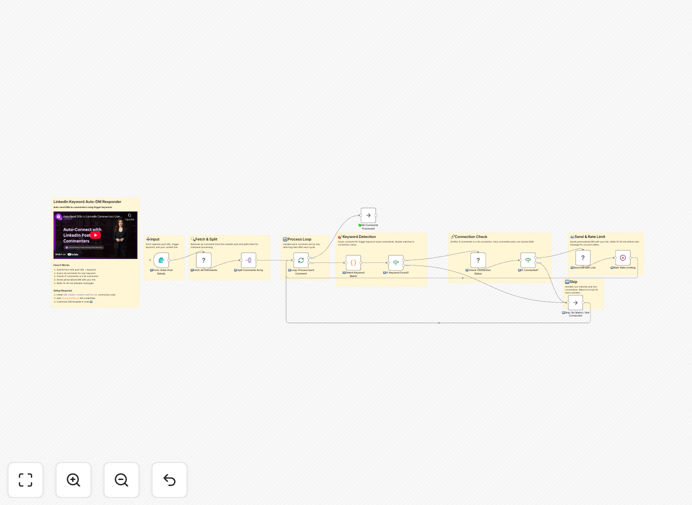
LinkedIn DM automation workflow diagram showing comment monitoring and automated message sending

What This Workflow Does

This n8n automation solves a common yet time-consuming LinkedIn marketing challenge: manually sending direct messages to everyone who comments with a specific keyword on your posts. Content creators, coaches, and marketers often use "comment LINK to get the PDF" or "type CODE for the template" strategies to generate engagement and distribute resources.

The workflow automatically monitors your LinkedIn post, detects when someone comments with your predefined keyword, checks if they're a connection, and sends them a personalized DM with your resource link. It handles the entire fulfillment process while you focus on creating content.

Beyond saving hours of manual work, this automation ensures no potential lead is missed—even when your post goes viral and receives hundreds of comments. It delivers instant value, builds trust through prompt response, and turns engagement into measurable conversions.

How It Works

The automation follows a logical sequence to ensure safe, compliant, and effective message delivery.

Step 1: Trigger & Input Collection

A simple web form captures your LinkedIn post URL, the trigger keyword (like "code" or "template"), the resource link you want to send, and your name for personalization. This form acts as the workflow's starting point whenever you have a new post to monitor.

Step 2: Comment Fetching

Using the ConnectSafely.AI API, the workflow retrieves all comments from your specified LinkedIn post. It processes them individually to maintain control and enable per-comment logic, such as connection checks and personalized messaging.

Step 3: Keyword Matching & Filtering

Each comment is checked for your trigger keyword (case-insensitive). Only comments containing the keyword proceed. This ensures you're only messaging genuinely interested users who explicitly requested your resource.

Step 4: Connection Verification

LinkedIn's platform restricts DMs to 1st-degree connections only. The workflow checks each commenter's connection status and automatically skips non-connections, protecting your account from policy violations and failed send attempts.

Step 5: Personalized DM Delivery

For each connected commenter who used the keyword, a personalized direct message is sent. The message includes their name, your resource link, and a friendly signature. This human touch increases response rates and builds relationships.

Step 6: Rate Limiting & Safety

Between each message, the workflow waits 15–30 minutes randomly. This built-in delay mimics human behavior, prevents LinkedIn's spam detection algorithms from flagging your account, and ensures long-term automation sustainability.

Who This Is For

This template is ideal for LinkedIn creators, marketers, and business owners who distribute digital resources. If you regularly share lead magnets, code samples, templates, webinar links, or exclusive content in exchange for comment engagement, this automation eliminates your manual fulfillment bottleneck.

Coaches and course sellers can automatically deliver lesson previews. Developers can share GitHub repositories. Newsletter owners can grow their lists by sending subscription links. The use cases are extensive, but the common thread is turning public engagement into private conversations efficiently.

What You'll Need

  1. A ConnectSafely.AI account with an active API key.
  2. Your LinkedIn profile connected and authorized within ConnectSafely.AI.
  3. A LinkedIn post with comments (or planned comments) containing your trigger keyword.
  4. The resource URL you want to send (Google Drive, Notion, Calendly, etc.).
  5. An n8n instance (cloud or self-hosted) to run the workflow.

Pro tip: Test with a small, controlled post first. Create a test post, comment on it yourself with the keyword, and verify the DM delivers correctly before scaling to larger audiences.

Quick Setup Guide

  1. Download the template using the button above and import it into your n8n instance.
  2. Add your ConnectSafely.AI API credential in the credentials section and select it in each ConnectSafely node.
  3. Activate the webhook trigger and copy the generated form URL.
  4. Open the form in your browser, enter your post URL, keyword, resource link, and name.
  5. Submit the form to trigger a test execution and verify messages send correctly.
  6. Activate the workflow and use the form whenever you publish new "comment for link" content.

Key Benefits

Save 5–10 hours per viral post by eliminating manual comment reading, profile checking, and copy-pasting. What used to take a full day now runs unattended.

Never miss a lead because the system processes every comment, regardless of volume. Even posts with 500+ comments are handled consistently.

Improve response time from hours (or days) to minutes. Instant delivery increases perceived value and conversion rates.

Scale your content distribution without scaling your workload. One workflow can support multiple posts, campaigns, and resource types.

Build a warm lead list automatically. Every DM recipient has already engaged with your content and requested your resource—making them highly qualified prospects.

Frequently Asked Questions

Common questions about LinkedIn automation and integration

LinkedIn keyword-triggered DM automation is a workflow that monitors your LinkedIn posts for specific keywords in comments and automatically sends a direct message to users who type them. For example, if you post 'Comment CODE below for the template,' anyone who comments 'CODE' receives your resource link instantly via DM. This automates lead magnet delivery, resource sharing, and audience engagement without manual effort.

It transforms a high-touch, manual process into a scalable system. Instead of you checking comments and sending individual messages, the workflow handles detection, validation, and delivery 24/7, ensuring prompt response even when you're offline.

Yes, when done responsibly. This template includes built-in safety measures like connection checks (only sends DMs to 1st-degree connections), random delays between messages (15-30 minutes), and daily volume limits. Always comply with LinkedIn's Terms of Service, avoid spammy content, and monitor your account for any warnings. Start with small batches to test.

The key is mimicking human behavior. Sending too many messages too quickly, messaging non-connections, or using overly promotional content can trigger restrictions. This workflow's design prioritizes safety by incorporating these guardrails directly into the automation logic.

You can send any digital resource: lead magnets (PDFs, checklists), course previews, webinar signup links, code repositories, template files, Discord/Slack invites, or exclusive content links. The message is fully customizable, allowing you to add personalization like the commenter's name and your signature for a human touch.

The automation works with any URL. You can link to Google Drive files, Notion pages, Calendly bookings, Typeform surveys, YouTube videos, or your website. The value is in delivering exactly what the commenter requested, instantly building trust and moving them further into your funnel.

ConnectSafely.AI provides an API that connects to LinkedIn's platform, allowing you to programmatically fetch post comments, check connection status, and send direct messages. It handles authentication and rate limiting, making it safer than unofficial scraping methods. You need a ConnectSafely.AI account and to authorize your LinkedIn profile once.

This official integration path is more reliable and sustainable than browser automation or unofficial APIs. It respects LinkedIn's limits and policies, reducing the risk of account flags while providing the necessary functionality to build professional automation.

Absolutely. The workflow can be easily modified to check for multiple keywords like 'code', 'template', 'link', or 'example'. You can set up an array of trigger words, and if any match, the DM is sent. This flexibility lets you run different campaigns from the same post or cater to varied audience requests.

For instance, you could offer multiple resources: "Comment CODE for the script, TEMPLATE for the spreadsheet, or GUIDE for the tutorial." The automation detects which keyword was used and could even send different links based on the match, though that requires additional customization.

Automating LinkedIn comment responses saves hours of manual work, ensures no lead is missed (even on viral posts), delivers instant value (boosting satisfaction), scales your content distribution, and captures warm leads directly into your DMs. It turns engagement into measurable conversions without increasing your workload.

Beyond efficiency, it creates a professional, responsive brand image. When users receive your resource within minutes of commenting, they're more likely to engage further. This automation transforms passive content consumption into active relationship building, all while you focus on creating more valuable content.

The base template focuses on delivery, but you can extend it with logging nodes. Add a Google Sheets or Airtable step to record each commenter's name, profile URL, timestamp, and the link sent. This creates an audit trail, prevents duplicate sends, and builds a lead list for follow-up campaigns.

This enhancement turns the workflow from a simple distributor into a lead capture system. You can later segment these contacts based on which resource they requested, creating targeted nurture sequences that increase conversion rates over time.

Yes, GrowwStacks specializes in custom LinkedIn automation solutions. We can build workflows for connection request personalization, automated follow-ups, content syndication, lead scoring, CRM integration, and multi-channel campaigns. Our team ensures compliance, scalability, and alignment with your specific sales or marketing funnel.

Whether you need advanced filtering, integration with your CRM, AI-powered message personalization, or complex multi-step sequences, we design and implement automation that drives real business results. Book a free consultation to discuss your needs.

  • Tailored workflows matching your exact use case
  • Integration with your existing tech stack (CRM, email, calendars)
  • Ongoing support and optimization as your needs evolve

Need a Custom LinkedIn Automation?

This free template is a starting point. Our team builds fully tailored automation systems for your specific business needs.