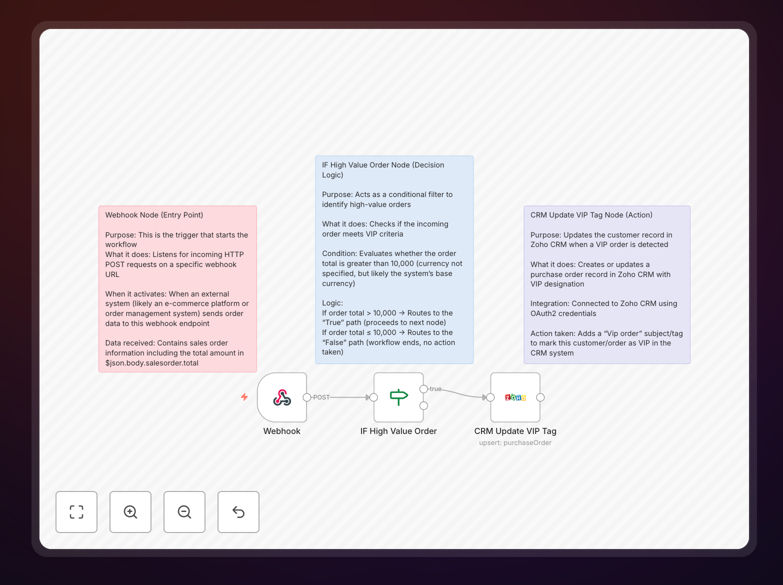
What This Workflow Does
In fast-paced sales environments, high-value orders often get lost in the noise. Manual review of every transaction to identify VIP customers is time-consuming and error-prone. This automation solves that by instantly detecting premium orders and flagging them in your Zoho CRM, ensuring your team gives priority attention to your most valuable customers.
The workflow listens for incoming sales orders via webhook, evaluates whether the order total exceeds your defined threshold (default $10,000), and automatically updates Zoho CRM with a "VIP Order" tag. This creates immediate visibility for your sales and customer service teams, enabling faster response times, personalized follow-up, and improved customer satisfaction for your premium clients.
How It Works
1. Webhook Trigger (Order Intake)
The workflow starts with a webhook node that receives POST requests from your eCommerce platform, POS system, or order management software. It captures the complete order data, including customer details, products, and the total order value.
2. Conditional Value Check
An "IF" node evaluates whether the order total exceeds your configured threshold. You can easily adjust this value to match your business definition of a high-value order. Only orders that meet or exceed the threshold proceed to the next step.
3. Zoho CRM VIP Tagging
For qualifying orders, the workflow uses the Zoho CRM node (with OAuth2 authentication) to create or update a purchase order record. It adds a "VIP Order" tag to the record, making it instantly identifiable in your CRM dashboard for priority handling.
Pro tip: You can extend this workflow to also create follow-up tasks, send Slack alerts to sales managers, or trigger personalized email sequences for VIP customers—all from the same automation.
Who This Is For
This template is ideal for B2B companies with large enterprise orders, D2C brands with premium product lines, eCommerce stores with tiered customer service, and sales teams managing complex deal pipelines. It's particularly valuable for businesses where timely response to high-value transactions directly impacts customer retention and revenue.
What You'll Need
- Zoho CRM account with API access and OAuth2 credentials configured
- Source system capable of sending webhooks (eCommerce platform, custom order system, ERP, etc.)
- n8n instance (cloud or self-hosted) to run the workflow
- Basic understanding of your order data structure to map fields correctly
Quick Setup Guide
- Download and import the JSON template into your n8n instance.
- Configure the Zoho CRM node with your OAuth2 credentials by following the authentication setup.
- Set your value threshold in the IF node (default is 10000, adjust to your currency and business needs).
- Test the webhook URL by sending a sample order payload from your source system.
- Activate the workflow and connect it to your live order system.
Key Benefits
Eliminate manual order review: Save 2-3 hours per week that sales managers typically spend scanning order reports for high-value transactions.
Improve VIP customer response time: Flag premium orders instantly, reducing follow-up time from hours/days to minutes.
Reduce human error: Automated threshold checking ensures no high-value order is missed due to oversight or fatigue.
Scale your sales operations: Handle thousands of orders daily without adding staff, as the automation works 24/7.
Enhance customer experience: VIP customers receive faster, more personalized service, increasing loyalty and repeat business.