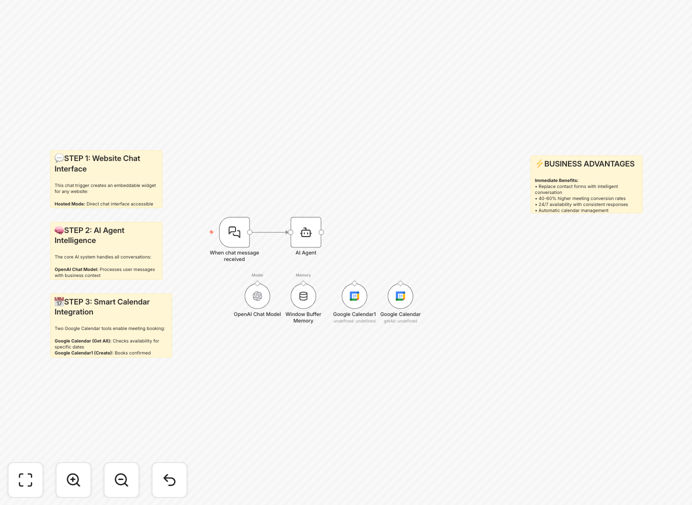
What This Workflow Does
This automation solves two critical business problems simultaneously: handling repetitive customer inquiries and managing appointment scheduling. Instead of forcing visitors to fill out contact forms and wait for email responses, this AI agent engages them in natural conversation directly on your website.
The system acts as a 24/7 virtual assistant that understands questions about your services, pricing, availability, and company information. When a visitor wants to schedule a meeting, the agent checks your Google Calendar in real-time, suggests available slots, collects necessary details, and books the appointment—all without human intervention.
This isn't just another chatbot. It's a complete business automation that reduces administrative workload, captures more qualified leads, and provides instant customer service that improves conversion rates and customer satisfaction.
How It Works
1. Website Visitor Engagement
When someone visits your website, a chat widget appears (or can be triggered by a button). The visitor asks questions in natural language, just like messaging a human representative.
2. Intelligent Response Generation
The AI analyzes the question using OpenAI's GPT models, references your specific business context (services, pricing, policies), and generates a helpful, accurate response. The system maintains conversation memory so follow-up questions are understood in context.
3. Calendar Availability Check
If the visitor wants to book a meeting, the workflow connects to your Google Calendar API, scans your upcoming events, and identifies available time slots based on your configured working hours and buffer times.
4. Automated Booking Process
The agent suggests available times, collects the visitor's name, email, and preferred slot, then creates a calendar event with proper timezone handling. Automatic confirmation messages are sent to both parties.
5. Lead Capture & Follow-up
All interactions are logged, and lead information is captured for your CRM or follow-up sequences. The system can be extended to notify your team about high-priority inquiries or new bookings.
Who This Is For
This automation delivers the most value for service-based businesses, consultants, agencies, coaches, and any company that receives frequent inquiries and schedules appointments. It's particularly effective for:
- Consulting firms that need to qualify leads and schedule discovery calls
- Service providers (designers, developers, marketers) handling project inquiries
- Healthcare practices and wellness professionals managing appointment requests
- Educational institutions and coaches scheduling consultations or demo sessions
- E-commerce businesses that need pre-sales support and post-sales scheduling
If you're currently spending more than 5 hours per week answering repetitive questions or managing your calendar, this automation will deliver immediate time savings and business value.
What You'll Need
- OpenAI API key (from platform.openai.com) – this powers the AI conversation capabilities
- Google Cloud Platform account with Calendar API enabled – for calendar integration
- Business Google Calendar where appointments should be booked
- n8n instance (cloud or self-hosted) to run the workflow
- Website access to add the embed code (any platform that accepts HTML/JavaScript)
- Business context document detailing your services, pricing, FAQs, and booking preferences
Pro tip: Before setting up, create a comprehensive "system prompt" that includes your business identity, services, pricing, and conversation rules. This ensures the AI agent represents your brand accurately and handles inquiries consistently.
Quick Setup Guide
Follow these steps to implement this automation in your business:
- Download and import the template JSON file into your n8n instance using the "Import from File" option.
- Configure OpenAI node with your API key and customize the system prompt with your business information.
- Set up Google Calendar OAuth by creating credentials in Google Cloud Console and connecting both calendar nodes.
- Test the conversation flow by asking common questions and attempting to book a meeting through the n8n webhook.
- Embed on your website by switching the chat trigger to embedded mode and adding the provided code snippet before your closing body tag.
- Monitor and optimize based on actual conversations, refining your prompts and booking rules as needed.
Key Benefits
24/7 customer service without staffing costs: The AI agent handles inquiries around the clock, capturing leads and answering questions even when your team is offline. This can increase lead capture by 30-40% for businesses with international clients or after-hours traffic.
40-60% reduction in administrative scheduling work: Automated calendar management eliminates the back-and-forth emails, manual availability checks, and data entry that typically consume hours each week. The system handles timezone conversions and avoids double-booking automatically.
Consistent brand representation: Unlike human staff who might provide varying information, the AI agent delivers accurate, consistent responses based on your configured business rules. This ensures every customer receives the same quality of information and service.
Scalable lead qualification: The system can ask qualifying questions, gather necessary information, and route high-value leads to your team while handling routine inquiries autonomously. This lets your sales team focus on closing rather than qualifying.
Valuable conversation analytics: Every interaction is logged, providing insights into common questions, customer concerns, and booking patterns. This data helps you improve your services, website content, and customer experience over time.