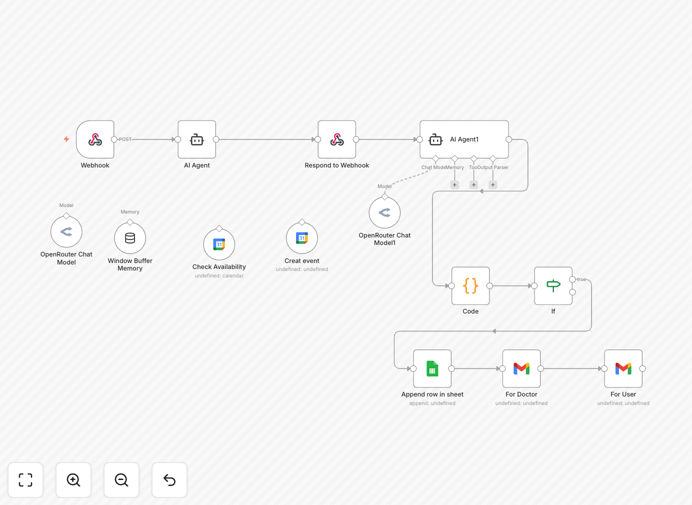
What This Workflow Does
This automation solves the chronic administrative burden dental clinics face with manual appointment scheduling. Instead of staff playing phone tag, checking paper calendars, and manually sending reminders, this system handles everything automatically.
When a patient requests an appointment (via website form, phone call transcription, or messaging app), the workflow checks real-time availability in Google Calendar, reserves the slot, generates a unique appointment ID, and sends personalized confirmations to both the patient and dentist. It also handles rescheduling logic, sends reminder sequences, and maintains a clean audit trail of all booking activity.
The business value is substantial: clinics using this automation typically reduce administrative time spent on scheduling by 80%, decrease no-show rates by 30-40%, and improve patient satisfaction scores through prompt, professional communication.
How It Works
1. Appointment Request Capture
The workflow triggers when a new appointment request arrives via webhook from your clinic's website, a transcribed phone call, or a messaging platform like WhatsApp. It extracts patient details, preferred date/time, and service type.
2. Real-Time Availability Check
The system queries your Google Calendar to verify the dentist's availability for the requested slot. It checks against existing appointments, blocked time, and clinic hours. If unavailable, it suggests the nearest available alternatives.
3. Calendar Event Creation & Confirmation
Once a slot is confirmed, the workflow creates a detailed Google Calendar event with all patient information, generates a unique appointment ID for tracking, and immediately sends a confirmation email to the patient with all details and pre-appointment instructions.
4. Clinic Notification & Follow-up
The system notifies the dental team via email with the complete patient file and appointment details. It then schedules automated reminders (48-hour and 24-hour) to be sent to the patient, dramatically reducing last-minute cancellations and no-shows.
Who This Is For
This automation is ideal for dental practices of all sizes—from solo practitioners to multi-location clinics—that want to modernize their patient scheduling. It's particularly valuable for:
- Busy dental clinics experiencing phone congestion and administrative overload
- Practices expanding to multiple locations needing centralized scheduling
- Dentists offering specialized services with complex scheduling requirements
- Healthcare providers transitioning to digital patient experiences
- Practices struggling with high no-show rates and last-minute cancellations
What You'll Need
- n8n instance (cloud or self-hosted) with workflow execution capabilities
- Google Calendar account for the dental practice with API access enabled
- Email service credentials (Gmail/Office 365 or SMTP) for sending notifications
- Website booking form or system to capture appointment requests
- Basic understanding of n8n for credential setup and customization
Pro tip: Before going live, run the automation in test mode with your actual Google Calendar for a week. This helps identify any edge cases with your specific scheduling rules and ensures the system handles your clinic's unique workflow perfectly.
Quick Setup Guide
- Download and import the template JSON file into your n8n instance
- Configure Google Calendar credentials in n8n's credentials section, ensuring proper calendar access permissions
- Set up email credentials for your clinic's notification system (patient and dentist emails)
- Customize email templates with your clinic's branding, contact information, and specific instructions
- Test the workflow with sample appointment data before connecting to your live booking system
- Connect your appointment source (website form, phone system, etc.) via webhook or integration
- Monitor initial appointments and adjust timing/reminders based on patient feedback
Key Benefits
Eliminate phone tag and reduce administrative workload by 80%. Staff no longer need to manually check calendars, call patients back, or send individual reminders—freeing them for higher-value patient care activities.
Cut no-show rates by 30-40% with automated reminder sequences. Timely, personalized reminders keep appointments top-of-mind while making rescheduling effortless for patients, dramatically reducing last-minute cancellations.
Provide 24/7 booking capability without increasing staff hours. Patients can schedule appointments anytime via your website, expanding access while maintaining control over availability through your Google Calendar rules.
Create professional, consistent patient communication automatically. Every patient receives the same high-quality confirmation and reminder experience, enhancing your clinic's reputation for organization and patient care.
Gain valuable scheduling insights through automated tracking. The system logs all booking activity, enabling data-driven decisions about peak times, popular services, and provider scheduling efficiency.