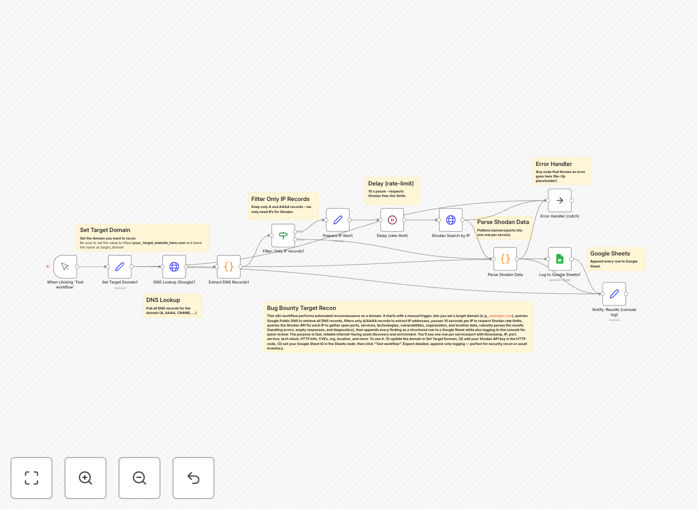
What This Workflow Does
This automation transforms the manual, time-consuming process of external security reconnaissance into a systematic, repeatable workflow. It's designed for security professionals, ethical hackers, and IT teams who need to maintain continuous visibility into their organization's internet-facing assets.
The workflow takes a target domain as input, performs comprehensive DNS lookups to identify all associated IP addresses and subdomains, then queries the Shodan API to gather intelligence on each discovered asset. This includes service banners, open ports, running technologies, SSL certificate details, and known vulnerabilities—all organized into a structured report.
Instead of spending hours manually checking different tools and compiling spreadsheets, this automation delivers actionable security intelligence in minutes, enabling proactive vulnerability management and reducing your organization's attack surface before malicious actors can exploit it.
How It Works
The workflow follows a logical reconnaissance pipeline that mimics how security professionals approach external footprinting, but with automation handling the repetitive tasks.
1. DNS Enumeration & Subdomain Discovery
The workflow begins by taking your target domain and performing comprehensive DNS lookups. It identifies all associated IP addresses, subdomains, and DNS records that might represent entry points to your infrastructure.
2. Shodan API Intelligence Gathering
Each discovered IP address is then queried against the Shodan database. Shodan returns detailed banners from services running on open ports, revealing software versions, configurations, and potential vulnerabilities.
3. Data Enrichment & Correlation
The workflow correlates DNS data with Shodan results, eliminating duplicates and false positives. It identifies which services are running on which assets and flags any discrepancies or unexpected exposures.
4. Report Generation & Alerting
Finally, the workflow compiles all findings into a structured report (CSV, JSON, or formatted message) and can trigger alerts via email, Slack, or other channels when critical vulnerabilities or unexpected exposures are detected.
Pro tip: Schedule this workflow to run weekly to maintain continuous visibility. The real value comes from detecting changes in your external attack surface, not just taking a one-time snapshot.
Who This Is For
This template is specifically designed for security teams and professionals who need to maintain external visibility:
- Security Operations (SecOps) Teams responsible for continuous monitoring and vulnerability management
- Penetration Testers & Ethical Hackers conducting external security assessments
- IT & DevOps Teams managing cloud infrastructure who need to verify nothing is accidentally exposed
- Compliance Officers needing documented evidence of external security monitoring
- Bug Bounty Researchers looking to automate initial reconnaissance phases
If you're responsible for knowing what's exposed to the internet and whether it's secure, this workflow will save you dozens of hours per month.
What You'll Need
- n8n instance (self-hosted or cloud)
- Shodan API key (free tier available with limited queries, paid for regular scanning)
- DNS resolution capability (built into n8n or via external DNS lookup services)
- Output destination (Google Sheets, database, or webhook endpoint for results)
- Basic understanding of your organization's legitimate external domains and IP ranges
Quick Setup Guide
Getting started with this security automation takes about 15 minutes:
- Download the template using the button above and import it into your n8n instance
- Configure your Shodan API credentials in the HTTP Request nodes (sign up at shodan.io if needed)
- Set your target domains in the initial trigger or manual execution node
- Configure output destinations—choose where results should go (Google Sheets, database, notification channels)
- Test with a single domain to verify everything works before scanning your entire portfolio
- Schedule the workflow for regular execution (daily, weekly, or monthly depending on your needs)
Security note: Always ensure you have authorization to scan the target domains. For internal use, scan only assets you own or have explicit permission to test. Consider rate limiting to avoid overwhelming services.
Key Benefits
Save 10+ hours per week on manual reconnaissance. What typically takes a security analyst a full day of manual work completes automatically in under 30 minutes.
Discover shadow IT and forgotten assets. Automated scanning regularly uncovers services and subdomains that weren't documented in asset inventories.
Proactive vulnerability identification. Get alerted about exposed databases, outdated software, and misconfigured services before they're exploited.
Compliance evidence generation. Maintain documented proof of continuous external monitoring for audit requirements like SOC 2, ISO 27001, or PCI DSS.
Scalable security operations. As your organization grows, this workflow scales with you—monitoring hundreds of domains with no additional manual effort.