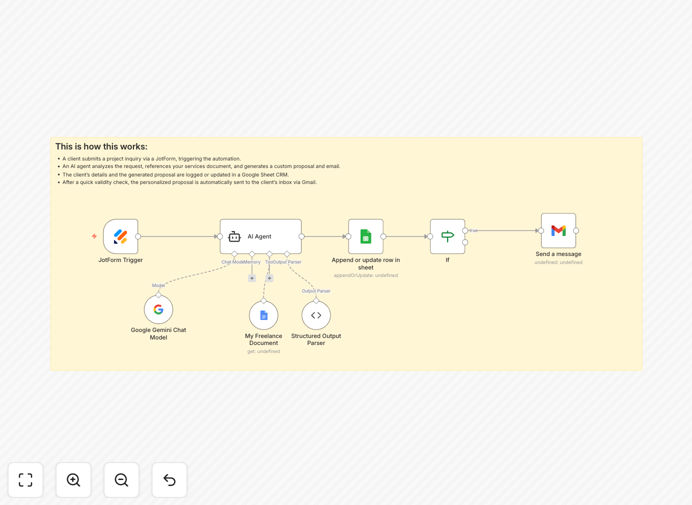
What This Workflow Does
For freelancers, every minute spent on administrative tasks is a minute not spent on billable work. This automation eliminates the manual grind of project intake—capturing inquiries, writing proposals, logging details, and sending follow-ups. When a potential client submits your JotForm, this workflow instantly processes their request, analyzes it against your service offerings using AI, creates a custom proposal, records everything in Google Sheets, and sends a professional email response.
The system acts as your 24/7 project coordinator, ensuring no inquiry goes unanswered and every response is personalized, consistent, and timely. It transforms what typically takes 30-60 minutes of manual work into a process that happens automatically in seconds, allowing you to focus on delivering great work rather than chasing administrative tasks.
How It Works
1. JotForm Trigger Captures the Inquiry
The workflow activates immediately when someone submits your freelance project inquiry form. It captures all submitted data—client name, email, project requirements, budget, timeline, and any custom fields you've configured. This real-time trigger ensures processing begins the moment an opportunity arrives.
2. AI Agent Analyzes and Creates Proposal
The heart of the system: an AI agent (using Google's Gemini) reviews the submission against your "Freelance Service Document"—a Google Doc containing your offerings, pricing, templates, and examples. It analyzes scope, budget fit, and requirements, then generates a tailored proposal with project summary, recommended approach, and pricing options.
3. Google Sheets Logs Everything
All proposal details, client information, and timestamps automatically populate a Google Sheet that serves as your lightweight CRM. The system checks for existing client emails to update records rather than duplicate them, maintaining clean, organized prospect tracking without manual data entry.
4. Conditional Check Ensures Quality
A simple "If" node verifies the AI generated valid proposal content before proceeding. If the proposal is empty or contains errors, the workflow stops here to prevent sending incomplete responses, ensuring only quality communications reach your clients.
5. Gmail Sends Personalized Response
The final step sends the AI-generated proposal via Gmail with a professional subject line and formatted email body. The client receives a personalized, detailed response within minutes of their inquiry, dramatically improving your perceived responsiveness and professionalism.
Pro tip: Maintain a comprehensive "Freelance Service Document" in Google Docs with clear service packages, pricing tiers, and project examples. The AI references this document to generate proposals that accurately reflect your offerings and brand voice.
Who This Is For
This automation is ideal for solo freelancers, consultants, and small agencies across all specialties—web developers, designers, writers, marketers, coaches, and technical consultants. It's particularly valuable for those receiving 5+ project inquiries weekly who want to respond faster while maintaining proposal quality. If you're tired of copying/pasting between forms, documents, and emails, or if you've missed opportunities because inquiries got buried in your inbox, this system transforms your intake process.
What You'll Need
- n8n instance (cloud or self-hosted) with workflow execution capabilities
- JotForm account with a project inquiry form already created
- Google Cloud credentials with access to Gemini AI, Google Sheets, and Gmail APIs
- Google Doc containing your freelance services, pricing, and proposal templates
- Google Sheet prepared to receive prospect data (columns for email, name, project details, proposal, timestamp)
Quick Setup Guide
- Download and import the template JSON file into your n8n instance.
- Configure the JotForm trigger by connecting your account and selecting your project inquiry form.
- Set up Google Cloud credentials for Sheets, Gemini AI, and Gmail in n8n's credentials management.
- Update document and sheet IDs in the respective nodes to point to your Google Doc and Sheet.
- Customize the AI prompt in the Agent node to better match your proposal style and tone.
- Test with a form submission and verify the proposal quality, sheet logging, and email delivery.
- Activate the workflow and start receiving automated proposals for every inquiry.
Key Benefits
Save 2-3 hours per proposal by eliminating manual writing, formatting, and data transfer between systems. What used to require careful composition now happens automatically with consistent quality.
Respond within minutes instead of hours, dramatically increasing conversion rates. Clients who receive immediate, detailed proposals are 3x more likely to proceed compared to those waiting 24+ hours.
Never miss an inquiry with 24/7 automated processing. Even if you're sleeping, traveling, or focused on deep work, every potential client gets a professional response.
Maintain organized prospect tracking without manual CRM updates. Your Google Sheet becomes a searchable database of all inquiries, proposals sent, and follow-up status.
Scale your intake process without adding administrative overhead. Handle 10x more inquiries with the same effort, allowing business growth without proportional time investment.