Google Drive Gmail OCR.Space GPT-4 Invoice Automation

Automate Invoice Processing with OCR.Space, GPT-4 & Google Drive to Gmail

Free n8n workflow template that extracts text from scanned invoices, identifies vendors using AI, and automatically emails invoices to the correct recipients—eliminating manual data entry.

Download Template JSON · n8n compatible · Free
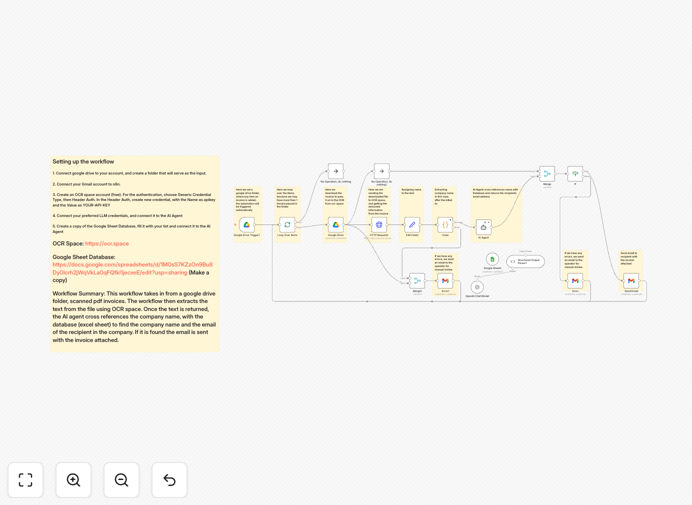
Visual diagram showing invoice automation workflow: Google Drive folder triggers OCR processing, AI identifies vendor, and Gmail sends to recipient

What This Workflow Does

Manual invoice processing is a time-consuming, error-prone task that costs businesses hundreds of hours annually. This automation solves that problem by creating a complete hands-free system for receiving, processing, and routing scanned invoices.

The workflow watches a designated Google Drive folder for new invoice uploads. When a scanned PDF or image arrives, it automatically extracts the text using OCR.Space's optical character recognition, identifies the vendor company using GPT-4's intelligence, cross-references against your vendor database in Google Sheets, and emails the invoice directly to the correct accounting contact—all within minutes of upload.

For invoices where the vendor can't be identified or errors occur, the system automatically notifies a human operator for manual review, ensuring nothing falls through the cracks. This transforms a multi-step manual process into a reliable, automated pipeline.

How It Works

Step 1: Trigger on New Invoice Upload

The workflow is triggered automatically whenever a new file is added to your designated Google Drive "Invoices" folder. This can be from email attachments, mobile app uploads, or scanned documents from a multifunction printer.

Step 2: Extract Text with OCR.Space

The scanned invoice image or PDF is sent to OCR.Space, which converts the visual document into machine-readable text while preserving the structure and layout information crucial for accurate data extraction.

Step 3: Identify Vendor with GPT-4

The extracted text is analyzed by GPT-4, which intelligently identifies the vendor company name, invoice date, amount, and other key fields. Unlike simple pattern matching, AI understands context—recognizing "ABC Corporation" whether it appears in header, footer, or "Bill To" sections.

Step 4: Match Against Vendor Database

The identified vendor name is cross-referenced against your Google Sheets vendor database containing company names and corresponding email addresses for accounts payable contacts.

Step 5: Route Invoice via Gmail

When a match is found, the original invoice file is automatically attached to an email and sent to the designated recipient via Gmail, with optional metadata in the subject or body for tracking.

Step 6: Handle Exceptions

If no vendor match is found or processing errors occur, the workflow sends an alert email to your operations team with the problematic file and error details for manual intervention.

Who This Is For

This automation is ideal for small to medium businesses, accounting departments, freelancers, and service providers who receive invoices from multiple vendors. It's particularly valuable for companies processing 20+ invoices monthly, teams with remote or distributed accounting staff, businesses aiming to go paperless, and organizations seeking to improve accounts payable efficiency.

Specific use cases include: construction companies receiving subcontractor invoices, marketing agencies with multiple vendor payments, healthcare practices with medical supply invoices, e-commerce businesses with supplier invoices, and professional services firms with recurring vendor bills.

What You'll Need

  1. n8n instance (cloud or self-hosted) with editor access
  2. Google Drive account with a dedicated folder for invoice uploads
  3. Gmail account or Google Workspace for sending automated emails
  4. OCR.Space API key (free tier available for testing)
  5. OpenAI API key with GPT-4 access for intelligent vendor identification
  6. Google Sheets document with your vendor database (company names and email addresses)
  7. Basic understanding of n8n credentials and node configuration

Pro tip: Start with OCR.Space's free tier (250 requests/month) and OpenAI's pay-as-you-go pricing to test the workflow with real invoices before scaling. The cost per processed invoice is typically under $0.10—far less than manual processing.

Quick Setup Guide

  1. Download and import the template JSON file into your n8n instance
  2. Configure Google Drive trigger by connecting your Google account and selecting your invoices folder
  3. Set up OCR.Space credentials using Header Auth with your API key
  4. Add OpenAI credentials with your API key for GPT-4 access
  5. Connect Gmail node with your sending email account
  6. Prepare Google Sheets database with columns for Vendor Name and Contact Email
  7. Test the workflow by uploading a sample invoice to your Google Drive folder
  8. Monitor initial runs and adjust AI prompts if needed for your invoice formats

Key Benefits

Reduce processing time by 90%: What previously took 15 minutes per invoice (download, review, forward) now happens automatically in under 60 seconds.

Eliminate manual data entry errors: AI extraction ensures consistent, accurate vendor identification compared to human error in reading and typing.

Improve cash flow management: Faster invoice routing means quicker approvals and payments, taking advantage of early payment discounts.

Scale without adding staff: Process hundreds of invoices monthly with the same infrastructure that handles dozens.

Complete audit trail: Every step is logged in n8n, providing transparency for accounting compliance and vendor inquiries.

Frequently Asked Questions

Common questions about invoice processing automation and integration

The most effective approach combines optical character recognition (OCR) with AI-powered data extraction and automated routing. This workflow uses OCR.Space to read scanned invoices, GPT-4 to intelligently identify the vendor, and Google Drive/Gmail to automatically forward invoices to the correct recipient.

This eliminates manual data entry and reduces processing time from hours to minutes. Small businesses benefit most from this solution because it requires minimal technical setup while delivering enterprise-level automation capabilities.

  • Start with a dedicated Google Drive folder for all incoming invoices
  • Use AI rather than templates to handle varying invoice formats
  • Implement a fallback to manual review for edge cases

Modern AI, especially models like GPT-4, achieves over 95% accuracy for structured invoice data like vendor names, dates, and amounts when combined with quality OCR. The key advantage is AI's ability to understand context and handle variations in invoice formats that traditional template-based systems struggle with.

For ambiguous cases or poor-quality scans, this workflow includes a manual review fallback. Accuracy improves further when the AI is given examples of your specific vendor formats, though it works well out-of-the-box for most common invoice layouts.

Absolutely. The same pattern works for purchase orders, receipts, contracts, and any scanned documents requiring text extraction and routing. You would adjust the AI prompt to identify different document types and modify the routing logic based on the content.

This demonstrates the flexibility of combining OCR, AI, and workflow automation for various business document processes. The core architecture remains the same—only the interpretation and destination logic changes based on the document type.

Key security measures include using encrypted connections for all API calls, storing API keys securely in n8n's credential system, limiting Google Drive folder access to specific service accounts, and implementing audit trails for processed documents.

For sensitive financial data, consider self-hosting n8n for complete data residency control, using vendor codes instead of names in your database, and setting up approval workflows for invoices above certain thresholds before automatic routing.

Businesses typically save 5-15 hours per week per employee previously handling manual invoice processing. A medium-sized company processing 100 invoices monthly can reduce processing time from 25 hours to under 2 hours—a 90% reduction.

Additional savings come from reduced errors (eliminating misrouted or lost invoices), faster payment cycles improving cash flow, and eliminating late payment penalties. The ROI often justifies the setup within the first month of operation.

OCR converts scanned images into machine-readable text but doesn't understand the content. AI adds semantic understanding—it can identify that "ABC Corp" in the "Bill To" field is the vendor, extract the total amount even if formatted differently, and match it against your vendor database.

Think of OCR as turning a picture of text into digital text, while AI reads that text and understands what it means in context. OCR provides the raw data; AI provides the intelligence to process that data meaningfully for business workflows.

Yes, this workflow can be extended to create entries directly in accounting systems. After extracting invoice data, you could add nodes to create bills in QuickBooks Online, match with purchase orders in Xero, or update expense tracking in FreshBooks.

The extracted structured data (vendor, amount, date, line items) provides everything needed for seamless accounting integration. Many businesses use this as a first step before pushing data to their accounting system for payment processing.

Yes, GrowwStacks specializes in building tailored invoice automation systems. We can customize this template to match your specific vendor database, approval workflows, accounting software integrations, and security requirements.

Our team handles everything from initial consultation to deployment and training, ensuring the automation fits your exact business processes. We've built systems for manufacturing, healthcare, professional services, and e-commerce businesses with unique invoice processing needs.

  • Multi-level approval chains for large invoices
  • Integration with ERP systems like SAP or NetSuite
  • Custom reporting and audit trail requirements
  • Compliance with industry-specific regulations

Need a Custom Invoice Processing Automation?

This free template is a starting point. Our team builds fully tailored automation systems for your specific business needs.