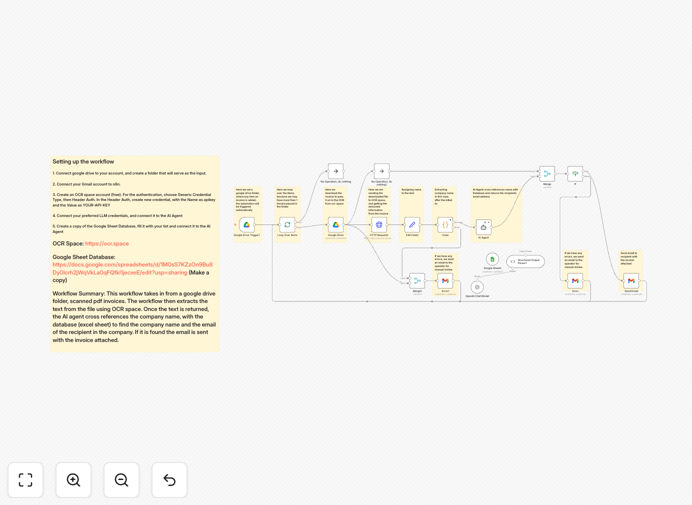
What This Workflow Does
Manual invoice processing is a time-consuming, error-prone task that costs businesses hundreds of hours annually. This automation solves that problem by creating a complete hands-free system for receiving, processing, and routing scanned invoices.
The workflow watches a designated Google Drive folder for new invoice uploads. When a scanned PDF or image arrives, it automatically extracts the text using OCR.Space's optical character recognition, identifies the vendor company using GPT-4's intelligence, cross-references against your vendor database in Google Sheets, and emails the invoice directly to the correct accounting contact—all within minutes of upload.
For invoices where the vendor can't be identified or errors occur, the system automatically notifies a human operator for manual review, ensuring nothing falls through the cracks. This transforms a multi-step manual process into a reliable, automated pipeline.
How It Works
Step 1: Trigger on New Invoice Upload
The workflow is triggered automatically whenever a new file is added to your designated Google Drive "Invoices" folder. This can be from email attachments, mobile app uploads, or scanned documents from a multifunction printer.
Step 2: Extract Text with OCR.Space
The scanned invoice image or PDF is sent to OCR.Space, which converts the visual document into machine-readable text while preserving the structure and layout information crucial for accurate data extraction.
Step 3: Identify Vendor with GPT-4
The extracted text is analyzed by GPT-4, which intelligently identifies the vendor company name, invoice date, amount, and other key fields. Unlike simple pattern matching, AI understands context—recognizing "ABC Corporation" whether it appears in header, footer, or "Bill To" sections.
Step 4: Match Against Vendor Database
The identified vendor name is cross-referenced against your Google Sheets vendor database containing company names and corresponding email addresses for accounts payable contacts.
Step 5: Route Invoice via Gmail
When a match is found, the original invoice file is automatically attached to an email and sent to the designated recipient via Gmail, with optional metadata in the subject or body for tracking.
Step 6: Handle Exceptions
If no vendor match is found or processing errors occur, the workflow sends an alert email to your operations team with the problematic file and error details for manual intervention.
Who This Is For
This automation is ideal for small to medium businesses, accounting departments, freelancers, and service providers who receive invoices from multiple vendors. It's particularly valuable for companies processing 20+ invoices monthly, teams with remote or distributed accounting staff, businesses aiming to go paperless, and organizations seeking to improve accounts payable efficiency.
Specific use cases include: construction companies receiving subcontractor invoices, marketing agencies with multiple vendor payments, healthcare practices with medical supply invoices, e-commerce businesses with supplier invoices, and professional services firms with recurring vendor bills.
What You'll Need
- n8n instance (cloud or self-hosted) with editor access
- Google Drive account with a dedicated folder for invoice uploads
- Gmail account or Google Workspace for sending automated emails
- OCR.Space API key (free tier available for testing)
- OpenAI API key with GPT-4 access for intelligent vendor identification
- Google Sheets document with your vendor database (company names and email addresses)
- Basic understanding of n8n credentials and node configuration
Pro tip: Start with OCR.Space's free tier (250 requests/month) and OpenAI's pay-as-you-go pricing to test the workflow with real invoices before scaling. The cost per processed invoice is typically under $0.10—far less than manual processing.
Quick Setup Guide
- Download and import the template JSON file into your n8n instance
- Configure Google Drive trigger by connecting your Google account and selecting your invoices folder
- Set up OCR.Space credentials using Header Auth with your API key
- Add OpenAI credentials with your API key for GPT-4 access
- Connect Gmail node with your sending email account
- Prepare Google Sheets database with columns for Vendor Name and Contact Email
- Test the workflow by uploading a sample invoice to your Google Drive folder
- Monitor initial runs and adjust AI prompts if needed for your invoice formats
Key Benefits
Reduce processing time by 90%: What previously took 15 minutes per invoice (download, review, forward) now happens automatically in under 60 seconds.
Eliminate manual data entry errors: AI extraction ensures consistent, accurate vendor identification compared to human error in reading and typing.
Improve cash flow management: Faster invoice routing means quicker approvals and payments, taking advantage of early payment discounts.
Scale without adding staff: Process hundreds of invoices monthly with the same infrastructure that handles dozens.
Complete audit trail: Every step is logged in n8n, providing transparency for accounting compliance and vendor inquiries.