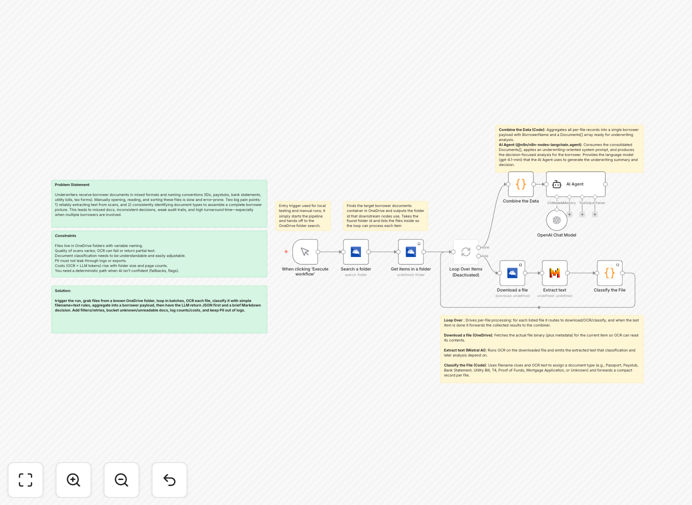
What This Workflow Does
Manual loan underwriting is slow, expensive, and prone to human error. Lenders spend hours reviewing pay stubs, bank statements, tax forms, and IDs—cross-referencing data, calculating ratios, and making judgment calls. This free n8n template automates the entire document analysis pipeline.
The workflow ingests borrower documents from cloud storage (Microsoft OneDrive), uses OCR to extract text from scanned PDFs and images, classifies each document type, aggregates financial data per applicant, and then uses AI (OpenAI GPT) to generate a comprehensive underwriting summary with risk assessment and recommended next steps.
Instead of analysts spending 30-60 minutes per application, this system processes documents in under 5 minutes with consistent, auditable logic. It handles the tedious data extraction so your team can focus on high-value exceptions and customer relationships.
How It Works
1. Document Ingestion & Classification
The workflow monitors a designated OneDrive folder for new loan application packages. It lists all files, then uses filename patterns and content analysis to classify each document—identifying pay stubs, bank statements, tax returns, IDs, and utility bills automatically.
2. OCR Text Extraction
Each document passes through an OCR service (Mistral AI or similar) to convert scanned images and PDFs into searchable text. The system handles various formats and qualities, with fallback logic for poor scans.
3. Data Aggregation Per Borrower
Extracted data from multiple documents is consolidated into a single borrower profile. The system calculates key metrics like monthly income, average balances, debt-to-income ratios, and employment verification status.
4. AI-Powered Risk Analysis
An OpenAI GPT model reviews the consolidated borrower data against your lending criteria. It generates a clear underwriting summary highlighting red flags, confidence scores, and recommended actions (approve, decline, or request additional information).
5. Output & Integration
The final analysis exports as structured JSON for your loan origination system and as a human-readable Markdown report for your team. You can easily connect this to your CRM, document management system, or notification channels.
Pro tip: Start with a small test folder containing 5-10 sample applications. This lets you validate the classification logic and OCR accuracy before scaling to production volumes.
Who This Is For
This template is ideal for financial institutions, online lenders, mortgage brokers, and fintech companies processing more than 50 loan applications monthly. It's particularly valuable for:
- Small to mid-sized lenders looking to compete with larger institutions' automation capabilities
- Fintech startups building digital lending platforms without massive development budgets
- Mortgage brokers drowning in paperwork during peak seasons
- Business loan providers needing to analyze both personal and business financial documents
- Compliance teams seeking consistent, auditable underwriting processes
What You'll Need
- n8n instance (cloud or self-hosted) with workflow execution permissions
- Microsoft OneDrive account with documents stored in organized folders
- OCR service API key (Mistral AI, Google Vision, or Azure Computer Vision)
- OpenAI API key with GPT-4 or GPT-3.5 Turbo access
- Basic understanding of your underwriting criteria and risk thresholds
Quick Setup Guide
Follow these steps to implement this automation in under 30 minutes:
- Download and import the JSON template into your n8n instance
- Configure credentials for OneDrive, your chosen OCR provider, and OpenAI
- Update the folder path in the "Search a folder" node to point to your loan documents directory
- Adjust classification keywords in the Switch node to match your document naming conventions
- Customize the AI prompt in the OpenAI node with your specific underwriting rules and risk thresholds
- Test with sample documents using the Manual Trigger, then switch to a Schedule Trigger for production
Important: For production use, replace folder name searches with specific folder IDs to avoid ambiguity. Also implement proper error handling for failed OCR extractions and add PII masking in logs.
Key Benefits
Reduce processing time by 80-90%: What takes a human 30-60 minutes completes in 2-5 minutes automatically, allowing your team to handle 5-10x more applications with the same staff.
Improve accuracy and consistency: Automated systems apply the same rules to every application, eliminating human fatigue errors and ensuring regulatory compliance across all decisions.
Scale during peak periods: Handle seasonal spikes in applications without hiring temporary staff or requiring overtime from your existing team.
Enhanced customer experience: Applicants receive faster decisions (often same-day instead of weeks), improving conversion rates and customer satisfaction scores.
Audit trail and transparency: Every decision includes the exact data points and reasoning used, making compliance reviews and regulatory audits straightforward.