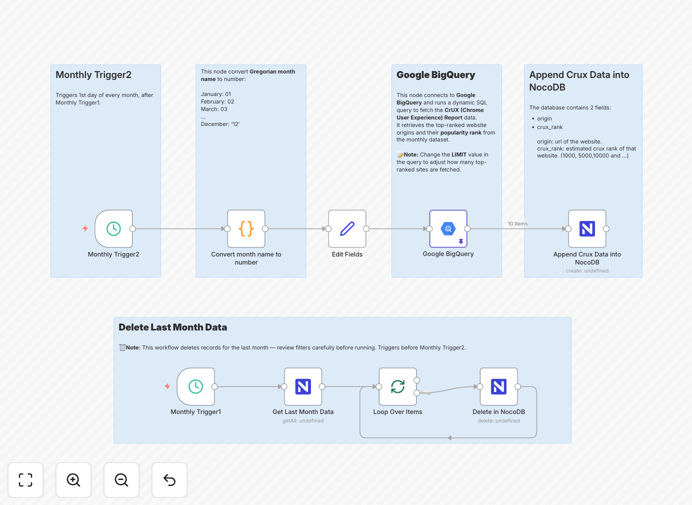
What This Workflow Does
This n8n workflow solves the tedious monthly task of manually extracting Chrome User Experience (CrUX) data from Google BigQuery and updating your performance database. Every month, website owners and digital marketers need fresh performance metrics to track how their sites are performing for real users. Without automation, this requires logging into multiple platforms, running complex queries, cleaning data, and manually updating databases.
The workflow automatically retrieves the latest monthly CrUX report from Google's public dataset, cleans previous month's data from your NocoDB database, and inserts the new rankings. It ensures your performance database always contains current data without manual intervention, providing reliable historical tracking of your website's popularity and user experience metrics.
How It Works
1. Monthly Schedule Trigger
The workflow starts with a schedule trigger configured to run monthly. You can set it for the first day of each month or any date that aligns with your reporting cycle. This automation ensures consistent data collection without manual initiation.
2. Month-to-Table Conversion
The workflow converts the current month name to a numeric format that matches Google BigQuery's table naming convention (e.g., "202509" for September 2025). This dynamic approach ensures the correct dataset is queried each month as new tables are added to the CrUX dataset.
3. Previous Data Cleanup
Before inserting new data, the workflow deletes last month's CrUX records from your NocoDB table. This cleanup prevents duplicate entries and ensures your database only contains the most recent monthly rankings, maintaining data integrity and storage efficiency.
4. BigQuery Data Extraction
The workflow queries Google BigQuery's public CrUX dataset using a configurable SQL query. You can adjust the LIMIT parameter to control how many top-ranked sites are retrieved, from top 100 to thousands, depending on your analysis needs.
5. Data Transformation and Insertion
Extracted data is formatted for NocoDB compatibility and inserted into your designated table. The workflow handles data type conversions and field mappings, ensuring clean integration between BigQuery's raw data and your database structure.
Pro tip: Configure the workflow to run a few days after month-end when Google's CrUX data is fully processed and available. This ensures you're working with complete datasets rather than partial monthly data.
Who This Is For
This automation is ideal for digital marketing agencies tracking client website performance, SEO specialists monitoring search ranking correlations, web development teams maintaining performance baselines, and business owners who need regular insights into their website's user experience metrics. It's particularly valuable for organizations managing multiple websites or needing historical performance data for trend analysis and reporting.
What You'll Need
- Google Cloud Project with BigQuery API enabled and access to the chrome-ux-report public dataset
- Service Account Credentials for authenticating n8n with Google BigQuery
- NocoDB Instance with a table created for CrUX data (origin and crux_rank fields at minimum)
- NocoDB API Token with read/write permissions for your CrUX table
- n8n Instance (cloud or self-hosted) with Google BigQuery and NocoDB nodes available
Quick Setup Guide
1. Download the template and import it into your n8n instance using the workflow import feature.
2. Configure the Google BigQuery node with your service account credentials and verify access to the chrome-ux-report dataset.
3. Set up the NocoDB node with your API token and test the connection to your CrUX table.
4. Adjust the schedule trigger to your preferred monthly execution time (recommended: 2nd day of each month).
5. Test the workflow manually first, then activate it for automated monthly execution.
Key Benefits
Save 3-5 hours monthly on manual data extraction, cleaning, and database updates. What used to be a multi-step manual process now runs automatically while your team focuses on analysis rather than data collection.
Ensure data consistency with automated error handling and retry logic. The workflow includes validation steps that prevent incomplete or corrupted data from entering your database, maintaining data quality over time.
Create reliable historical records for performance trend analysis. With consistent monthly data collection, you can track how website improvements affect user experience metrics and identify seasonal performance patterns.
Enable proactive performance monitoring with up-to-date metrics. Regular data updates allow you to spot performance degradation early and take corrective action before it impacts user experience or search rankings.
Integrate with existing dashboards and reporting tools through NocoDB's API. The structured data in NocoDB can be easily connected to visualization tools like Grafana, Tableau, or custom reporting applications.