What This Workflow Does
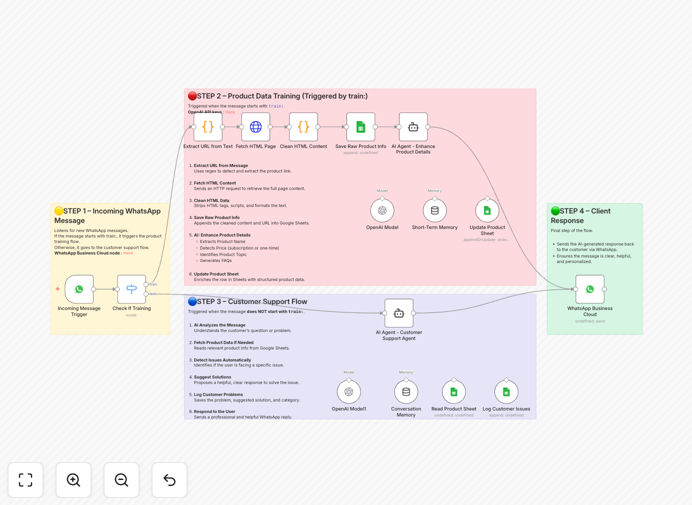
This automation solves two critical problems for eCommerce and product-based businesses: manual product data management and slow, inconsistent customer support. When customers message your WhatsApp business number, the system intelligently routes their queries. If a message starts with "train:", it extracts product URLs, fetches content, enriches it with GPT-4, and stores structured data in Google Sheets. For regular customer questions, it analyzes the query with AI, searches your product database, provides accurate answers, and logs the interaction—all within seconds.
The workflow eliminates hours of manual data entry while providing 24/7 customer support. It creates a living product knowledge base that improves with every interaction, ensuring your support team has accurate, AI-enhanced information at their fingertips. This transforms WhatsApp from a simple messaging app into a powerful business automation hub.
How It Works
Step 1: Message Detection & Routing
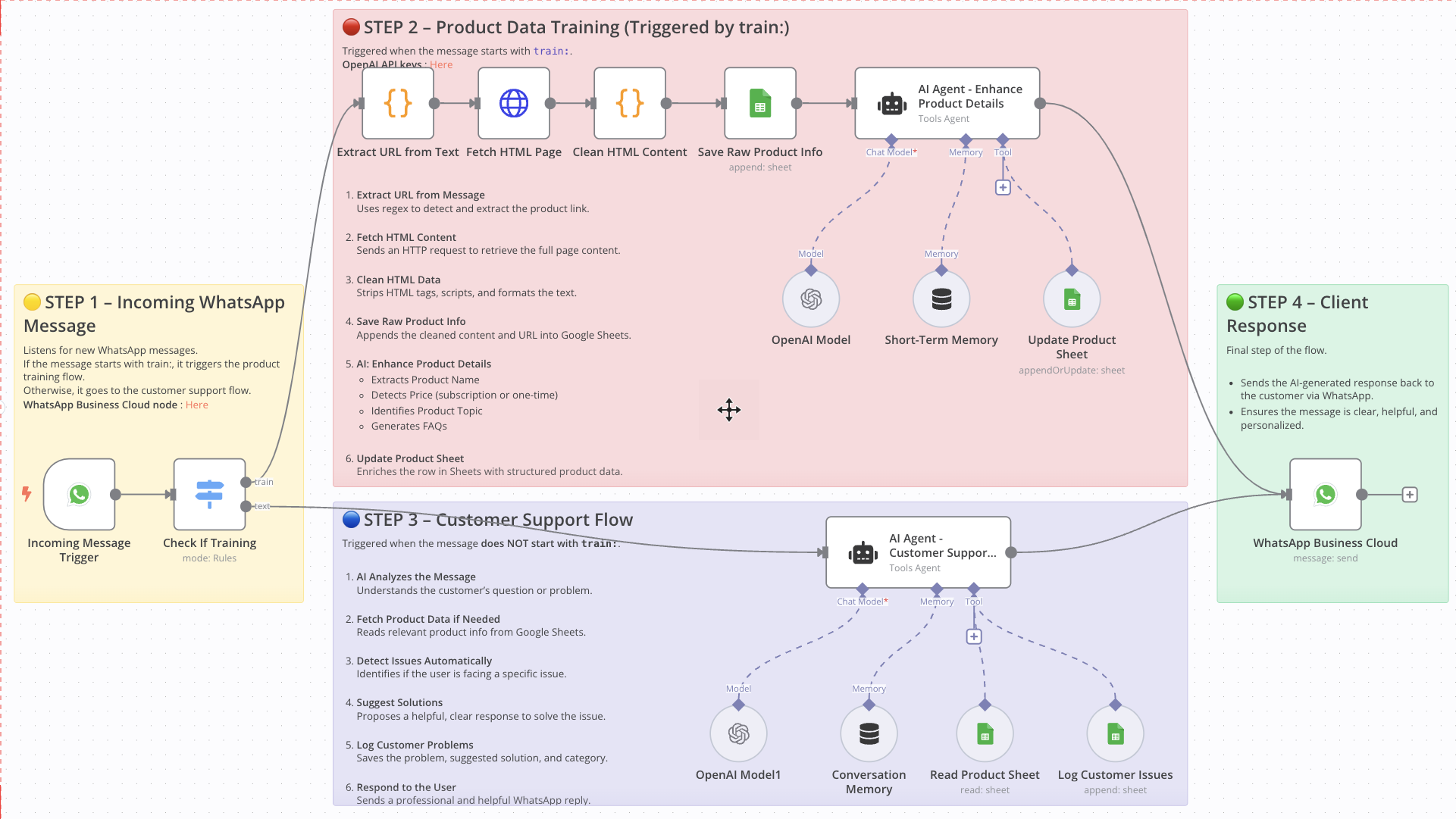
The workflow listens for incoming WhatsApp messages. It immediately checks if the message contains the "train:" keyword. If yes, it routes to the product training pipeline. If not, it treats it as a customer support query and routes to the AI assistant flow.
Step 2: Product Data Training Pipeline
For training messages, the system extracts URLs using regex, fetches HTML content, cleans it to readable text, and saves the raw data to Google Sheets. GPT-4 then analyzes this content to generate product names, pricing models, key topics, and frequently asked questions. The enriched data updates the product database automatically.
Step 3: Customer Support AI Assistant
For customer queries, GPT-4 analyzes the message intent, searches the Google Sheets product database for relevant information, identifies potential issues (payment, delivery, technical), suggests solutions, and logs the complete interaction—including problem category and resolution—to a customer issues sheet.
Step 4: Response Delivery & Logging
The AI-generated response is sent back to the customer via WhatsApp. The entire conversation—query, solution, and metadata—is documented in your sheets, creating an audit trail for quality assurance and continuous improvement of your support system.
Pro tip: Start by training the system with your top 10 products. The AI will learn your product language and structure, making subsequent training and support responses more accurate and brand-appropriate.
Who This Is For
This automation is ideal for eCommerce founders, product managers, and customer support teams who rely on WhatsApp for business communication. It's particularly valuable for businesses with extensive product catalogs, subscription services, or technical products requiring detailed support. Digital agencies serving eCommerce clients can implement this as a value-added service, while SaaS companies can use it to provide instant product guidance.
Businesses experiencing growth in customer inquiries but limited support staff will find immediate relief. The system scales effortlessly—handling 10 or 10,000 queries requires the same infrastructure. It's also perfect for companies expanding into new markets where 24/7 support is expected but staffing is challenging.
What You'll Need
- WhatsApp Business API access – Required to send and receive messages programmatically.
- OpenAI API key – For GPT-4 access to process messages and enrich product data.
- Google Account with Sheets access – To store and retrieve product information and customer logs.
- n8n instance – Either self-hosted or n8n.cloud to run the workflow.
- Basic automation understanding – Ability to follow setup instructions and configure API connections.
Quick Setup Guide
- Import the workflow into your n8n instance using the downloaded JSON file.
- Configure credentials for WhatsApp Business API, OpenAI, and Google Sheets in n8n's credential manager.
- Update sheet IDs in the workflow nodes to point to your specific Google Sheets.
- Test the training function by sending a "train: [product-url]" message to your WhatsApp number.
- Test support queries by asking a product question via WhatsApp and verifying the AI response.
- Activate the workflow and monitor the logs sheet for the first few days to ensure proper operation.
Pro tip: Create a separate Google Sheet for testing before connecting to your live product database. This prevents accidental data modification during setup.
Key Benefits
Reduce support response time from hours to seconds. Customers get immediate, accurate answers regardless of when they message, dramatically improving satisfaction and reducing abandonment.
Eliminate manual product data entry completely. What used to take hours per product now happens automatically—extracting, structuring, and enriching information with AI-generated insights.
Create a searchable knowledge base that improves automatically. Every customer interaction trains your system, making future responses more accurate and reducing repeat queries.
Scale support without additional staffing costs. The system handles unlimited concurrent conversations, allowing business growth without proportional increases in support overhead.
Gain valuable insights from customer interactions. Logged issues reveal product pain points, common questions, and opportunities for improvement that would otherwise go unnoticed.