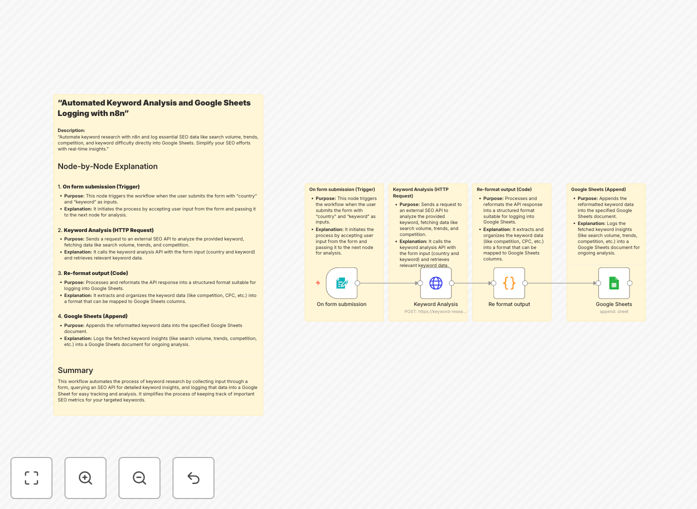
What This Workflow Does
Manual keyword research is a time-consuming bottleneck for SEO teams. You juggle multiple tools, copy-paste data between platforms, and struggle to maintain consistent tracking spreadsheets. This workflow eliminates that friction by automating the entire process.
It connects directly to keyword research APIs via RapidAPI, fetches essential metrics like search volume, competition level, cost-per-click, and trend data, then structures and logs everything automatically into your Google Sheets. What used to take hours now happens with a single trigger, giving you real-time, actionable SEO intelligence without manual data entry.
How It Works
Step 1: Trigger with Keyword Input
The workflow starts when you submit a keyword (or list of keywords) along with target country parameters. This can be triggered manually, via a form, or scheduled to run automatically for regular research updates.
Step 2: Fetch Data from SEO API
n8n sends the keyword and location data to a keyword research API available on RapidAPI. The API returns comprehensive metrics including monthly search volume, keyword difficulty score, CPC estimates, trend data, and related keyword suggestions.
Step 3: Structure and Clean the Data
Raw API responses are processed and reformatted into a clean, consistent structure. This step ensures all metrics are properly labeled, numbers are formatted correctly, and the data is ready for spreadsheet import.
Step 4: Append to Google Sheets
The structured keyword data is automatically appended to your designated Google Sheets document. Each run adds a new row with timestamp, keyword, and all collected metrics, building a historical database of your research.
Pro tip: Schedule this workflow to run weekly with your core keyword list. You'll build a valuable historical dataset showing how search volume and competition change over time, revealing seasonal trends and emerging opportunities.
Who This Is For
This automation is ideal for digital marketing agencies managing multiple client SEO campaigns, in-house SEO specialists at growing companies, content creators and bloggers needing data-driven topic planning, and e-commerce businesses optimizing product page targeting. If you spend more than 2 hours per week on keyword research or struggle with inconsistent tracking spreadsheets, this workflow will transform your process.
What You'll Need
- n8n instance (cloud or self-hosted) with workflow editing permissions
- Google Sheets document with write access (create a new sheet or use existing)
- RapidAPI account with access to a keyword research API (like Keyword Research Tool, SerpAPI, or similar)
- Basic understanding of your target keywords and geographic markets
Quick Setup Guide
- Download and import the template JSON file into your n8n instance.
- Configure the HTTP Request node with your RapidAPI endpoint, headers, and authentication key.
- Connect the Google Sheets node to your target spreadsheet and worksheet.
- Test with a single keyword to verify data flows correctly from API to spreadsheet.
- Schedule the workflow (optional) for automatic weekly or monthly updates.
Key Benefits
Save 10+ hours monthly on manual research and data entry. What previously required switching between tools, copying metrics, and formatting spreadsheets now happens automatically while you focus on strategy.
Eliminate human error in data transcription. Automated workflows ensure every metric is captured consistently, with timestamps and proper formatting, creating reliable datasets for decision-making.
Build historical intelligence by automatically tracking keyword metrics over time. Spot seasonal trends, identify rising opportunities, and make data-backed content decisions with longitudinal data.
Scale research effortlessly from dozens to hundreds of keywords. The same workflow that analyzes 10 keywords can process 500 with minimal additional configuration, perfect for expanding content calendars or new market entry.
Centralize team knowledge in accessible Google Sheets. Marketing teams, content writers, and stakeholders can all access the same live keyword data without requesting exports or waiting for manual updates.