What This Workflow Does
Manual video posting to Facebook Stories consumes valuable time and leads to inconsistent posting schedules. Social media managers often spend hours each week downloading videos, formatting them, and manually uploading to Facebook—missing optimal posting times and reducing content velocity.
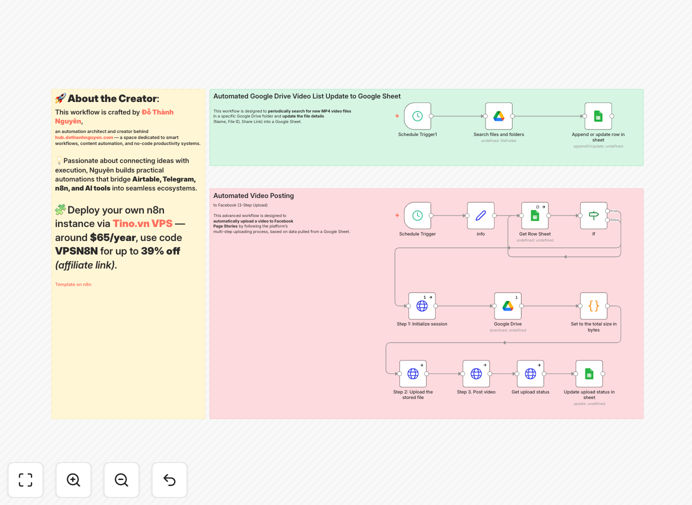
This automation solves that by creating a seamless pipeline from Google Drive to Facebook Stories. Videos stored in Drive are automatically uploaded as Facebook Stories based on a queue managed in Google Sheets. The workflow checks for new videos every 2.5 hours, handles the complete Facebook API upload process, and updates the sheet with posting status—all without manual intervention.
Beyond simple automation, this system creates a content calendar that multiple team members can contribute to. Marketing teams can batch-create videos, add them to the queue with metadata, and trust that they'll publish at the right intervals, maintaining consistent audience engagement while freeing up creative time.
How It Works
Step 1: Queue Management & Scheduling
The workflow begins by checking your Google Sheet queue every 2 hours and 30 minutes. It looks for the first video where the "Stories" column is empty—indicating it hasn't been posted yet. This scheduled trigger ensures regular checking without overwhelming the systems.
Step 2: Video Retrieval & Validation
Once a pending video is identified, the workflow validates that a valid Google Drive File ID exists. It then downloads the video file from Google Drive and calculates its size in bytes—critical information for the Facebook upload API which requires file size headers.
Step 3: Facebook API Three-Step Upload
The core automation executes Facebook's three-step upload protocol: First, it initializes an upload session with Facebook's API to receive a temporary upload URL and video ID. Second, it streams the video binary data to that URL. Third, it publishes the uploaded video as a Facebook Story on your specified Page.
Step 4: Status Update & Logging
After successful posting, the workflow updates the Google Sheet row, marking the video as processed. This creates an audit trail and prevents duplicate posting. Failed uploads are logged with error details for troubleshooting.
Who This Is For
This automation is ideal for social media managers, content creators, marketing agencies, and small business owners who regularly share video content on Facebook. Specifically, it benefits teams producing daily or weekly Stories content, businesses with multiple locations needing consistent posting, and agencies managing multiple client accounts where manual posting becomes unscalable.
Educational institutions, event promoters, and product-based businesses with regular video updates will find particular value. The system works equally well for solo entrepreneurs wanting to maintain professional social media presence and large teams needing collaborative content calendars.
What You'll Need
- n8n instance (self-hosted or cloud)
- Google Drive account with videos to publish
- Google Sheets for the content queue (template provided)
- Facebook Page with admin access
- Facebook Page Access Token with pages_manage_posts permission
- Google OAuth credentials for Drive and Sheets API access
Pro tip: Use a dedicated Google Drive folder for Facebook Stories content. This keeps your assets organized and makes permission management easier when multiple team members need access.
Quick Setup Guide
- Download and import the workflow JSON into your n8n instance
- Create your Google Sheet with columns for File ID, Stories status, and row_number
- Set up credentials for Google Drive, Google Sheets, and Facebook in n8n
- Configure the Schedule Trigger to your preferred checking frequency
- Add your Facebook Page ID and secure access token in the workflow nodes
- Test with one video to verify the complete pipeline works
- Activate the workflow and start adding videos to your queue
Key Benefits
Save 5-10 hours weekly by eliminating manual video uploads. What used to be a daily 30-60 minute task becomes completely automated, freeing social media managers for strategic work.
Ensure consistent posting even during weekends, holidays, or team absences. The automation runs 24/7, maintaining your Facebook presence without gaps in content delivery.
Reduce human error like wrong video selection, incorrect formatting, or missed posting times. The systematic approach guarantees each video processes correctly through the entire pipeline.
Enable team collaboration through a shared Google Sheet queue. Multiple contributors can add videos with notes, creating a transparent content calendar everyone can access.
Scale content production without proportional increases in posting effort. Whether you post 5 videos weekly or 50, the automation handles the upload workload seamlessly.