What This Workflow Does
Manual lead generation is time-consuming and inconsistent. Sales teams spend hours searching Google Maps for potential clients, copying information into spreadsheets, and trying to follow up before competitors do. This process is repetitive, prone to errors, and doesn't scale.
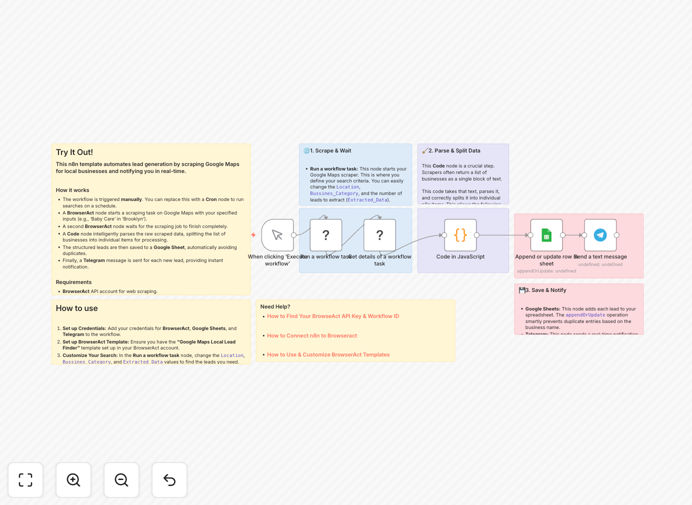
This n8n workflow automates the entire local B2B lead generation process. It systematically searches Google Maps for businesses matching your criteria (location, category), extracts their contact information, saves it directly to Google Sheets for organization and analysis, and sends instant notifications via Telegram so your team can act immediately. What used to take hours now happens automatically while you focus on closing deals.
How It Works
1. Manual Trigger & Configuration
The workflow starts with a manual trigger where you set your search parameters: location, business category, and number of leads to extract. This gives you complete control over targeting without needing to modify the workflow logic.
2. BrowserAct Scraping Execution
A BrowserAct node initiates the scraping job on Google Maps using your specified criteria. It programmatically navigates Google Maps, extracts business listings, and collects data including business names, addresses, phone numbers, websites, and reviews.
3. Data Processing & Validation
The workflow pauses while waiting for the scraping task to complete, then processes the raw JSON output. A Code node parses and structures the data, splitting it into individual lead records while validating completeness and formatting.
4. Google Sheets Integration
Each validated lead is appended to your Google Sheets spreadsheet. The workflow checks for duplicates based on business name to maintain data integrity, ensuring your lead database remains clean and organized automatically.
5. Telegram Notification
Finally, a Telegram node sends an instant message with the new lead's details to your specified chat or channel. This real-time alert enables immediate follow-up, dramatically increasing conversion rates by reaching prospects while they're top of mind.
Who This Is For
This automation is ideal for service-based businesses (plumbers, electricians, cleaners), marketing agencies targeting local clients, B2B software companies selling to specific industries, real estate professionals, insurance agents, and any sales team with a geographic focus. It's particularly valuable for businesses where each new client has high lifetime value and manual prospecting limits growth.
What You'll Need
- BrowserAct API account for web scraping capabilities
- BrowserAct "Google Maps Local Lead Finder" template configured for your use case
- BrowserAct n8n community node installed in your n8n instance
- Google Sheets credentials with write access to your lead spreadsheet
- Telegram bot token and chat ID for notifications
- Self-hosted n8n instance (this workflow uses community nodes)
Pro tip: Start with a small geographic area and specific business category to test your setup. Once confirmed, expand to broader territories. Quality targeting beats quantity in lead generation.
Quick Setup Guide
- Download and import the template JSON file into your n8n instance
- Configure BrowserAct nodes with your API key and workflow ID from your BrowserAct account
- Set up Google Sheets connection by creating credentials in n8n and specifying your spreadsheet ID
- Configure Telegram node with your bot token and target chat ID
- Test with minimal parameters – set a small location and category to verify the complete flow
- Schedule or trigger manually based on your lead generation needs
Key Benefits
Save 10-15 hours weekly on manual prospecting. This automation eliminates the tedious search-and-copy process, freeing your sales team to focus on relationship building and closing deals rather than data entry.
Increase lead quality through precise targeting. By specifying exact locations and business categories, you generate highly relevant prospects rather than generic lists, resulting in higher conversion rates and better ROI on sales efforts.
Enable real-time response with instant notifications. Telegram alerts ensure your team contacts prospects within minutes of discovery, dramatically increasing engagement rates compared to delayed follow-up.
Maintain organized, searchable lead databases automatically. Google Sheets integration creates a structured repository that's easily segmented, analyzed, and shared across teams without manual organization.
Scale lead generation efforts without adding staff. The automation handles increasing volumes effortlessly, allowing business growth without proportional increases in sales overhead or prospecting costs.