What This Workflow Does
This workflow solves a common but time-consuming problem: moving content from flexible documentation tools like ClickUp Docs into structured databases like Airtable. Many teams use ClickUp for brainstorming, meeting notes, and project documentation, but need that information organized in Airtable for tracking, reporting, and collaboration.
Manually copying and pasting this content is error-prone and doesn't scale. This automation triggers whenever a new task is created in ClickUp containing a Doc URL. It fetches the full content of that Doc (including sub-pages), intelligently parses the text, and creates clean, structured records in your designated Airtable base.
The result is a seamless bridge between creative documentation and operational databases, ensuring your team's knowledge is instantly actionable without administrative overhead.
How It Works
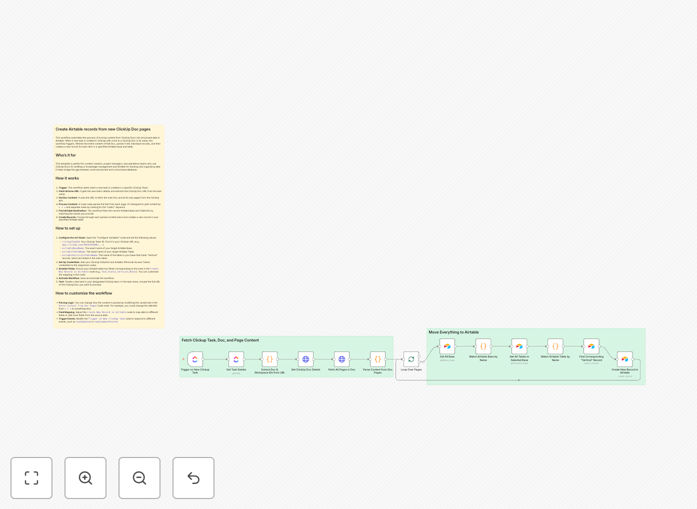
The automation follows a logical sequence to transform unstructured content into structured data.
1. Trigger on New ClickUp Task
The workflow monitors a specific ClickUp team for new tasks. It looks for tasks whose names contain a ClickUp Doc URL. This URL serves as the pointer to the content that needs to be migrated.
2. Extract and Fetch Doc Content
Using the ClickUp API, the workflow retrieves the task details, extracts the Doc URL, and then fetches the entire content of that Doc page and all its linked sub-pages. This ensures no part of the documentation is missed.
3. Parse and Structure the Data
A custom code node processes the raw text. It can split content based on delimiters (like ***), identify sections like "notes:", and separate main ideas from supporting details. This parsing logic is customizable to match your specific Doc formatting.
4. Locate the Airtable Destination
The workflow finds your target Airtable base and table by name. It also identifies related tables (like a "Verticals" table) if you need to create linked records, maintaining relational integrity within your database.
5. Create New Airtable Records
Finally, the workflow loops through each parsed content piece and creates a new record in your Airtable table. It maps the extracted text, status, category, and notes to the appropriate fields in your Airtable schema.
Who This Is For
This template is ideal for product managers, content teams, operations specialists, and anyone who uses ClickUp for planning and Airtable for execution.
Content Teams: Migrate editorial calendars, content briefs, and publishing schedules from collaborative Docs into a trackable Airtable base.
Product Managers: Turn product requirement documents (PRDs) and user research notes from ClickUp into structured feature backlogs and user story databases in Airtable.
Consultants & Agencies: Automatically transform client meeting notes and project briefs into standardized project trackers and deliverable logs.
Operations Teams: Bridge the gap between team documentation (SOPs, process notes) and operational databases used for reporting and task management.
Pro tip: Use this workflow to create a "single source of truth." Let teams draft and collaborate freely in ClickUp Docs, while ensuring the finalized, actionable items automatically populate your primary operational database in Airtable.
What You'll Need
- A ClickUp account with Docs and API access. You'll need your Team ID, which is found in your ClickUp URL.
- An Airtable account with a base and table set up to receive the data. You'll need a Personal Access Token from Airtable.
- An n8n instance (cloud or self-hosted) to run the workflow.
- Basic configuration details: Your ClickUp Team ID, and the exact names of your target Airtable base and table.
- Optional: A basic understanding of your Airtable field structure to customize the field mapping if needed.
Quick Setup Guide
You can have this automation running in under 15 minutes by following these steps.
- Download and Import: Click the "Download Template" button above and import the JSON file into your n8n instance.
- Configure Variables: Open the "Configure Variables" node. Enter your
clickupTeamId,airtableBaseName,airtableTableName, andairtableVerticalsTableName(if using linked records). - Add Credentials: Set up OAuth2 credentials for ClickUp and add your Airtable Personal Access Token in the respective nodes.
- Review Field Mapping: Check the "Create New Record in Airtable" node to ensure the field names match your Airtable table's schema. Adjust if necessary.
- Activate and Test: Activate the workflow in n8n. Create a test task in your ClickUp team with a Doc URL in the name. Verify that a new record appears in your Airtable table.
Key Benefits
Eliminate Manual Data Entry: Save 2-5 hours per week per team member by automating the transfer of information from Docs to databases. This time can be redirected to higher-value strategic work.
Improve Data Accuracy: Remove human error from copy-paste processes. The automation reliably transfers exact content, ensuring your Airtable records are a perfect reflection of your ClickUp documentation.
Accelerate Project Velocity: Ideas and decisions documented in ClickUp become actionable items in Airtable instantly. This reduces the lag between planning and execution, speeding up project timelines.
Enhance Cross-Tool Visibility: Break down data silos. Teams working in ClickUp can see their work reflected in the organization's primary Airtable database, and vice-versa, improving alignment and transparency.
Scale Your Processes: What works for one project or team can be easily replicated. This automation provides a scalable model for connecting documentation and databases across your entire organization.