What This Workflow Does
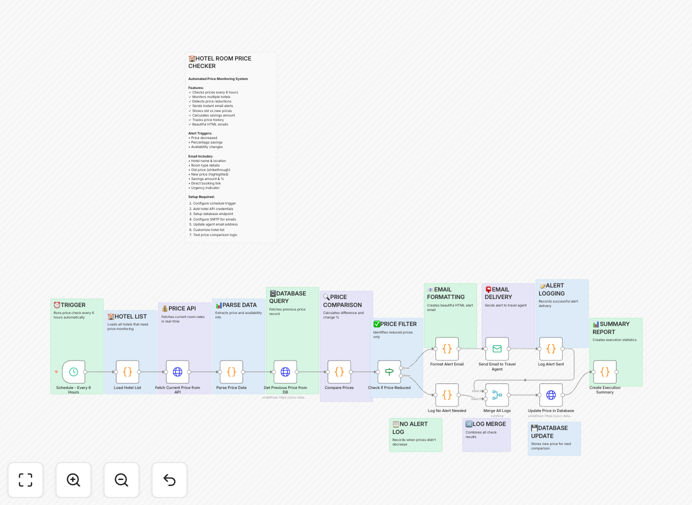
For businesses and frequent travelers, manually checking hotel prices is a tedious, time-consuming task that often leads to missed savings. This automation solves that by acting as your 24/7 price watchdog. It continuously monitors specified hotels and room types, comparing current rates against historical data stored in a database or spreadsheet.
When a price drop is detected—whether a specific dollar amount or percentage—the workflow instantly calculates the savings and sends a detailed, formatted email alert. It also logs every price check, creating a valuable dataset for analyzing pricing trends over time. This turns a reactive, manual process into a proactive, automated system that guarantees you book at the optimal price.
How It Works
The workflow operates on a scheduled loop, intelligently fetching, comparing, and acting on data.
Step 1: Scheduled Trigger & Data Fetch
A scheduler node (like Cron or Schedule Trigger) initiates the workflow at your chosen interval—every 6 hours, daily, etc. It then triggers an HTTP Request or Webhook node to fetch current pricing and availability data from your target source, such as a hotel booking API, aggregator site, or a custom scraping setup.
Step 2: Historical Price Retrieval & Comparison
The workflow queries a database (like PostgreSQL, Airtable) or a Google Sheet to retrieve the last recorded price for the specific hotel and room combination. A Function or IF node performs the logic: Is the new price lower than the old price? It can also check for a specific threshold (e.g., a 10% drop) or renewed availability.
Step 3: Alert Generation & Dispatch
If a favorable price change is detected, the workflow constructs a rich HTML email. It populates a template with key details: hotel name, location, old price (strikethrough), new price (highlighted), savings amount, percentage saved, and a direct booking link. This alert is then sent via an SMTP or transactional email service node (like Gmail, SendGrid).
Step 4: Data Logging & Update
Regardless of an alert, the workflow concludes by updating the database or sheet with the latest price and timestamp. This ensures the historical record is always current for the next comparison cycle, creating a complete audit trail.
Pro tip: Extend this workflow by adding a second notification channel like Slack or Telegram for urgent deals, or by integrating with a calendar to block dates when prices are predicted to rise.
Who This Is For
This template delivers immediate value for several key audiences. Travel agencies and corporate travel managers can use it to secure the best rates for clients and enforce travel policy compliance automatically. Frequent business travelers and consultants can eliminate the hassle of constant price checking for their regular destinations.
Event planners and conference organizers booking room blocks can monitor rates to leverage drops for group savings. Finance and operations teams benefit from the automated logging, which creates a clear audit trail for expense reporting and budget forecasting. Essentially, any individual or business that views travel as a significant, recurring cost will find this automation indispensable.
What You'll Need
- An n8n instance (cloud or self-hosted) to run the workflow.
- Access to a hotel data source. This could be an API key from a travel aggregator (like Booking.com, Expedia affiliate APIs), a custom web scraping setup, or data exported from a travel management platform.
- A database or spreadsheet for storage. Options include PostgreSQL, MySQL, Airtable, or a simple Google Sheet to store historical prices and hotel IDs.
- Email sending credentials. Configure an SMTP node (using a service like Gmail, Outlook, or Amazon SES) or a dedicated email API node (SendGrid, Mailgun).
- A list of hotels/rooms to monitor, including their unique identifiers (like property IDs) and your target email addresses for alerts.
Quick Setup Guide
Import and configure this template in under 15 minutes to start saving on travel.
- Download & Import: Click the "Download Template" button above to get the JSON file. In your n8n dashboard, go to "Workflows" and use the "Import from File" option to load it.
- Configure the Trigger: Open the Schedule Trigger node and set your preferred interval (e.g., every 6 hours, daily at 9 AM).
- Connect Your Data Source: Replace the placeholder HTTP Request node with your actual API call or webhook configuration to fetch live hotel prices. You may need to add authentication headers or query parameters.
- Set Up Your Database/Sheet: Configure the database or Google Sheets node with your connection credentials. Ensure the table/sheet has columns for Hotel ID, Last Price, Last Checked Date, etc., as defined in the workflow.
- Configure Email Alerts: In the Email node, enter your SMTP details or API credentials. Customize the HTML email template with your branding and adjust the alert message to your liking.
- Test & Activate: Click "Execute Workflow" on a single test hotel to verify the fetch, compare, and email logic works. Then, activate the workflow to run automatically on your schedule.
Pro tip: Start by monitoring just 2-3 key hotels for your next trip. This lets you validate the workflow is capturing price changes correctly before scaling to a full watchlist.
Key Benefits
Maximize Travel Budgets: Automatically book at the lowest possible price, achieving savings of 15-40% on hotel costs that directly improve your bottom line or personal travel fund.
Eliminate Manual Work: Reclaim hours previously spent refreshing booking sites. This workflow does the monitoring for you 24/7, freeing up time for strategic tasks.
Gain Data-Driven Insights: The built-in logging creates a historical price database. Use this data to identify seasonal trends, the best booking windows, and negotiate better corporate rates.
Ensure Policy Compliance: For businesses, automate checks to ensure bookings stay within budgeted price caps, with alerts sent to managers if exceptions are needed.
Scale Effortlessly: Once configured for one hotel, adding more is as simple as appending to your watchlist. The same workflow can monitor dozens or hundreds of properties without additional effort.