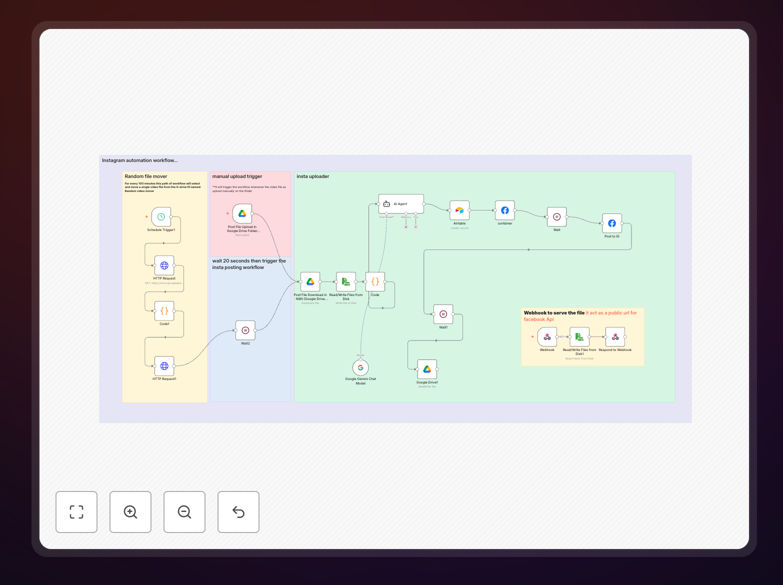
What This Workflow Does
This workflow completely automates your Instagram Reels content pipeline, from content storage in Google Drive to scheduled posting on Instagram. It solves the time-consuming manual process of creating, captioning, and posting Reels by handling everything automatically.
The system supports two content creation paths: scheduled posting of pre-created content from a Google Drive folder, and automatic processing of newly uploaded videos. It generates AI-powered captions, logs all content in Airtable for tracking, and handles Instagram's strict API requirements for reliable posting.
How It Works
1. Content Collection
The workflow either picks a random video from your "Random video mover" Google Drive folder on a schedule, or detects newly uploaded videos in your "n8n reels automation" folder.
2. AI Caption Generation
Using Google Gemini AI, the system creates engaging captions with relevant hashtags based on the video filename and your brand voice. This ensures each post has optimized text without manual effort.
3. Airtable Logging
All posted content is recorded in Airtable with the video name, generated caption, posting date, and Instagram URL for easy reference and performance tracking.
4. Instagram Posting
The workflow handles Instagram's strict API requirements by temporarily storing the file locally and serving it through a webhook, ensuring successful uploads every time.
Who This Is For
This workflow is ideal for:
- Social media managers handling multiple Instagram accounts
- Content creators who want to maintain consistent posting schedules
- Marketing teams managing brand Instagram profiles
- Agencies handling client Instagram content
- Businesses using Instagram for product showcases or tutorials
What You'll Need
- An Instagram Business account connected to a Facebook Page
- Google Drive account with your content folders set up
- Airtable account for content tracking
- Access to Google Gemini AI (or alternative AI service)
- Facebook Developer account for API access
Quick Setup Guide
- Download the template file
- Import into your n8n instance
- Configure your Google Drive folder paths
- Connect your Airtable base
- Set up Facebook Graph API credentials
- Configure your AI caption preferences
- Test with sample content before going live
Key Benefits
Saves 10+ hours per month by automating the entire Reels creation and posting process. No more manual uploading, caption writing, or scheduling.
Improves engagement with AI-generated captions that include relevant hashtags and calls-to-action tailored to your content.
Maintains content organization through automatic Airtable logging, giving you a complete record of all posted content with performance metrics.
Ensures reliable posting by working around Instagram's API limitations through temporary local storage and webhook delivery.
Provides content flexibility with both scheduled and on-demand posting options to match your workflow.