Google Sheets Google Docs Document Automation Billing n8n

Automated Invoice Generator from Google Sheets to Google Docs

Transform spreadsheet data into professional, branded invoices automatically. Eliminate manual copy-pasting and ensure billing accuracy.

Download Template JSON · n8n compatible · Free
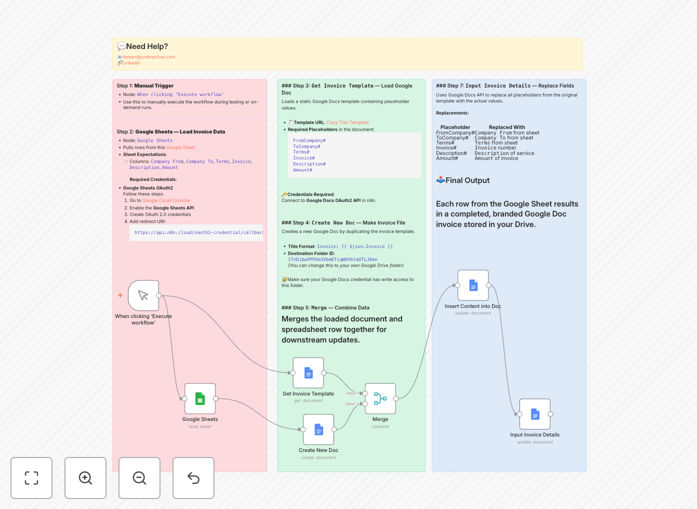
Visual diagram showing automation flow from Google Sheets data to Google Docs invoice generation

What This Workflow Does

Manual invoice creation is a tedious, error-prone process that drains valuable time from your team. This automation solves that by connecting your data source (Google Sheets) directly to your document creation tool (Google Docs). Whenever you add a new client, project, or billing entry to your spreadsheet, the workflow automatically generates a fully formatted, branded invoice document.

The system pulls structured data—client details, services, amounts, terms—and inserts them into a pre-designed template. What used to take 10-15 minutes per invoice now happens in seconds, with zero manual intervention. This ensures consistency across all client communications while eliminating costly data entry mistakes.

How It Works

Step 1: Data Extraction

The workflow reads your Google Sheet containing invoice data. Each row represents a unique invoice with columns for client information, line items, totals, and payment terms.

Step 2: Template Loading

It accesses your pre-designed Google Docs invoice template containing placeholder markers for dynamic data insertion.

Step 3: Document Creation

A new Google Doc is created as a copy of your template, automatically named and organized in your specified Drive folder.

Step 4: Data Merging

The system replaces all placeholder markers in the document with actual values from your spreadsheet—client names, amounts, dates, and descriptions.

Step 5: Delivery & Organization

The completed invoice is saved to your Drive, ready for review, sharing, or integration with your email system for automatic client delivery.

Pro tip: Add a timestamp column to your Google Sheet to trigger invoices automatically on specific dates, creating a completely hands-free recurring billing system.

Who This Is For

This automation is ideal for freelancers, small agencies, consultants, and service-based businesses that bill clients regularly. If you're currently copying data from spreadsheets into document templates, sending manual invoices via email, or struggling with billing consistency across team members, this workflow will transform your operations. It's particularly valuable for businesses with recurring clients, project-based billing, or multiple team members handling invoicing.

What You'll Need

  1. A Google Workspace account with access to Sheets and Docs
  2. A Google Sheet structured with invoice data (client, amount, description, etc.)
  3. A Google Docs invoice template with placeholder markers
  4. n8n instance (cloud or self-hosted) with Google OAuth credentials configured
  5. Basic understanding of how to import and activate n8n workflows

Quick Setup Guide

1. Download the template using the button above and import it into your n8n instance.

2. Connect your Google Sheets and Google Docs credentials via OAuth in n8n.

3. Update the workflow nodes with your specific Google Sheet ID and Docs template ID.

4. Test with a single row of data to ensure the invoice generates correctly.

5. Schedule the workflow to run automatically (daily, weekly, or on-demand).

Pro tip: Create a dedicated "Invoices" folder in Google Drive for the workflow to use. This keeps all generated documents organized and easily accessible for your team.

Key Benefits

Save 2-3 hours weekly per team member by eliminating manual invoice creation. What used to be a 15-minute task per invoice becomes instantaneous.

Eliminate 100% of data entry errors that occur during manual copying between systems. The automation ensures perfect data transfer every time.

Maintain perfect brand consistency across all client communications by using your standardized template for every invoice.

Scale your billing operations effortlessly as you add more clients or projects—the system handles increased volume without additional work.

Improve cash flow visibility by having all invoices systematically organized and easily accessible for tracking and follow-up.

Frequently Asked Questions

Common questions about invoice automation and integration

Manual invoice creation is error-prone and time-consuming. Automation ensures consistency, eliminates data entry mistakes, and frees up your team for higher-value tasks. Businesses save 2-3 hours per week on average by automating invoices.

Beyond time savings, automated invoices go out faster, improving cash flow. They also create an audit trail and reduce disputes by ensuring accuracy in calculations and client details.

This integration creates a seamless data flow. Your sales or project data lives in Sheets, and automation transforms it into professional, branded documents in Docs. It maintains a single source of truth while producing client-ready outputs automatically.

The connection leverages tools your team already uses, minimizing training needs. Changes in your spreadsheet instantly reflect in future invoices, ensuring your billing always uses current rates and terms.

Absolutely. The workflow uses a Google Docs template that you fully control. You can design it with your logo, colors, terms, and layout. The automation simply populates the data fields, preserving your complete brand identity.

You can create multiple templates for different service lines or client types. The automation can select the appropriate template based on data in your spreadsheet, providing tailored communication for each scenario.

The workflow processes each row in your Google Sheet independently. You can add custom columns for special notes, discount rates, or project-specific terms. The automation will incorporate these into each generated invoice, maintaining personalization at scale.

For complex scenarios, you can add conditional logic in n8n to apply different calculations, include specific clauses, or even select different template designs based on the client type or project value.

Yes. The data stays within your Google Workspace ecosystem. No third-party services store your client information. You control access permissions on both the source Sheet and the generated Docs, ensuring compliance with data protection standards.

The automation runs on your infrastructure (n8n cloud or self-hosted), giving you full control over data flow. You can implement additional security measures like two-factor authentication and access logging.

The workflow creates organized documents in your specified Drive folder. You can then manually review and send them, or extend the automation to automatically email PDF versions to clients, update your accounting software, or log them in a CRM.

Many businesses add a second automation stage that converts the Docs to PDF, attaches them to personalized emails, and sends them at scheduled times. This creates a completely hands-free billing system from data entry to client delivery.

Yes. GrowwStacks specializes in building tailored automation systems. We can integrate your specific accounting software, add approval workflows, include payment tracking, or create multi-currency support. Book a free consultation to discuss your requirements.

Custom solutions might include connecting to QuickBooks or Xero, adding manager approval for large invoices, automating payment reminder sequences, or generating detailed billing reports for your finance team.

  • Integration with your existing accounting platform
  • Multi-level approval workflows for compliance
  • Automated payment tracking and reconciliation

Need a Custom Invoice Automation?

This free template is a starting point. Our team builds fully tailored automation systems for your specific business needs.