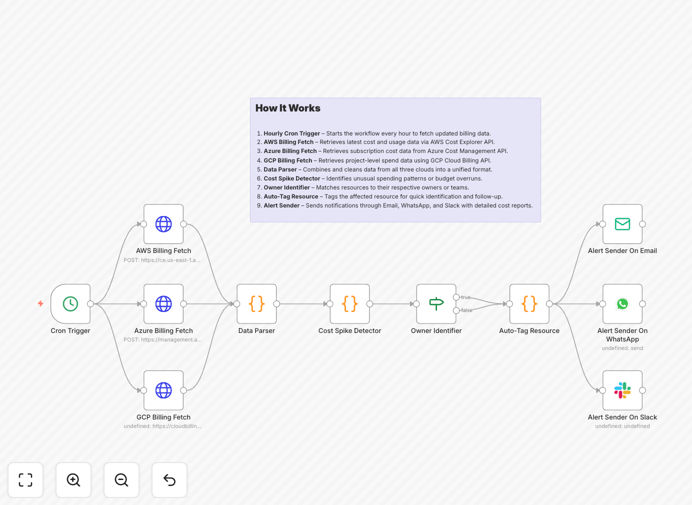
What This Workflow Does
Managing cloud costs across multiple providers is one of the biggest challenges for modern businesses. With AWS, Azure, and GCP each having different billing systems and reporting interfaces, finance teams often struggle to get a unified view of spending until the monthly invoice arrives—by which time it's too late to control overruns.
This automated n8n workflow solves this problem by providing real-time, cross-platform cost monitoring. It pulls hourly spending data from all three major cloud providers, detects anomalies and budget breaches as they happen, automatically tags affected resources for accountability, and sends immediate alerts through your preferred communication channels.
The result is proactive financial governance rather than reactive cost management. Instead of discovering you've overspent by thousands at month-end, you get notified within hours of any unusual spending pattern, giving your team time to investigate and resolve issues before they impact your bottom line.
How It Works
1. Scheduled Data Collection
The workflow triggers automatically every hour using a cron scheduler. It simultaneously queries the billing APIs of AWS Cost Explorer, Azure Cost Management, and Google Cloud Billing to fetch the latest spending data across all your accounts and projects.
2. Data Normalization & Analysis
Raw data from each cloud provider is transformed into a consistent format. The system calculates daily and monthly trends, compares current spending against predefined budgets, and identifies resources with unusual cost patterns or sudden spikes.
3. Anomaly Detection & Tagging
Using configurable thresholds, the workflow flags any spending that exceeds normal patterns or budget limits. It then automatically applies tags to the affected resources in their respective cloud platforms, linking costs to specific teams, projects, or environments for clear accountability.
4. Multi-Channel Alerting
When issues are detected, detailed alerts are sent simultaneously through email, Slack, Microsoft Teams, or WhatsApp. Each alert includes specific cost details, affected resources, and recommended actions, enabling rapid response from the responsible teams.
5. Reporting & Documentation
The workflow generates consolidated reports that can be saved to Google Sheets, sent to accounting systems, or stored in your data warehouse. This creates an audit trail of cost events and supports monthly financial reconciliation processes.
Who This Is For
This workflow is ideal for DevOps teams managing infrastructure across multiple clouds, finance professionals responsible for cloud budgeting and forecasting, IT leaders overseeing digital transformation initiatives, and any business running significant workloads on AWS, Azure, or GCP.
It's particularly valuable for companies experiencing rapid cloud adoption, those with decentralized teams provisioning their own resources, organizations undergoing cloud migration projects, or businesses with strict financial governance requirements. If you've ever been surprised by a cloud bill or struggled to allocate costs accurately across departments, this automation will transform your financial operations.
What You'll Need
- AWS Account with Cost Explorer enabled and IAM credentials with billing read permissions
- Azure Subscription with Cost Management Reader role assigned to your service principal
- Google Cloud Project with a service account key having Billing Account Viewer permissions
- n8n Instance (cloud or self-hosted) with HTTP Request, Cron, and Code nodes available
- Communication Channels configured (Slack webhook, email SMTP, WhatsApp Business API, etc.)
Pro tip: Start with conservative budget thresholds (10-15% above expected spending) and adjust based on your team's response patterns. It's better to get a few extra alerts initially than miss a major cost anomaly.
Quick Setup Guide
- Import the template into your n8n instance using the downloaded JSON file
- Configure cloud credentials by adding your AWS keys, Azure service principal, and GCP service account to n8n's credential management
- Set budget thresholds in the "Cost Spike Detector" node based on your monthly allocations
- Connect alert channels by adding your Slack webhook URL, email SMTP settings, or WhatsApp API credentials
- Test the workflow manually to ensure all API connections work and alerts are delivered correctly
- Activate the schedule by enabling the Cron trigger for hourly execution (adjust frequency as needed)
- Monitor initial runs for a few days and fine-tune thresholds based on actual spending patterns
Key Benefits
Real-time visibility replaces monthly surprises. Instead of waiting for end-of-month invoices, you see spending trends as they develop, enabling proactive adjustments that can save 15-30% on cloud costs through timely optimization.
Cross-platform consolidation eliminates manual work. The automation replaces hours of manual data gathering and spreadsheet manipulation with automated, accurate consolidation that updates continuously throughout the month.
Automated accountability improves cost culture. By automatically tagging resources and alerting responsible teams, you create a system of accountability that encourages better cloud resource management across your organization.
Scalable governance supports business growth. As your cloud footprint expands across more accounts, projects, and providers, this workflow scales with you, maintaining consistent financial controls without additional overhead.
Actionable intelligence drives better decisions. Beyond just reporting numbers, the system provides context-rich alerts with specific recommendations, turning raw data into actionable business intelligence.