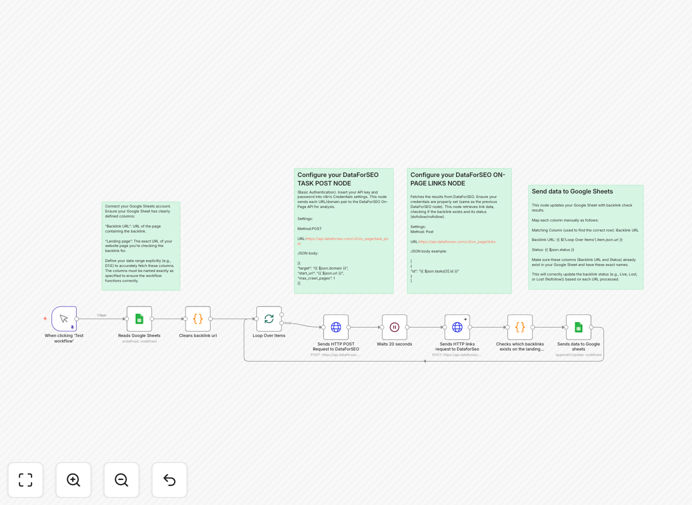
What This Workflow Does
Manual backlink tracking is a massive time sink for SEO professionals and marketers. This n8n workflow automates the entire process by reading a list of backlinks from a Google Sheet, sending each URL to the DataForSEO On-Page API for analysis, and determining the link's current status. It eliminates hours of tedious checking and provides reliable, up-to-date data on your link profile's health.
The workflow checks three critical statuses for each backlink: whether the link is still live on the target page, whether it's a valuable dofollow link or a nofollow, and whether the link has been removed (lost). This automated audit helps you quickly identify broken links, recover lost SEO value, and prioritize outreach for link recovery campaigns.
How It Works
1. Read Backlinks from Google Sheets
The workflow starts by connecting to your Google Sheet where you maintain your backlink list. It reads each row containing the backlink URL and the target landing page. This step ensures your data source is always current and easily manageable.
2. Send Each URL to DataForSEO On-Page API
Each backlink URL is sent to the DataForSEO On-Page API, which crawls the target page and extracts detailed information about the link, including its presence, attributes, and surrounding content.
3. Analyze Link Status
The API response is parsed to determine if the backlink is present, if it's a dofollow or nofollow link, and if it's missing entirely. The workflow categorizes each link as Live, Lost, or Lost (Nofollow).
4. Update Google Sheets with Results
The final step writes the status back to your Google Sheet in a new column, providing a clear, real-time overview of your backlink portfolio's health. This creates a self-updating backlink monitoring system.
Pro tip: Schedule this workflow to run weekly or monthly to maintain an ongoing audit of your backlink profile without any manual effort. This ensures you never miss a broken link that could be affecting your search rankings.
Who This Is For
This automation is perfect for SEO agencies managing multiple clients, in-house SEO teams at mid-to-large companies, digital marketing consultants, and content marketers who rely on backlinks for traffic and authority. If you spend more than a few hours a month checking backlinks manually, this workflow will save you significant time and provide more accurate, consistent data than manual checks.
What You'll Need
- A Google Sheets document with columns for Backlink URL, Landing page, and Status (or similar).
- An n8n instance (self-hosted or cloud).
- Google Sheets credentials configured in n8n.
- DataForSEO API credentials (available from their platform).
- Basic familiarity with n8n's interface to import and configure the workflow.
Quick Setup Guide
1. Download the template file using the button above.
2. In your n8n instance, go to Workflows > Import from File and select the downloaded JSON file.
3. In the imported workflow, configure the Google Sheets node with your sheet ID and range.
4. Configure the HTTP Request node with your DataForSEO API endpoint and authentication headers.
5. Test the workflow with a few backlinks to ensure the connection and data flow work correctly.
6. Once verified, activate the workflow and optionally schedule it to run automatically.
Key Benefits
Eliminate manual backlink checks that can take hours each month. This workflow automates the entire process, freeing up your time for more strategic SEO work.
Maintain accurate, up-to-date link status with automated API calls that provide reliable data on whether your backlinks are live, lost, or nofollow.
Identify broken links quickly to prioritize outreach and link recovery efforts, preserving your site's authority and search rankings.
Create a self-updating backlink audit system that runs on a schedule, ensuring you always have the latest information on your link profile's health.