Google Sheets Email Verification Lead Generation Data Cleaning n8n

Batch Verify Emails in Google Sheet with Icypeas

Automatically clean your email lists by verifying addresses directly from Google Sheets. Improve deliverability and save marketing budget.

Download Template JSON · n8n compatible · Free
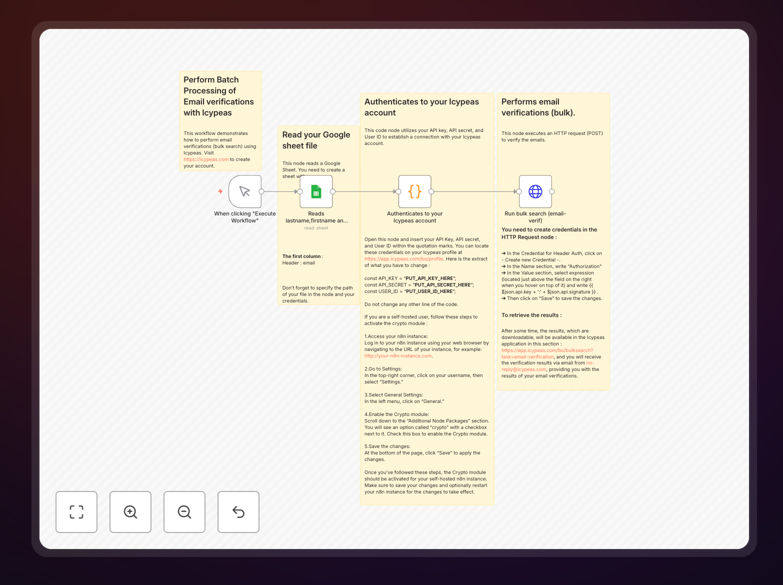
n8n workflow diagram showing Google Sheets connected to Icypeas for email verification

What This Workflow Does

Invalid email addresses silently drain marketing budgets and damage sender reputations. Every bounced email hurts deliverability rates, while sales teams waste time contacting dead leads. Manual verification is tedious and doesn't scale with growing contact lists.

This automation solves that by connecting Google Sheets directly to Icypeas' email verification API. It reads email addresses from your spreadsheet, verifies each one in bulk, and updates the sheet with validation results. You get clean, deliverable lists without manual work, ensuring your campaigns reach real people and your sales team contacts valid prospects.

The workflow handles the entire process: reading your sheet, processing batches through the verification service, and returning detailed results including validity status, risk scores, and suggested actions for problematic addresses.

How It Works

1. Trigger & Data Collection

The workflow starts manually or on a schedule. It connects to your specified Google Sheet and reads the column containing email addresses. The sheet can be shared across teams—marketing can add new leads, sales can upload prospect lists, and support can include customer contacts.

2. Data Preparation

Emails are formatted into the proper array structure required by the Icypeas API. The workflow handles data cleaning, removing duplicates, and filtering out obviously invalid formats before sending for verification, saving API credits.

3. API Connection & Verification

The workflow authenticates with your Icypeas account using API credentials, then sends batches of emails for comprehensive verification. Icypeas checks mailbox existence, domain validity, disposable email detection, and spam trap risks.

4. Results Processing & Update

Verification results are parsed and mapped back to your original spreadsheet. Each email receives a status (valid, invalid, risky, unknown) along with confidence scores and detailed reasons. The sheet updates automatically, creating an auditable record.

Who This Is For

Marketing teams running email campaigns who need clean lists to improve deliverability and ROI. Sales teams prospecting from lead lists who want to avoid wasting time on invalid contacts. Startups and SMBs building their first contact databases who need to establish good data hygiene practices from day one. Agencies managing multiple client lists who require consistent verification across accounts. E-commerce businesses with customer email lists that decay over time.

What You'll Need

  1. A Google Sheet with email addresses in a dedicated column
  2. Google Sheets API access (via service account or OAuth)
  3. An active Icypeas account with API credits
  4. Your Icypeas API Key, API Secret, and User ID
  5. n8n instance (cloud or self-hosted) with HTTP Request and Google Sheets nodes available

Pro tip: Create a dedicated "Email Verification" sheet template with columns for original email, status, confidence score, last verified date, and notes. Use this template consistently across campaigns for standardized reporting.

Quick Setup Guide

  1. Import the template into your n8n instance using the downloaded JSON file.
  2. Configure Google Sheets connection by adding your service account credentials or OAuth tokens and specifying the spreadsheet ID and range.
  3. Add Icypeas credentials in the HTTP Request node with your API Key, Secret, and User ID from your Icypeas dashboard.
  4. Test with a small batch of 5-10 emails to verify the connection works and results format correctly.
  5. Schedule the workflow to run weekly or monthly for ongoing list hygiene, or trigger manually for new list imports.

Key Benefits

Improve email deliverability by 25-40% by removing invalid addresses before campaigns launch. Email providers reward senders with clean lists with better inbox placement.

Save 15-20% of marketing budget currently wasted on emails that never reach real people. Each invalid email costs both the send fee and the opportunity cost of not reaching a valid prospect.

Boost sales team productivity by ensuring every contact in your CRM is valid. Sales reps spend time connecting with real decision-makers instead of bouncing between dead emails.

Maintain sender reputation by keeping bounce rates below critical thresholds. Poor reputation affects all emails from your domain, not just campaign blasts.

Create auditable compliance records of list cleaning efforts. Documentation proves due diligence in maintaining clean lists, important for GDPR and CAN-SPAM compliance.

Frequently Asked Questions

Common questions about email verification automation and integration

Email verification is crucial because it removes invalid, disposable, or risky email addresses from your lists. This improves deliverability rates, protects sender reputation, reduces bounce rates, and ensures your marketing budget targets real prospects.

Without verification, up to 30% of emails can bounce, hurting campaign performance and triggering spam filters. Verified lists see higher open rates, better engagement, and improved ROI across all email marketing activities.

  • Reduces hard bounces that damage sender score
  • Filters disposable emails that never convert
  • Identifies spam traps that can blacklist your domain

Syntax validation only checks if an email follows basic format rules (like having an @ symbol). Real-time verification connects to mail servers to confirm the mailbox exists, checks for disposable domains, validates MX records, and detects catch-all servers.

Icypeas provides real-time verification for accurate results. For example, "[email protected]" passes syntax checks but fails real verification because the mailbox doesn't exist. Real verification catches these before they hurt your campaigns.

Verify new leads immediately upon collection, then re-verify your entire list every 3-6 months. Email addresses decay at about 22% annually as people change jobs or abandon accounts.

Regular verification maintains list hygiene and prevents wasted marketing spend on inactive contacts. Businesses with high list churn (like job boards or event marketers) should verify more frequently—monthly or even weekly for critical campaigns.

  • New leads: Verify within 24 hours of capture
  • Active lists: Quarterly verification minimum
  • Dormant lists: Verify before re-engagement campaigns

Absolutely. Sales teams waste 15-20% of their time chasing invalid leads. Automated verification ensures every contact in your CRM is valid before outreach begins.

This increases connection rates, improves lead scoring accuracy, and lets sales reps focus on qualified prospects rather than dead ends. Verified lists also improve email sequence performance, with higher reply rates and more meetings booked.

High bounce rates trigger spam filters, damaging your sender reputation. Poor reputation leads to inbox placement issues, where even valid emails land in spam. Email providers may blacklist your domain.

You also waste budget on emails that never reach real people and skew your campaign analytics with false data. Over time, these effects compound, making it increasingly difficult to reach any inboxes effectively.

Google Sheets provides a familiar interface for non-technical teams to manage lists. Integration allows marketing, sales, and support teams to add emails to a shared sheet, then automatically trigger verification.

Results update in real-time, creating a centralized, auditable record of list hygiene status. This eliminates manual data exports/imports and ensures everyone works from the same verified data source.

Track bounce rate reduction, deliverability improvement, spam complaint decrease, and engagement rate increases. Monitor how many invalid addresses were caught per batch.

Calculate cost savings from avoided wasted sends. Measure sales team efficiency gains from higher contact rates with verified leads. These metrics prove ROI and justify ongoing verification investment.

  • Bounce rate: Target below 2%
  • Invalid rate: Typically 10-30% of new lists
  • ROI: Calculate saved send costs ÷ verification costs

Yes, GrowwStacks specializes in custom email verification automations tailored to your specific CRM, marketing tools, and business processes. We can integrate verification into your lead capture forms, CRM updates, marketing automation sequences, and sales workflows for end-to-end list hygiene.

Our team builds solutions that fit your exact needs—whether you need real-time verification on form submission, scheduled list cleaning, or integration with your existing marketing stack. We handle the technical complexity so you get clean lists without operational overhead.

  • CRM integration (HubSpot, Salesforce, etc.)
  • Real-time form validation
  • Custom reporting and alerting

Need a Custom Email Verification Automation?

This free template is a starting point. Our team builds fully tailored automation systems for your specific business needs.