Binance Crypto Trading Market Data AI Agent n8n

Binance Market Data Automation Tool

A powerful sub-agent that collects real-time market structure data from Binance for any trading pair — including price, volume, order book depth, and candlestick snapshots across multiple timeframes (15m, 1h, 4h, 1d).

Download Template JSON · n8n compatible · Free
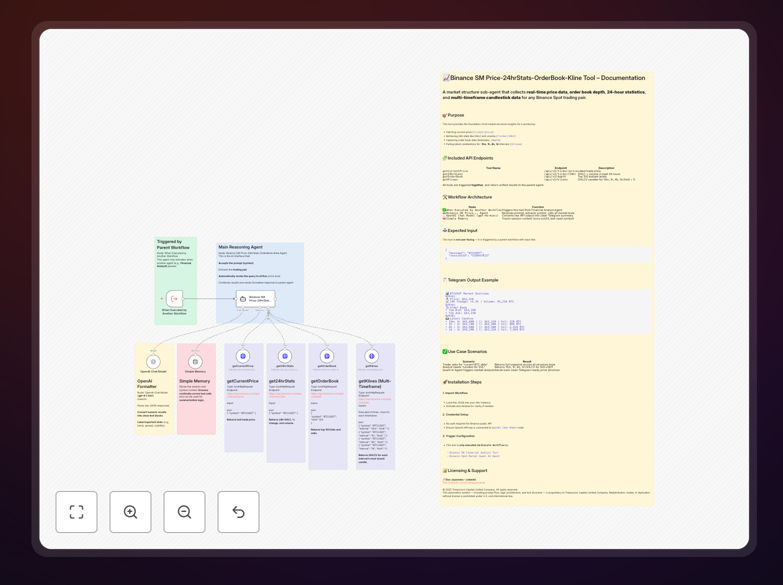
Visual diagram of the Binance market data automation workflow showing data flow between nodes

What This Workflow Does

This n8n workflow automates the collection and processing of real-time cryptocurrency market data from Binance. It acts as a powerful sub-agent within a larger trading or analysis system, fetching comprehensive market structure information for any trading pair on demand.

The tool solves the problem of manual, time-consuming market monitoring by providing instant, structured data feeds. Instead of constantly checking charts and refreshing APIs, traders and analysts can trigger this workflow to get a complete market snapshot formatted for immediate use in Telegram messages, dashboards, or decision-making algorithms.

By combining price feeds, 24-hour statistics, order book depth, and multi-timeframe candlestick data into a single automated process, it eliminates data fragmentation and ensures consistency across your trading analysis.

How It Works

The workflow is triggered by a parent system (like a Quant AI agent or trading dashboard) and executes a sequence of coordinated API calls to Binance's public endpoints.

Step 1: Input & Session Management

The workflow begins with an Execute Workflow Trigger node that accepts a trading pair symbol (like "BTCUSDT") and a session ID. This data is stored in a Simple Memory node for reference throughout the execution chain.

Step 2: AI-Powered Routing & Parsing

A Binance SM Market Agent (powered by OpenAI's GPT-4o-mini) interprets the request and intelligently routes to the appropriate data collection tools based on what information is needed.

Step 3: Parallel Data Collection

Four HTTP Request nodes simultaneously fetch different data types from Binance's API: current price via /ticker/price, 24-hour statistics via /ticker/24hr, order book depth via /depth, and candlestick data for multiple timeframes via /klines.

Step 4: Data Formatting & Output

The raw API responses are cleaned, structured, and formatted into a Telegram-optimized summary by the AI model. The final output presents a complete market overview in a readable format ready for analysis or notification.

Who This Is For

This automation is ideal for cryptocurrency traders, quantitative analysts, trading bot developers, and financial researchers who need reliable, real-time market data without manual effort.

Retail traders can use it to monitor portfolio assets and set up price alerts. Algorithmic trading teams can integrate it as a data feed for their strategies. Crypto fund managers can employ it for daily market analysis reports. Developers building trading tools can use it as a foundational component for more complex systems.

Even non-technical users can benefit by importing the template and simply changing the trading pair symbol to monitor their preferred assets.

What You'll Need

  1. An n8n instance (cloud or self-hosted) with internet access to Binance's API endpoints.
  2. OpenAI API credentials for the GPT-4o-mini node that formats the output (optional but recommended for readable summaries).
  3. Basic understanding of cryptocurrency trading pairs (like BTCUSDT, ETHUSDC).
  4. A parent workflow or trigger to call this sub-agent with the trading pair parameter.
  5. No Binance API key required – uses public endpoints for market data.

Pro tip: While no Binance API key is needed for market data, consider getting one if you plan to extend this workflow with trading functionality. Rate limits are more generous with authenticated requests.

Quick Setup Guide

  1. Download and import the JSON template into your n8n instance.
  2. Configure the OpenAI node with your API credentials if you want formatted Telegram output.
  3. Test with a sample trigger using the Execute Workflow node with input: {"message": "BTCUSDT", "sessionId": "test123"}
  4. Verify the output in the workflow execution panel to ensure all API calls succeed.
  5. Integrate with your parent system by connecting the Execute Workflow Trigger node to your existing automation.
  6. Customize timeframes or add calculations by modifying the HTTP Request nodes' parameters.

Key Benefits

Save 2-3 hours daily on manual market data collection and compilation. What used to require constant browser refreshing now happens automatically with a single trigger.

Eliminate human error in data recording. Automated API calls ensure price, volume, and order book data is accurate and timestamped consistently.

Monitor unlimited trading pairs by simply changing the input parameter. Scale your analysis without proportional time investment.

Get structured, actionable data instead of raw API responses. The AI formatting creates ready-to-use summaries for decision making.

Build upon a proven foundation for custom trading systems. This workflow provides the data layer you can extend with trading logic, alerts, or portfolio management features.

Frequently Asked Questions

Common questions about crypto market data automation and integration

Automating market data collection saves hours of manual checking, eliminates human error in data entry, and provides real-time insights for faster trading decisions. It allows you to monitor multiple trading pairs simultaneously and trigger alerts or actions based on specific market conditions automatically.

Manual data gathering is not only time-consuming but also prone to mistakes during fast market movements. Automation ensures you have consistent, timestamped data for backtesting strategies and making informed decisions without emotional bias.

n8n provides unlimited flexibility to combine Binance data with other apps. You can send price alerts to Telegram, log trades to Google Sheets, trigger buys/sells via API, or feed data into AI models for analysis. Unlike basic trading bots, n8n lets you build custom logic without coding.

The visual workflow editor makes complex integrations accessible. You can create conditional trading rules, aggregate data from multiple exchanges, or build complete portfolio management systems that would require extensive programming in other platforms.

When built correctly, automated data pipelines are more reliable than manual checking. This workflow uses Binance's official API, ensuring data accuracy. You can add validation steps and redundancy. The key is setting up proper error handling and monitoring alerts for any API disruptions.

Automation actually increases reliability by removing human inconsistency. The system checks at precise intervals, never gets tired, and follows the exact same process every time. For critical trading decisions, you can implement data verification from multiple sources within the same workflow.

Yes, the workflow is designed to accept any trading pair symbol (like BTCUSDT or ETHUSDT) as input. You can run it sequentially for multiple pairs or modify it to process a list of pairs in a loop. This makes it scalable for portfolio tracking across different cryptocurrencies.

For monitoring 10+ pairs, consider adding a Loop node that iterates through an array of symbols. Each iteration would process one pair, with all results compiled into a comprehensive report. This approach maintains organization while maximizing efficiency.

This workflow is a data collection and formatting tool, not an automated trading system. It gathers and structures market data (price, volume, order book) which you can then use to inform decisions. You can extend it into a trading bot by adding conditional logic and exchange API calls for execution.

Think of it as the "eyes" of a trading system rather than the "hands." It provides the information needed to make trading decisions but doesn't execute trades itself. This separation is actually beneficial—it lets you test data quality independently before adding execution risk.

No, n8n's visual interface lets you modify workflows without coding. You can change timeframes, add calculations, or connect new apps using pre-built nodes. Basic technical understanding helps, but the template includes clear documentation for common modifications.

Most customizations involve dragging and dropping nodes, configuring API endpoints, or adjusting parameters in forms. For advanced logic, n8n offers Code nodes where you can add JavaScript if needed, but many trading automations can be built entirely visually.

  • Change candlestick intervals by editing the "interval" parameter
  • Add Telegram notifications with a few clicks
  • Connect to Google Sheets for historical tracking

Yes, GrowwStacks specializes in building custom crypto automation systems. We can create tailored solutions for arbitrage detection, portfolio rebalancing, multi-exchange monitoring, or institutional trading workflows. Our team handles API integration, error handling, and deployment so you get a production-ready system.

We work with trading firms, crypto funds, and individual traders to build automation that fits their specific strategy. Whether you need high-frequency data processing, regulatory compliance features, or integration with proprietary systems, we can develop a solution that saves time and reduces operational risk.

  • Multi-exchange arbitrage detection systems
  • Portfolio rebalancing with risk management
  • Custom alerting and notification workflows
  • Historical data analysis and reporting dashboards

Need a Custom Crypto Trading Automation?

This free template is a starting point. Our team builds fully tailored automation systems for your specific business needs.