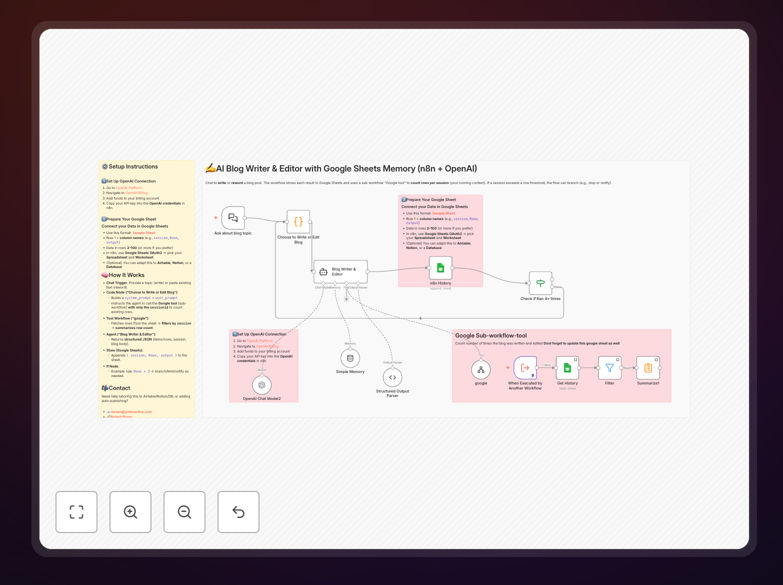
What This Workflow Does
This automation solves the challenge of inconsistent, time-consuming content creation by providing an intelligent AI assistant that writes and edits blog posts while maintaining memory across sessions. Instead of starting from scratch each time, the system tracks your content history, preferences, and previous outputs in Google Sheets, creating a growing knowledge base that improves with every use.
The workflow enables content teams, marketers, and business owners to produce high-quality written material at scale without sacrificing brand voice or consistency. Whether you need to generate new blog posts from scratch, rewrite existing content for different platforms, or maintain a coherent content series, this automation handles the heavy lifting while you focus on strategy and refinement.
How It Works
1. Content Request & Session Tracking
You provide a topic or paste existing text through a chat interface. The system assigns a unique session ID that tracks all related content requests, maintaining context across multiple interactions for coherent content series.
2. AI Processing with Context Awareness
The workflow checks Google Sheets for previous content in the same session, providing the AI with historical context. GPT-4 then generates or rewrites content based on this context, ensuring consistency with previous materials.
3. Structured Output & Storage
The AI returns structured content including the blog body, suggested headlines, and key takeaways. All outputs are automatically appended to Google Sheets with session metadata, creating a searchable content library.
4. Quality Control & Branching Logic
The system includes conditional logic that can trigger different actions based on content quality, session length, or specific requirements. This might include sending content for human review, adjusting AI parameters, or stopping generation when quality thresholds are met.
Who This Is For
This automation is ideal for marketing agencies managing multiple client content calendars, content teams at SaaS companies producing regular blog posts, e-commerce businesses needing product descriptions at scale, and solo entrepreneurs who want to maintain consistent content output without hiring a full-time writer.
It's particularly valuable for businesses that need to maintain brand voice across numerous pieces of content, teams with limited writing resources but substantial content needs, and organizations looking to repurpose existing content for different platforms and audiences.
What You'll Need
- n8n instance (cloud or self-hosted) with workflow execution capabilities
- OpenAI API key with GPT-4 access and sufficient billing credits
- Google Sheets account with a prepared spreadsheet following the template structure
- Basic understanding of your brand voice and content requirements
- Content approval workflow for human review before publication
Pro tip: Start with a small sample of your best existing content in Google Sheets to train the AI on your brand voice. Include examples of headlines, body copy, and calls-to-action that match your style.
Quick Setup Guide
- Import the template into your n8n instance using the downloaded JSON file
- Configure OpenAI credentials with your API key in the n8n credentials manager
- Set up Google Sheets connection using OAuth2 and select your target spreadsheet
- Prepare your Google Sheet with column headers: Session ID, Row Count, Output, Timestamp
- Test with simple prompts to verify the workflow connects properly to all services
- Adjust parameters like temperature and max tokens to match your content style
- Implement quality checks by adding conditional nodes for content review thresholds
Key Benefits
Save 10-15 hours weekly on content creation and editing tasks. What previously required extensive research, drafting, and rewriting now happens automatically with consistent quality.
Maintain brand voice consistency across all content through session tracking and historical context. The system learns from your previous outputs to match tone, style, and terminology preferences.
Create searchable content libraries in Google Sheets that grow more valuable over time. Every piece of content becomes part of an organized knowledge base that informs future creations.
Scale content production without proportional increases in human resources. Handle seasonal content spikes, product launches, or campaign requirements with the same small team.
Improve content ROI through systematic tracking of what works. The Google Sheets storage enables performance analysis and data-driven decisions about content strategy.