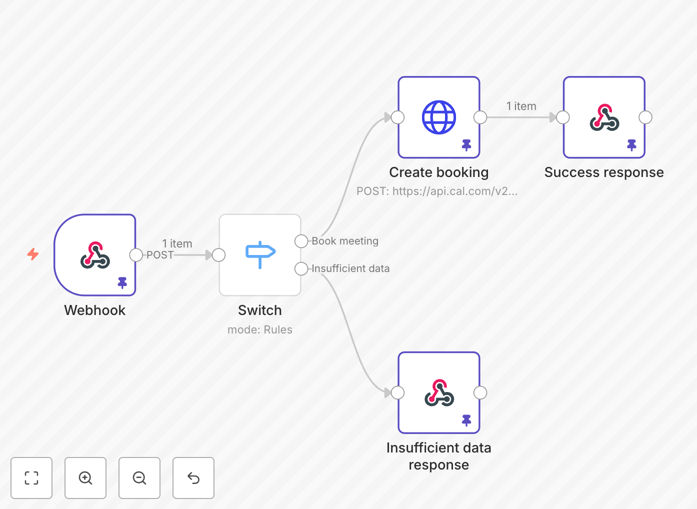
What This Workflow Does
This automation solves a critical gap in AI-powered customer interactions: turning conversations into confirmed meetings. When an ElevenLabs voice agent successfully collects information from a prospect, this workflow automatically books a meeting in your Cal.com calendar.
The system validates all required attendee data, handles the Cal.com API request, and ensures meetings are created with proper details. It acts as a reliable bridge between conversational AI and your scheduling system, eliminating manual copying, pasting, and the inevitable errors that come with it.
Businesses using AI voice agents for lead qualification, customer support, or appointment setting can deploy this to capture intent immediately and schedule follow-ups without human intervention. This reduces response time from hours to seconds and ensures no lead falls through the scheduling cracks.
Pro tip: Use this workflow as a foundation for more complex sales automation. Once a meeting is booked, you can automatically trigger CRM updates, send personalized confirmation emails, or notify your sales team via Slack.
How It Works
The workflow follows a logical sequence to ensure data integrity and successful booking creation.
Step 1: Webhook Trigger
Your ElevenLabs voice agent is configured with a custom tool that calls this workflow's webhook URL when ready to book a meeting. The agent passes structured JSON containing all collected attendee information.
Step 2: Data Validation
The workflow checks that all required fields are present and properly formatted. This includes attendee name, email, phone, timezone, desired meeting time, and your specific Cal.com event type ID. If validation fails, it returns a clear error response.
Step 3: API Request to Cal.com
With validated data, the workflow makes a POST request to the Cal.com bookings API. It structures the request according to Cal.com's requirements, including all attendee details and meeting parameters.
Step 4: Response Handling
The workflow processes Cal.com's response. If successful, it can trigger additional actions (like sending confirmations). If the API returns an error, the workflow handles it gracefully and can notify administrators.
Who This Is For
This automation is ideal for businesses already using or considering AI voice agents for customer interactions. Specifically:
- Sales teams using AI agents for lead qualification who want to automatically book discovery calls
- Customer support operations where complex issues require follow-up meetings with specialists
- Consulting firms that use voice AI for initial client consultations and need to schedule paid sessions
- Healthcare providers using conversational AI for patient intake and appointment scheduling
- Education platforms that use AI tutors and need to schedule live sessions with human instructors
If you're spending more than 5 hours per week manually scheduling meetings from conversations, this automation will deliver immediate time savings and improved conversion rates.
What You'll Need
- An active ElevenLabs account with conversational AI capabilities
- A Cal.com account with API access enabled
- Your Cal.com event type ID for the meetings you want to book
- n8n instance (cloud or self-hosted) to run the workflow
- Basic understanding of webhook configuration in ElevenLabs
- API keys for both services with appropriate permissions
Pro tip: Before going live, test the workflow thoroughly with different data scenarios. Create test event types in Cal.com specifically for validation testing to avoid polluting your real calendar.
Quick Setup Guide
- Download and import the template JSON file into your n8n instance.
- Configure the Webhook node to generate a unique URL. Note this URL for ElevenLabs setup.
- Set up Cal.com credentials in n8n's HTTP Request node using your API key.
- Update the eventTypeId in the workflow to match your specific Cal.com event type.
- Adjust validation logic if your Cal.com event requires different or additional fields.
- Create a custom tool in your ElevenLabs agent configuration pointing to your webhook URL.
- Test the integration by having your voice agent collect information and trigger the booking.
Once configured, the workflow will run automatically whenever your voice agent calls the booking tool. Monitor the initial executions to ensure data flows correctly and meetings appear in your Cal.com calendar as expected.
Key Benefits
Eliminate manual scheduling work. What previously required copying information between systems now happens automatically, saving 5-10 minutes per booked meeting and reducing administrative overhead.
Improve conversion rates. Prospects can book meetings immediately after expressing interest, capturing intent when motivation is highest. This reduces drop-off between conversation and scheduling.
Ensure data accuracy. Automated validation catches missing or incorrect information before attempting to book, preventing failed appointments and follow-up emails to collect missing details.
Scale AI conversations. Your voice agents can handle unlimited conversations without creating scheduling bottlenecks. Each successful qualification automatically progresses to a booked meeting.
Gain visibility. The workflow creates a clear audit trail between conversations and bookings, helping you track which AI interactions are most effective at generating scheduled meetings.