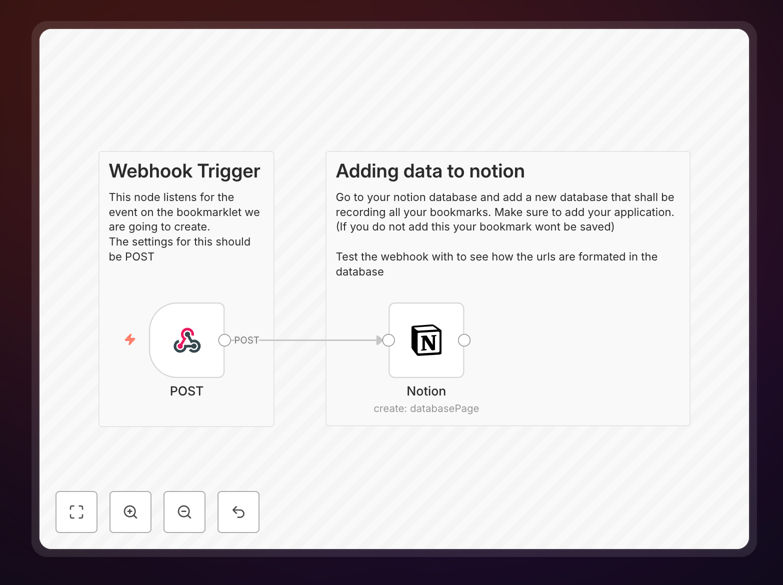
What This Workflow Does
This automation solves the universal problem of research fragmentation. When you're deep in online research—whether for a project, competitive analysis, or content creation—you constantly find valuable pages you want to save. Traditional bookmarking traps links inside your browser, making them hard to organize, search, or share with teams.
This workflow creates a seamless bridge between your browsing activity and your Notion knowledge base. With a simple browser bookmarklet (a special bookmark containing JavaScript), you capture the current page URL and send it directly to a webhook. n8n receives this data, structures it, and creates a new entry in your designated Notion database—complete with timestamps, titles, and any custom metadata you configure.
The result is a centralized, searchable repository of all your saved links that integrates with your existing Notion workflows. No more switching between apps, no more manual data entry, and no more lost references.
How It Works
Step 1: Browser Trigger
You create a special "bookmarklet" in your browser's bookmarks bar. This isn't a normal bookmark—it contains a small JavaScript snippet that captures the current page URL when clicked.
Step 2: Webhook Reception
Clicking the bookmarklet sends the URL data via a POST request to a webhook endpoint hosted on your n8n instance. This webhook acts as the entry point for your automation, securely receiving data from your browser.
Step 3: Data Processing
n8n receives the webhook payload, extracts the URL, and can optionally enrich it with additional data (like fetching the page title or meta description). The workflow structures this information into the format required by your Notion database.
Step 4: Notion Creation
The processed data is sent to Notion's API, creating a new database entry. You can map the URL to a specific property, add tags, include the capture date, and even generate a summary—all automatically.
Who This Is For
This template delivers immediate value for researchers, academics, content creators, product managers, and digital marketers. If you regularly collect online references, track competitor features, build resource libraries, or conduct thematic research, this automation transforms a chaotic process into a systematic workflow.
Teams collaborating on research projects benefit particularly—every member can save links to a shared Notion database, creating a collective knowledge base without coordination overhead. Students compiling sources for papers, consultants gathering client industry data, and developers collecting technical documentation all save hours previously spent on manual organization.
What You'll Need
- A running n8n instance (cloud or self-hosted)
- A Notion account with a database prepared to receive bookmarks
- A Notion integration token (created via notion.so/my-integrations)
- Basic familiarity with editing browser bookmarks
- The webhook URL generated by this workflow
Quick Setup Guide
1. Download the template and import it into your n8n instance.
2. Configure the Webhook node: copy the unique webhook URL it provides.
3. Create your browser bookmarklet: create a new bookmark, paste the JavaScript snippet (provided in the workflow notes), and replace the placeholder webhook URL with your actual n8n webhook URL.
4. Configure the Notion node: connect your Notion integration, select your target database, and map the incoming URL to the correct database property.
5. Activate the workflow and test by clicking your new bookmarklet on any webpage.
Pro tip: Place your bookmarklet in your browser's bookmarks bar for one-click access. Name it something clear like "Save to Notion" so you never forget its purpose.
Key Benefits
Eliminate manual copy-pasting: Save 5–10 seconds per bookmark, which adds up to hours monthly for active researchers. The automation handles the transfer flawlessly every time.
Create a searchable knowledge base: Notion's powerful search and filter capabilities make rediscovering saved links instantaneous. No more scrolling through endless browser bookmark folders.
Enable team collaboration: Shared Notion databases mean everyone contributes to and benefits from the collective research. Perfect for agency teams, research groups, or product squads.
Maintain research context: Automatically capture timestamps and potentially page metadata, creating richer records than basic browser bookmarks that often lose context over time.
Foundation for advanced automation: Once links are in Notion, you can trigger additional workflows—like weekly digests, AI summarization, or integration with project management tools.