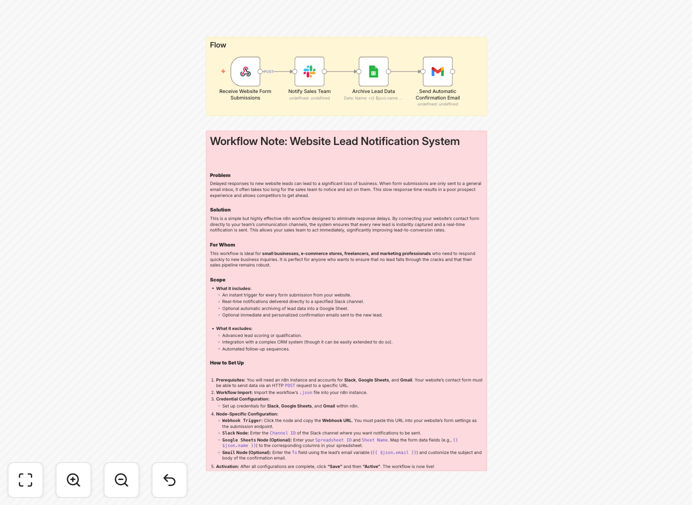
What This Workflow Does
Every business website generates leads through contact forms, but manual follow-up is slow, inconsistent, and leads get missed. This automation solves that by creating a seamless bridge between your website and your sales team.
When a visitor submits your contact form, this workflow instantly captures their information and triggers three simultaneous actions: your sales team receives a formatted notification in Slack with all lead details, the lead gets an automated confirmation email from your Gmail, and their contact information is securely archived in a Google Sheet for future reference and analysis.
The result? Response times drop from hours to seconds, no lead ever falls through the cracks, and your team can focus on selling rather than data entry.
How It Works
1. Webhook Trigger Captures Form Data
Your website form sends submission data to a unique webhook URL. This acts as the starting trigger, receiving the lead's name, email, company, and message in a structured format.
2. Slack Notification Alerts Your Team
The workflow immediately posts a formatted message to your designated Slack sales channel. The notification includes all lead details with clear labels, making it easy for team members to understand the opportunity at a glance.
3. Gmail Sends Instant Confirmation
Simultaneously, an automated email is sent from your business Gmail account to the lead. This professional acknowledgment confirms receipt of their inquiry and sets expectations for follow-up timing.
4. Google Sheets Archives for Reporting
All lead data is appended as a new row in a Google Sheet with timestamp. This creates a searchable database for tracking lead sources, analyzing conversion patterns, and ensuring data backup.
Who This Is For
This automation is ideal for small to medium businesses, agencies, consultants, and SaaS companies that receive leads through website contact forms. It's particularly valuable for sales teams that need to respond quickly to remain competitive, solopreneurs who can't monitor forms constantly, and businesses scaling their lead generation efforts without proportional increases in administrative overhead.
Marketing agencies managing multiple client websites will find this workflow essential for delivering superior lead response times as a service differentiator. Real estate agents, consultants, and service providers who convert leads through timely personal engagement will see immediate improvements in conversion rates.
What You'll Need
- n8n instance (cloud or self-hosted) with workflow execution capabilities
- Slack workspace with a dedicated channel for lead notifications
- Google account with Sheets and Gmail access
- Website contact form that can send data via webhook (most modern form builders support this)
- Basic understanding of how to copy webhook URLs into form settings
Pro tip: Test your workflow with a dummy form submission before connecting it to your live website. This ensures all notifications and archiving work correctly without risking real lead data.
Quick Setup Guide
- Download and import the template JSON file into your n8n instance
- Configure credentials for Slack, Gmail, and Google Sheets in n8n
- Update channel/email details in each node to match your business
- Copy the webhook URL from the Webhook Trigger node
- Add the webhook URL to your website form's integration settings
- Activate the workflow and test with a form submission
Key Benefits
Reduce response time from hours to seconds. Studies show leads contacted within 5 minutes are 9x more likely to convert. This automation ensures your team knows about new leads immediately, not when someone remembers to check the inbox.
Eliminate manual data entry completely. No more copying information from forms to spreadsheets or typing notification messages. The workflow handles all data transfer automatically, saving 5-10 minutes per lead.
Create a reliable lead audit trail. Every lead is timestamped in Google Sheets with complete details. This provides valuable data for analyzing which marketing channels generate the highest quality leads over time.
Improve team coordination and accountability. Slack notifications create a public record of incoming leads, making it clear who's responsible for follow-up and preventing duplicate outreach or missed assignments.
Scale lead handling without adding staff. As your website traffic grows, this automation handles increased lead volume without additional administrative work, allowing your team to focus on closing rather than processing.