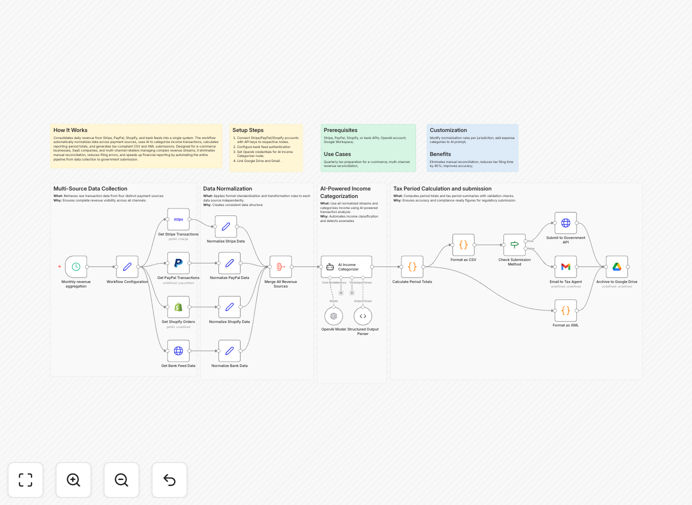
What This Workflow Does
For e-commerce businesses, SaaS companies, and multi-channel retailers, managing revenue across multiple payment platforms creates a significant administrative burden. You're pulling data from Stripe, PayPal, Shopify, and bank accounts, manually reconciling transactions, categorizing income, and preparing tax filings—a process that can consume 10-20 hours each month and is prone to human error.
This automation solves that problem by creating a unified financial pipeline. It automatically consolidates daily revenue from all your payment sources, normalizes the data into a consistent format, uses AI to intelligently categorize transactions, calculates reporting-period totals, and generates tax-compliant CSV and XML submissions. The entire process runs on autopilot, transforming financial management from a manual chore into a streamlined, accurate system.
How It Works
The workflow follows a logical sequence to transform fragmented payment data into organized financial reports.
Step 1: Data Collection
The system connects to each payment platform via their APIs—Stripe for card payments, PayPal for alternative payments, Shopify for store sales, and your bank feed for direct deposits. It pulls transaction data on a scheduled basis (daily or weekly) to ensure your financial records are always current.
Step 2: Data Normalization
Each platform returns data in different formats with varying field names, currency formats, and date structures. The workflow standardizes this information into a consistent schema, converting all amounts to your base currency, standardizing date formats, and mapping platform-specific fields to universal financial categories.
Step 3: AI-Powered Categorization
Using OpenAI's language models, the system analyzes transaction descriptions, amounts, and metadata to intelligently categorize income. Unlike rigid rule-based systems, AI can understand context—distinguishing between product sales, subscription renewals, service fees, or refunds based on the transaction details.
Step 4: Calculation & Aggregation
The workflow calculates totals for each category, applies any necessary tax calculations, and aggregates data by time period (daily, weekly, monthly, quarterly). It can handle complex scenarios like currency conversions, fee deductions, and net/gross revenue calculations.
Step 5: Report Generation & Distribution
Finally, the system generates formatted reports in multiple formats—CSV for spreadsheet analysis, XML for tax filing systems, and summary PDFs for management review. These can be saved to Google Drive, emailed to your accountant, or submitted directly to tax authorities via their APIs.
Who This Is For
This automation delivers the most value for specific business profiles:
E-commerce businesses selling across multiple platforms who need to reconcile Shopify store sales with Stripe/PayPal transactions and bank deposits from wholesale orders.
SaaS companies with subscription revenue flowing through Stripe, one-time payments via PayPal, and enterprise invoices paid directly to bank accounts.
Multi-channel retailers operating physical stores, online shops, and marketplace accounts who struggle with disconnected financial data across all sales channels.
Digital agencies & freelancers receiving client payments through various methods who want professional, automated financial reporting without hiring a bookkeeper.
Any business preparing for tax season and tired of the last-minute scramble to compile financial data from multiple sources.
What You'll Need
- API access to your payment platforms (Stripe, PayPal, Shopify) with appropriate read permissions for transaction data.
- Bank feed connectivity through your bank's API or a service like Plaid for accessing transaction data programmatically.
- OpenAI API key for the AI categorization functionality (you can use GPT-3.5 or GPT-4 depending on your needs and budget).
- Google Workspace account if you want to save reports to Google Drive or email them via Gmail.
- Tax authority credentials if you plan to submit filings directly through government APIs (optional).
- n8n instance either self-hosted or using n8n.cloud to run the workflow.
Pro tip: Start with just one or two payment sources when testing. Connect Stripe and your bank first, then add PayPal and Shopify once you're confident the system is working correctly. This incremental approach makes troubleshooting much easier.
Quick Setup Guide
Follow these steps to implement this automation in your business:
- Download and import the template JSON file into your n8n instance using the import functionality.
- Configure credentials for each payment platform in n8n's credentials management, ensuring each has the necessary read permissions for transaction data.
- Set up your bank connection using your preferred method (bank API, Plaid, or manual CSV upload as a fallback).
- Add your OpenAI API key and test the categorization node with sample transaction data to ensure it's working as expected.
- Configure output destinations—set the Google Drive folder for report storage and the email addresses for distribution.
- Test with historical data by running the workflow for a previous month to verify accuracy before automating current transactions.
- Schedule the workflow to run daily or weekly based on your transaction volume and reporting needs.
Key Benefits
Eliminate manual reconciliation that consumes 10-20 hours monthly. The system automatically matches transactions across platforms, identifies discrepancies, and provides a single source of truth for all revenue.
Reduce tax preparation time by 80% with automatically generated, tax-compliant reports. No more last-minute spreadsheet work before filing deadlines—your reports are always ready and accurate.
<Improve financial accuracy with AI-powered categorization that understands context better than rigid rules. The system learns from your business patterns and applies consistent classification across all transactions.
Gain real-time visibility into cash flow across all payment channels. Instead of waiting for monthly statements, you can see daily revenue performance in a unified dashboard.
Scale effortlessly as your business grows. Adding new payment platforms or sales channels simply requires connecting another API—the consolidation logic remains the same.
Ensure compliance with automated audit trails and detailed transaction logs. Every calculation is traceable, making financial reviews and tax audits straightforward.