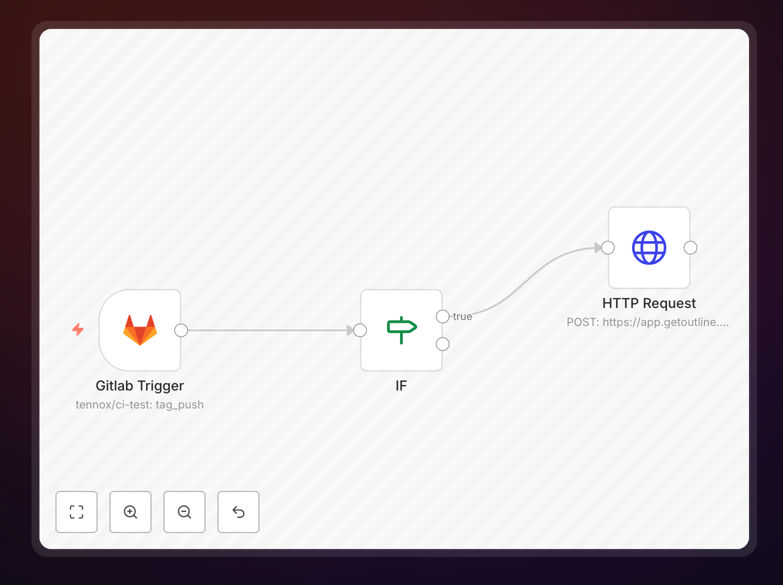
What This Workflow Does
This automation solves a common problem in software development teams: the disconnect between code releases and internal documentation. When developers create new releases in GitLab, the details often get lost in commit messages or remain trapped in the repository. This workflow automatically captures every new GitLab release and creates a corresponding, well-formatted document in your Outline knowledge base.
The automation transforms technical release data into accessible documentation that your entire team can use. Product managers can track feature rollouts, support teams can reference version-specific changes, and new developers can understand the evolution of your codebase—all without asking engineers to stop coding and write manual documentation.
Pro tip: This workflow is particularly valuable for teams practicing continuous delivery, where frequent releases make manual documentation impractical. It ensures your internal wiki evolves alongside your product.
How It Works
The automation follows a logical sequence that mirrors how development teams actually work with releases:
1. GitLab Release Detection
The workflow monitors your GitLab repository for new releases using webhooks or scheduled polling. When a release is tagged (like v1.2.3), it immediately captures the release notes, commit history, author information, and any associated metadata.
2. Data Processing and Enrichment
The raw GitLab data is processed to extract the most valuable information. This includes filtering out noise, formatting commit messages for readability, categorizing changes (features, bugs, chores), and adding contextual information about the release environment.
3. Outline Document Creation
Using the Outline API, the workflow creates a new document in your specified collection. It applies consistent formatting templates, sets appropriate permissions, adds relevant tags for searchability, and includes all the processed release information in an organized structure.
4. Notification and Verification
Optional steps can notify relevant teams in Slack or Microsoft Teams, verify the document was created correctly, and even trigger additional workflows like updating project management tools or sending release announcements to stakeholders.
Who This Is For
This automation delivers the most value to specific roles and team structures:
Development Teams practicing Agile or DevOps methodologies who need to maintain documentation velocity matching their release velocity. Teams with more than 2 releases per month will see immediate time savings.
Engineering Managers who need visibility into release cycles without micromanaging developers. The automated documentation provides audit trails and helps with sprint retrospectives and planning.
Product & Support Teams who rely on accurate, up-to-date information about what features are available in which versions. This eliminates the "which release included that fix?" guessing game.
Remote or Distributed Teams where asynchronous communication is essential. The automated documentation becomes a single source of truth that team members across time zones can access independently.
What You'll Need
- GitLab Repository Access: API credentials with read access to releases and tags.
- Outline Workspace: An active Outline instance with API access enabled.
- n8n Instance: A running n8n installation (cloud or self-hosted).
- Target Collection ID: The Outline collection where release documents should be created.
- Optional Parent Document: If you want releases nested under a parent document in Outline.
Quick Setup Guide
Getting this automation running takes about 15 minutes if you have your credentials ready:
- Download and Import: Download the template file and import it into your n8n instance.
- Configure Credentials: Set up GitLab and Outline credentials in n8n's credential management.
- Set Collection Details: In the HTTP Request node, configure your Outline collectionId and optional parentDocumentId.
- Test with a Release: Create a test release in GitLab or use historical data to verify the workflow creates documents correctly.
- Activate the Trigger: Enable the GitLab webhook trigger or schedule regular polling based on your release frequency.
Pro tip: Start by testing with a private collection in Outline to verify formatting before rolling out to your team's main workspace. You can also modify the template to include custom fields specific to your development process.
Key Benefits
Save 2-4 hours per release cycle by eliminating manual documentation work. For teams with weekly releases, this adds up to 100-200 hours annually that developers can spend on feature development instead of administrative tasks.
Improve documentation accuracy to near 100%. Automated systems don't forget to include breaking changes or skip important commit details that humans might overlook when rushing to meet deadlines.
Enhance cross-team collaboration by giving non-technical team members immediate, searchable access to release information in a format they can understand without navigating GitLab's interface.
Create valuable institutional knowledge that persists even when team members change roles or leave the company. The automated documentation becomes a living history of your product's evolution.
Scale your documentation efforts effortlessly as your team grows and release frequency increases. The automation handles 10 releases per day as easily as it handles 10 releases per month.