WhatsApp AI Chatbot Whapi.Cloud OpenAI

Create an AI Chatbot for WhatsApp with Whapi.Cloud and OpenAI

Automate customer conversations with AI-powered WhatsApp messaging

Download Template JSON · n8n compatible · Free
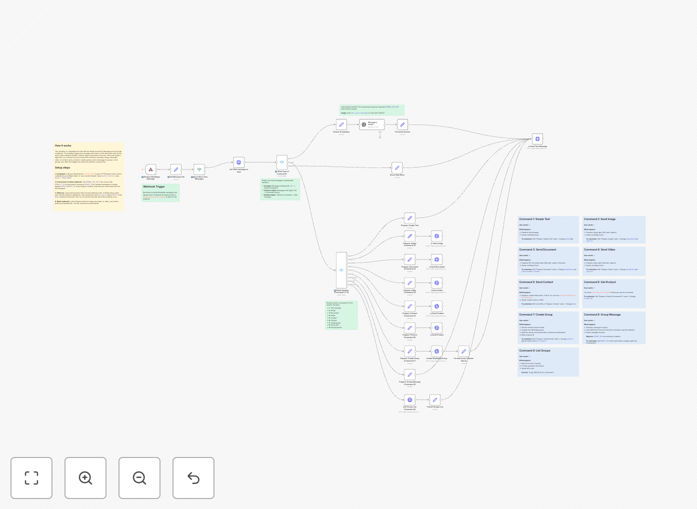
Screenshot of WhatsApp AI chatbot workflow in n8n interface

What This Workflow Does

This automation transforms WhatsApp into a powerful AI-powered communication channel for your business. It eliminates manual message handling while providing intelligent, instant responses to customers 24/7.

The workflow connects Whapi.Cloud's WhatsApp API with OpenAI's GPT-3.5 to create a sophisticated chatbot that understands natural language, handles complex queries, and manages group communications - all without writing code.

How It Works

1. Message Reception

Whapi.Cloud captures incoming WhatsApp messages via webhook and forwards them to your n8n workflow. This happens in real-time with minimal latency.

2. Command Processing

The workflow analyzes each message to determine if it's a:

  • AI chat request (/ai prefix)
  • Numeric command (1-9 for menu options)
  • Help request
  • Group management command

3. Response Generation

Based on the command type, the workflow either:

  • Queries OpenAI for AI-powered responses
  • Pulls pre-defined responses from your database
  • Executes group management functions
  • Returns help instructions

Who This Is For

This workflow is ideal for:

  • E-commerce stores needing 24/7 customer support
  • Service businesses managing appointments via WhatsApp
  • Marketing teams running WhatsApp campaigns
  • Developers building custom WhatsApp solutions
  • Startups needing affordable customer communication

What You'll Need

  1. Whapi.Cloud account with active WhatsApp number
  2. OpenAI API key (optional for AI features)
  3. n8n instance (cloud or self-hosted)
  4. Basic understanding of webhooks

Quick Setup Guide

  1. Download and import the JSON template into your n8n instance
  2. Configure Whapi.Cloud credentials in the HTTP Request node
  3. Set up the webhook URL in your Whapi.Cloud dashboard
  4. Add your OpenAI API key if using AI features
  5. Test with your WhatsApp number

Pro tip: Start with basic commands before enabling AI features. Test thoroughly with your team before going live with customers.

Key Benefits

80% faster response times by automating frequent queries and providing instant answers to common questions.

24/7 availability without staffing costs - handles nighttime and weekend inquiries automatically.

Multi-format support sends not just text but images, documents, videos and product cards.

AI understanding goes beyond keywords to comprehend customer intent and context.

No Meta approval needed - Whapi.Cloud provides immediate access to WhatsApp automation.

Frequently Asked Questions

Common questions about WhatsApp automation and AI integration

Automating WhatsApp saves businesses up to 80% response time while maintaining 24/7 availability. It enables instant replies, scales customer support without hiring, and integrates with existing business systems for seamless workflows.

Unlike human agents, automated systems never sleep, don't make typos, and can handle thousands of simultaneous conversations while maintaining perfect response consistency.

Whapi.Cloud offers faster onboarding (minutes vs weeks), no approval process, and more flexible message types compared to Meta's API. It's ideal for businesses needing quick implementation without strict compliance requirements.

Key differences include Whapi's support for unofficial business numbers, higher message limits out of the box, and ability to send certain message types that require special approval through Meta's official API.

This automation handles text replies, image sharing, document transfers, video messages, contact sharing, and product information. It can also manage group creation and group messaging with proper permissions.

The system supports rich media formats including PDFs, spreadsheets, MP4 videos, high-res images, and vCard contact files - making it versatile for various business communication needs.

AI enables natural language understanding for complex queries, contextual conversations, multilingual support, and personalized responses based on chat history - going beyond basic keyword-triggered replies.

With GPT-3.5, the chatbot can understand typos, slang, and incomplete sentences while maintaining conversation context across multiple messages - creating a much more human-like interaction.

Most businesses implement this in 1-2 hours. Basic setup takes 15 minutes (credentials + webhook), while customizing responses and AI behavior may require additional configuration time.

The template includes pre-built command structures and sample responses to accelerate deployment, with clear documentation for each configuration step.

Yes, the workflow can be duplicated and configured for multiple numbers. Each number requires its own Whapi.Cloud token and webhook configuration for proper routing.

For businesses with high volume, we recommend creating separate workflow instances for each number to maintain performance and simplify troubleshooting.

Minimal maintenance needed. Periodic checks for API updates (monthly), monitoring message quotas, and occasional training data updates for AI responses are recommended.

The system includes built-in error handling and notifications for critical issues like expired API tokens or exceeded message limits.

Yes, GrowwStacks specializes in custom WhatsApp automation solutions tailored to specific business workflows, integration needs, and AI training requirements.

Our team can build advanced features like payment processing, CRM integration, multilingual support, and specialized AI training for your industry terminology and use cases.

  • Custom integration with your existing systems
  • Industry-specific AI training
  • Advanced analytics and reporting

Need a Custom WhatsApp Automation?

This free template is a starting point. Our team builds fully tailored automation systems for your specific business needs.