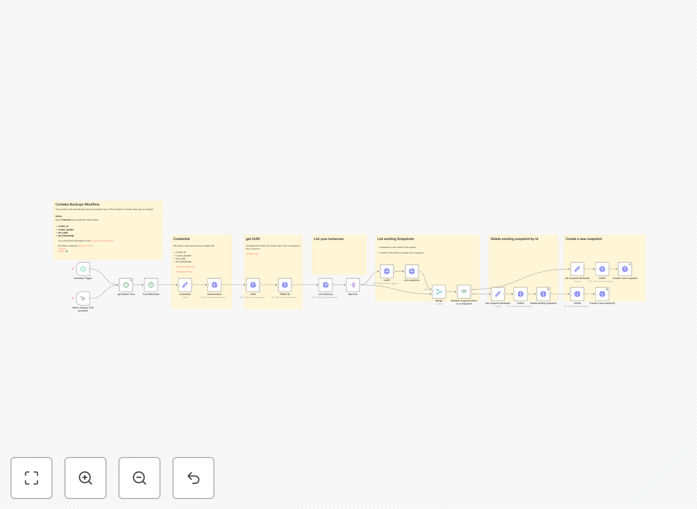
What This Workflow Does
This n8n workflow solves a critical problem for businesses and developers using Contabo VPS (Virtual Private Server) hosting: ensuring reliable, hands-off daily backups. Manually creating server snapshots is a task that's easy to forget, leaving your data and applications vulnerable. A missed backup can mean hours of lost work, revenue, and customer trust if a server fails.
The automation runs every day at midnight, connecting to the Contabo API to create a fresh snapshot of your VPS instances. More importantly, it includes intelligent cleanup logic, checking for existing snapshots and removing older ones to manage storage costs and prevent clutter. This turns a reactive, manual chore into a proactive, reliable system that protects your digital assets around the clock.
For agencies managing client sites, SaaS companies running production environments, or developers hosting projects, this workflow is an insurance policy. It ensures business continuity by guaranteeing you always have a recent restore point, minimizing potential downtime and data loss from unforeseen server issues, accidental deletions, or security incidents.
How It Works
The workflow is built on a logical, step-by-step process that mimics best-practice manual backup procedures, but with perfect consistency.
1. Scheduled Trigger
A Schedule Trigger node initiates the workflow daily at a configurable time (default is midnight). This is the automation's heartbeat, ensuring the process starts reliably without any manual intervention.
2. Credential Authentication
The workflow authenticates with the Contabo API using your stored credentials (Client ID, Secret, API User, and Password). This secure connection is established once, allowing all subsequent actions to be performed on your behalf.
3. Snapshot Inventory Check
Before creating a new snapshot, the workflow first lists all existing snapshots for your target VPS instance. This step is crucial for the cleanup logic, allowing the system to identify which snapshot is the previous one that should be removed.
4. Conditional Logic & Cleanup
An "IF" node evaluates the results of the inventory check. If a previous daily snapshot is found, the workflow proceeds to delete it, ensuring you don't accumulate endless snapshots and run up storage costs. If no snapshot is found (e.g., on first run), it skips deletion.
5. New Snapshot Creation
The core action: the workflow sends a command to the Contabo API to create a new snapshot of your VPS. It uses a formatted date in the snapshot name (e.g., "backup-2025-04-08") for clear identification and tracking.
6. Success Confirmation & Error Handling
The workflow can be extended to send a confirmation notification (via email, Slack, etc.) upon successful completion or to trigger an alert if any step fails, ensuring you're always informed of your backup status.
Who This Is For
This template is designed for anyone responsible for server stability and data integrity on Contabo's platform.
Freelance Developers & Agencies: If you host client websites or applications on Contabo VPS, this automation protects your deliverables and provides peace of mind. It's a scalable way to offer robust backup solutions to every client without increasing your manual workload.
SaaS Founders & Small Tech Teams: For bootstrapped startups and small teams without a dedicated DevOps person, automating backups is a foundational best practice. It prevents a single point of failure and lets you focus on building your product, not babysitting servers.
IT Consultants & Managed Service Providers (MSPs): This workflow can be templatized and deployed across multiple client servers, standardizing your backup offering and creating a reliable, auditable process that adds value to your service package.
What You'll Need
- A running n8n instance: You can use n8n.cloud, self-hosted n8n, or the desktop app.
- Contabo VPS Instance: An active Contabo VPS where you have API access enabled.
- Contabo API Credentials: Your Client ID, Client Secret, API User, and API Password from the Contabo Customer Control Panel.
- Basic understanding of n8n: Knowing how to import a JSON workflow and set credentials is sufficient.
Pro tip: Before running this in production, test it on a non-critical VPS or during a low-traffic period. Snapshot creation can be resource-intensive and may briefly impact server performance.
Quick Setup Guide
You can have this automation running in under 15 minutes.
- Download & Import: Click the "Download Template" button above to get the JSON file. In your n8n interface, go to "Workflows" > "Import from File" and select the downloaded file.
- Configure Contabo Credentials: In the imported workflow, find the "Contabo" node. Click the credential field and create a new credential set. Enter your Client ID, Client Secret, API User, and API Password obtained from your Contabo account.
- Set Your VPS Instance ID: Locate the node that fetches or identifies your VPS (often a "List Instances" or similar node). You may need to adjust the filter or manually input your specific VPS instance ID to target the correct server.
- Adjust Schedule (Optional): The Schedule Trigger is set to run daily at midnight UTC. Click on it to change the timezone or frequency (e.g., every 12 hours, weekly) to match your backup policy.
- Activate & Test: Toggle the workflow to "Active". For the first run, you can also manually execute it by clicking "Execute Workflow" to verify everything works and a snapshot is created successfully in your Contabo panel.
Key Benefits
Eliminate Human Error & Forgetfulness: Manual backups fail when people get busy. This automation runs like clockwork, 365 days a year, ensuring your backup schedule is never compromised by a busy day or an oversight.
Implement Smart Retention Policies: Go beyond simple creation. The built-in cleanup logic automatically manages old snapshots, preventing storage bloat and controlling costs while ensuring you always have a recent restore point available.
Standardize Operations Across Servers: Apply this identical, reliable process to every Contabo VPS you manage. This creates consistency, makes auditing easier, and simplifies disaster recovery procedures.
Free Up Valuable Technical Time: Reclaim the hours spent on routine server maintenance. What used to be a weekly or daily manual task is now fully automated, allowing you or your team to focus on higher-value development and strategic work.
Build a Foundation for Advanced DevOps: This workflow is a stepping stone. Once automated backups are in place, you can extend the automation to include health checks, failure alerts sent to your communication tools, and integration with monitoring dashboards.