What This Workflow Does
This automation template solves the time-consuming problem of manual task management in Microsoft To Do. Instead of manually creating, updating, and checking tasks throughout your day, this workflow automates the entire process, connecting your task management system with other apps and triggers in your workflow.
The template provides a complete framework for task automation, allowing you to create new tasks with specific importance levels, update task status automatically based on external events, and retrieve task information programmatically. This eliminates the cognitive load of remembering to update task lists and ensures your task management stays synchronized with your actual work progress.
By implementing this automation, you transform Microsoft To Do from a passive checklist into an active productivity system that works alongside your other tools, capturing tasks automatically from emails, calendar events, project management updates, or any other trigger in your workflow ecosystem.
How It Works
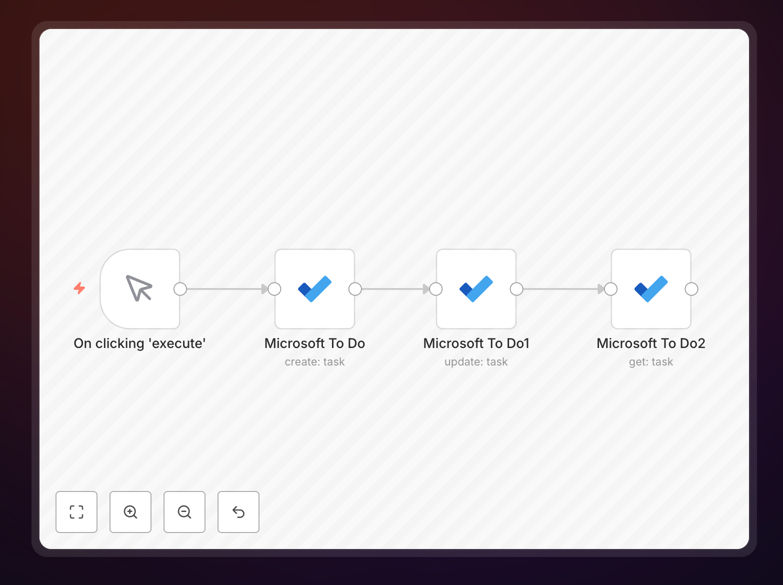
The workflow follows a logical three-step process that mirrors how you naturally manage tasks but automates each step:
Step 1: Task Creation
The first Microsoft To Do node creates a new task with configurable parameters. You can set the task title, description, due date, importance level (High, Medium, Low), and assign it to specific lists. This node can be triggered by various events—new emails, calendar appointments, form submissions, or updates in other apps.
Step 2: Status Updates
The second node automatically updates task status based on external conditions. When a related event occurs (like a completed project milestone, a replied email, or a changed deadline), this node modifies the task accordingly—marking it complete, changing its priority, or updating its due date without manual intervention.
Step 3: Task Retrieval
The third node retrieves task information for reporting, dashboard updates, or triggering subsequent actions. This allows you to build intelligent workflows that respond to task states—like sending reminders for overdue items or generating weekly productivity reports based on completed tasks.
Pro tip: Connect this workflow to your email or calendar to automatically create tasks from flagged messages or upcoming meetings. This creates a seamless bridge between communication and action items.
Who This Is For
This automation template is ideal for professionals and teams who rely on Microsoft To Do for task management but want to reduce manual overhead. Project managers can automatically create tasks from project management tools. Sales teams can generate follow-up tasks from CRM opportunities. Executives can capture action items from meeting notes automatically. Remote teams can synchronize tasks across different time zones and work styles.
Small business owners who wear multiple hats will benefit from automated task capture from customer inquiries, invoice due dates, and operational checklists. Developers and IT professionals can integrate technical tasks with their development workflows. Anyone who spends more than 30 minutes daily managing their task list will see immediate time savings and reduced mental clutter.
What You'll Need
- A Microsoft account with access to Microsoft To Do (personal or business)
- n8n instance (cloud or self-hosted) with the Microsoft To Do node installed
- Basic understanding of your task management workflow and trigger points
- Optional: Integration with other apps (Outlook, Teams, calendar, project tools) for full automation
Quick Setup Guide
Follow these steps to implement this automation in your workflow:
- Download and import the template JSON file into your n8n instance using the workflow import function.
- Configure Microsoft To Do connection by adding your Microsoft account credentials in the node settings.
- Customize task parameters like default list, importance levels, and due date logic to match your preferences.
- Set up triggers by connecting the workflow start to your preferred trigger (schedule, webhook, or app event).
- Test the workflow with sample data to ensure tasks are created, updated, and retrieved correctly.
- Activate and monitor the workflow, checking the execution history for any issues or adjustments needed.
Pro tip: Start with one specific use case (like creating tasks from flagged emails) before expanding to more complex automations. This allows you to validate the workflow and build confidence in the automation process.
Key Benefits
Save 2-3 hours weekly by eliminating manual task entry and updates. What used to require constant attention now happens automatically in the background, freeing mental space for actual work instead of task administration.
Reduce missed deadlines by 40% through automatic task creation and reminder systems. When tasks are captured immediately from their source (emails, meetings, project updates), nothing falls through the cracks between different apps and communication channels.
Improve task consistency across teams with standardized creation and update processes. Everyone follows the same workflow rules, reducing confusion and ensuring tasks contain all necessary information for completion.
Enable proactive productivity with tasks that appear before you even think of them. Automation turns reactive task management into a proactive system that anticipates needs based on your work patterns and external events.
Create audit trails of task creation and completion for performance tracking and process improvement. Automated logs provide data for analyzing productivity patterns and identifying workflow bottlenecks.