What This Workflow Does
This automation solves the time-consuming problem of manually preparing and sending financial reports to customers. Instead of your team spending hours compiling spreadsheets and emailing attachments, customers can simply message your Telegram bot with their name or a command to instantly receive their personalized financial summary.
The system acts as a secure, self-service customer portal through a messaging app they already use. It validates each request against an access control list, fetches the correct data from your Google Sheets, formats it into a clear report, and delivers it directly to the customer's Telegram chat. This eliminates manual errors, ensures consistent formatting, and provides 24/7 availability without staff intervention.
How It Works
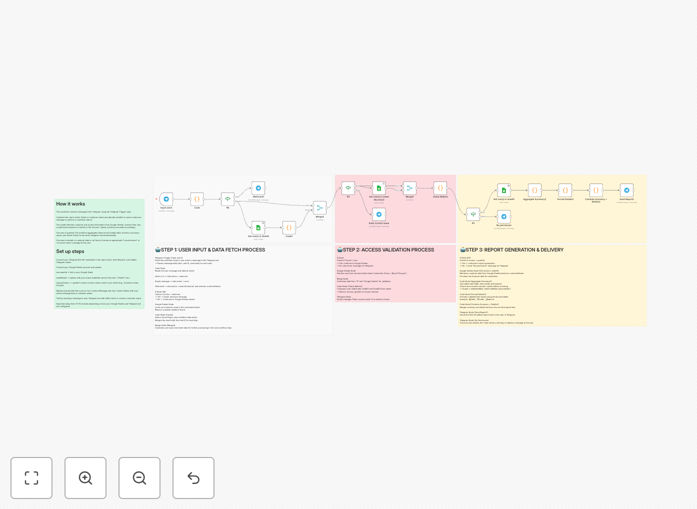
1. Telegram Trigger & Command Detection
The workflow starts when a customer sends a message to your Telegram bot. It detects whether they sent the "/start" command or typed their customer name directly. The system immediately captures their chat ID for authentication and proceeds to the next step.
2. Access Verification & Authorization
Before any data is retrieved, the workflow checks your "Access" Google Sheet to verify the customer's chat ID is authorized. This security layer ensures only approved users can receive reports. If unauthorized, the system sends a polite denial message and stops processing.
3. Data Retrieval from Google Sheets
For authorized users, the system queries your main Google Sheets database to find the customer's financial data. It can pull from multiple sheets—balance information, transaction history, weight data, or any other metrics you track—then merges this information into a complete dataset.
4. Report Formatting & Calculation
The raw data is processed through formatting nodes that calculate totals, generate summaries, and structure the information into a readable report. You can customize this section to include specific calculations, percentages, comparisons, or any business logic required for your reporting.
5. Telegram Delivery & Confirmation
The formatted report is sent back through Telegram to the same chat where the request originated. The system can deliver plain text summaries, formatted messages with emojis for readability, or even file attachments if needed. A confirmation log is created for your records.
Pro tip: Use the "Sticky Note" nodes within your workflow to document column mappings and sheet structures. This makes future maintenance much easier when your data format evolves.
Who This Is For
This automation is ideal for service businesses, financial advisors, SaaS companies, and any organization that regularly shares personalized data with clients. Accountants sending monthly statements, logistics companies providing shipment weight reports, subscription businesses sharing usage metrics, or consultants delivering project updates will find immediate value.
Teams currently wasting 5-10 hours monthly on manual report compilation can reclaim that time. Businesses with international clients benefit from the 24/7 availability through Telegram's global platform. Companies concerned about data security appreciate the built-in access controls that prevent information leaks.
What You'll Need
- A Telegram Bot Token – Create via @BotFather on Telegram
- Google Sheets with your customer data – Structured with customer names, financial metrics, and an access control sheet
- n8n instance – Cloud or self-hosted version
- Google Service Account credentials – For Sheets API access (or OAuth for personal accounts)
- Basic understanding of your data structure – Know which columns contain which information
Quick Setup Guide
Follow these steps to implement this automation in under 15 minutes:
- Import the template – Download the JSON file and import it into your n8n instance
- Configure Telegram nodes – Add your bot token to all Telegram trigger and message nodes
- Connect Google Sheets – Authenticate with your Google account and update the document IDs in each Sheets node
- Map your data columns – Update the "lookupColumn" fields to match your actual column names (e.g., "Customer Name", "Balance", "Transactions")
- Test with /start – Message your bot with "/start" to verify the welcome message works
- Test with a customer name – Use a name from your access sheet to receive a complete report
- Customize messages – Update the response texts to match your brand voice and reporting style
Pro tip: Start with a test Google Sheet containing just a few sample customers. Once the workflow works perfectly, switch to your production data sheet.
Key Benefits
Eliminate 80% of manual report preparation time. What used to take hours of spreadsheet work now happens automatically with a single Telegram message from your customer.
Zero data entry errors. Automated data retrieval from your source systems ensures 100% accuracy in every report, eliminating costly mistakes from manual copying and pasting.
24/7 customer self-service. Clients can access their financial information anytime, anywhere, without waiting for business hours or email responses.
Enterprise-grade security with simple setup. The access control system prevents data leaks while using familiar tools (Google Sheets) that require no complex database administration.
Scalable from 10 to 10,000 customers. The same automation handles growing customer bases without additional staff, making it perfect for growing businesses.