Telegram Google Sheets Automated Reporting Customer Portal n8n

Customer Financial Report Delivery System with Telegram & Google Sheets

Automate secure, instant delivery of personalized financial reports to customers via Telegram. Fetch data from Sheets, verify access, and send reports with one message.

Download Template JSON · n8n compatible · Free
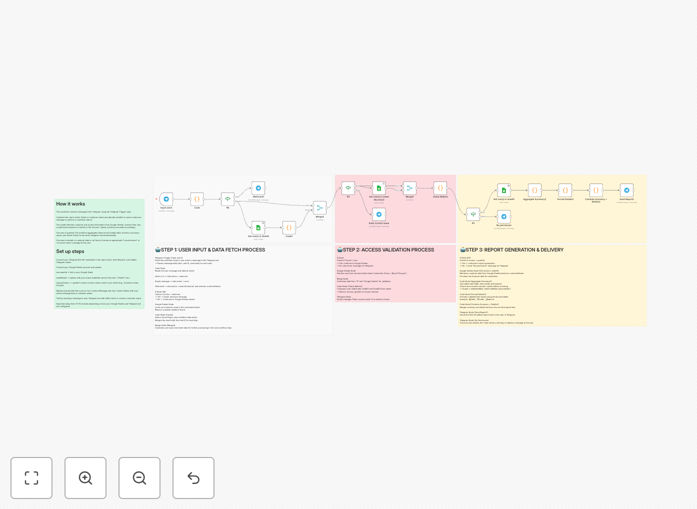
Automated financial report delivery system workflow connecting Telegram and Google Sheets

What This Workflow Does

This automation solves the time-consuming problem of manually preparing and sending financial reports to customers. Instead of your team spending hours compiling spreadsheets and emailing attachments, customers can simply message your Telegram bot with their name or a command to instantly receive their personalized financial summary.

The system acts as a secure, self-service customer portal through a messaging app they already use. It validates each request against an access control list, fetches the correct data from your Google Sheets, formats it into a clear report, and delivers it directly to the customer's Telegram chat. This eliminates manual errors, ensures consistent formatting, and provides 24/7 availability without staff intervention.

How It Works

1. Telegram Trigger & Command Detection

The workflow starts when a customer sends a message to your Telegram bot. It detects whether they sent the "/start" command or typed their customer name directly. The system immediately captures their chat ID for authentication and proceeds to the next step.

2. Access Verification & Authorization

Before any data is retrieved, the workflow checks your "Access" Google Sheet to verify the customer's chat ID is authorized. This security layer ensures only approved users can receive reports. If unauthorized, the system sends a polite denial message and stops processing.

3. Data Retrieval from Google Sheets

For authorized users, the system queries your main Google Sheets database to find the customer's financial data. It can pull from multiple sheets—balance information, transaction history, weight data, or any other metrics you track—then merges this information into a complete dataset.

4. Report Formatting & Calculation

The raw data is processed through formatting nodes that calculate totals, generate summaries, and structure the information into a readable report. You can customize this section to include specific calculations, percentages, comparisons, or any business logic required for your reporting.

5. Telegram Delivery & Confirmation

The formatted report is sent back through Telegram to the same chat where the request originated. The system can deliver plain text summaries, formatted messages with emojis for readability, or even file attachments if needed. A confirmation log is created for your records.

Pro tip: Use the "Sticky Note" nodes within your workflow to document column mappings and sheet structures. This makes future maintenance much easier when your data format evolves.

Who This Is For

This automation is ideal for service businesses, financial advisors, SaaS companies, and any organization that regularly shares personalized data with clients. Accountants sending monthly statements, logistics companies providing shipment weight reports, subscription businesses sharing usage metrics, or consultants delivering project updates will find immediate value.

Teams currently wasting 5-10 hours monthly on manual report compilation can reclaim that time. Businesses with international clients benefit from the 24/7 availability through Telegram's global platform. Companies concerned about data security appreciate the built-in access controls that prevent information leaks.

What You'll Need

  1. A Telegram Bot Token – Create via @BotFather on Telegram
  2. Google Sheets with your customer data – Structured with customer names, financial metrics, and an access control sheet
  3. n8n instance – Cloud or self-hosted version
  4. Google Service Account credentials – For Sheets API access (or OAuth for personal accounts)
  5. Basic understanding of your data structure – Know which columns contain which information

Quick Setup Guide

Follow these steps to implement this automation in under 15 minutes:

  1. Import the template – Download the JSON file and import it into your n8n instance
  2. Configure Telegram nodes – Add your bot token to all Telegram trigger and message nodes
  3. Connect Google Sheets – Authenticate with your Google account and update the document IDs in each Sheets node
  4. Map your data columns – Update the "lookupColumn" fields to match your actual column names (e.g., "Customer Name", "Balance", "Transactions")
  5. Test with /start – Message your bot with "/start" to verify the welcome message works
  6. Test with a customer name – Use a name from your access sheet to receive a complete report
  7. Customize messages – Update the response texts to match your brand voice and reporting style

Pro tip: Start with a test Google Sheet containing just a few sample customers. Once the workflow works perfectly, switch to your production data sheet.

Key Benefits

Eliminate 80% of manual report preparation time. What used to take hours of spreadsheet work now happens automatically with a single Telegram message from your customer.

Zero data entry errors. Automated data retrieval from your source systems ensures 100% accuracy in every report, eliminating costly mistakes from manual copying and pasting.

24/7 customer self-service. Clients can access their financial information anytime, anywhere, without waiting for business hours or email responses.

Enterprise-grade security with simple setup. The access control system prevents data leaks while using familiar tools (Google Sheets) that require no complex database administration.

Scalable from 10 to 10,000 customers. The same automation handles growing customer bases without additional staff, making it perfect for growing businesses.

Frequently Asked Questions

Common questions about financial report automation and integration

Manual report delivery is time-consuming, error-prone, and lacks security controls. Automation ensures reports are sent instantly when requested, eliminates human data entry mistakes, and enforces access permissions so only authorized customers receive their specific data.

For example, an accounting firm sending monthly statements to 50 clients might spend 15 hours monthly compiling and emailing reports. With automation, this reduces to near-zero while improving accuracy and customer satisfaction with instant delivery.

  • Reduces administrative workload by 80%
  • Eliminates copy-paste data errors
  • Provides consistent, professional formatting every time

Telegram provides end-to-end encryption for secret chats, but for financial data, the security layer is in the automation workflow itself. This template includes access control checks against a Google Sheets permissions list before any data is sent.

The system never exposes your full database. Each customer only receives their specific data after passing the authorization check. You maintain complete control over who can access what information through your access sheet management.

  • Access control happens before data retrieval
  • No customer sees another customer's information
  • Audit trail of all requests and deliveries

Absolutely. The core architecture works for any personalized document delivery: sales reports, project updates, inventory summaries, or performance metrics. Simply modify the Google Sheets data structure and the message formatting in the workflow.

A marketing agency could deliver campaign performance reports, a logistics company could send shipment tracking summaries, and a SaaS business could provide usage analytics. The Telegram interface and access control system remain the same across all use cases.

  • Adaptable to any data-driven reporting need
  • Same security model applies to all data types
  • Customers use familiar Telegram interface

The workflow automatically detects unauthorized requests and sends a polite "access denied" message via Telegram. You can customize this response and set up notifications to your team about unauthorized access attempts.

This creates an audit trail while maintaining a professional customer experience. The system doesn't reveal why access was denied—it simply states the request cannot be processed, protecting your security model.

  • Professional, non-technical denial messages
  • Optional admin notifications for security monitoring
  • No exposure of system internals to unauthorized users

The template uses Google Sheets as a flexible data source where each customer's data can have different columns and structures. You can add conditional logic in the workflow to format reports differently based on customer type or subscription tier.

For instance, premium customers might receive additional metrics or visual summaries. The merge node allows combining data from multiple sheets to create comprehensive, customized reports for each user without creating separate workflows.

  • Conditional formatting based on customer attributes
  • Merge data from multiple source sheets
  • Tiered reporting for different customer segments

Yes, n8n handles high-volume automation efficiently. The Google Sheets integration can query thousands of rows, and Telegram's API supports mass messaging. For enterprise scaling, you might transition to a database instead of Sheets and add rate limiting.

The workflow architecture remains the same, making it easy to scale from 10 to 10,000 customers with minimal adjustments. Performance optimizations like caching and batch processing can be added as your volume grows.

  • Google Sheets handles thousands of rows efficiently
  • Telegram API supports high message volumes
  • Easy migration to databases for enterprise scale

Google Sheets provides an accessible, collaborative data management interface your team already knows, while Telegram offers instant, interactive delivery to customers worldwide. Together, they create a low-cost, highly effective reporting system.

This combination requires no custom app development, minimal training, and leverages tools with excellent mobile experiences. Updates to reports happen in Sheets and automatically reflect in the next customer request through Telegram.

  • No custom app development required
  • Teams already know how to use both tools
  • Excellent mobile experience for customers

Yes, GrowwStacks specializes in building custom automation solutions for financial reporting, data delivery, and customer communication systems. We can adapt this template to your specific data sources, security requirements, and reporting formats.

Our team handles the complete implementation, testing, and deployment, integrating with your existing CRM, accounting software, or databases. We ensure the solution matches your exact business processes and scales with your growth.

  • Custom integration with your existing systems
  • Tailored security and compliance features
  • Ongoing support and optimization

Need a Custom Financial Report Automation?

This free template is a starting point. Our team builds fully tailored automation systems for your specific business needs.