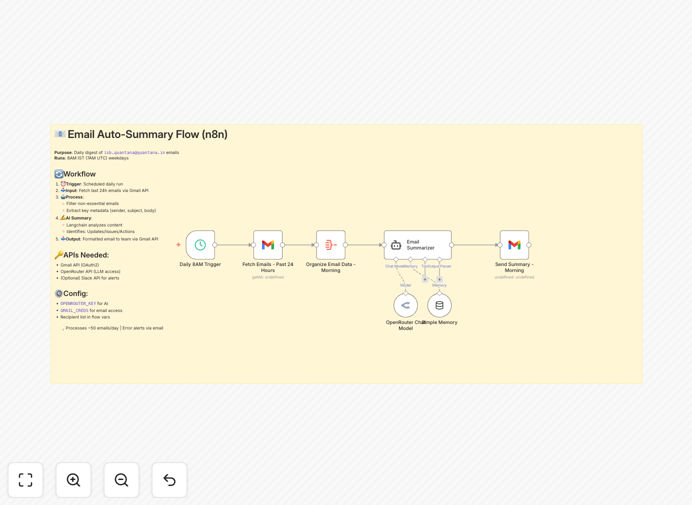
What This Workflow Does
This automation simplifies your mornings by creating AI-powered summaries of your emails. It connects Gmail with OpenRouter's AI models through LangChain to analyze your inbox and extract key information.
The workflow runs daily, scanning emails from specified senders, identifying important content, and delivering concise summaries to you and your team. It maintains context across days and highlights action items automatically.
How It Works
1. Email Collection
The workflow checks your Gmail inbox for new messages matching your criteria (specific senders, time range, labels).
2. AI Processing
Selected emails are sent to OpenRouter's AI models via LangChain, which extracts key points while maintaining context from previous summaries.
3. Summary Generation
The AI generates structured summaries including: main points, action items, follow-ups, and important details.
4. Delivery
Formatted summaries are emailed to you and optionally shared with team members through your preferred channels.
Who This Is For
This workflow benefits busy professionals, managers, and teams who:
- Receive high volumes of important emails
- Need to quickly identify action items
- Want to maintain context across communications
- Share email updates with team members
What You'll Need
- A Gmail account with API access
- OpenRouter API key
- n8n instance (cloud or self-hosted)
- Basic understanding of workflow automation
Quick Setup Guide
- Download the template file
- Import into your n8n instance
- Configure your Gmail and OpenRouter credentials
- Set your preferred senders and schedule
- Test with a small set of emails first
Key Benefits
Save 1-2 hours daily by automating email review and summarization.
Never miss important details with AI-powered extraction of key points.
Improve team alignment with consistent, structured summaries.
Reduce email overload by focusing only on what matters.
Customizable to your workflow with adjustable summary formats.
Pro tip: Start with summarizing emails from your most important contacts first, then expand as you refine the workflow.